HDMI cable (not supplied)
Note
The following settings are required for this connection.
Set [HDMI Out B Mode] in the HDMI Setup menu to [Zone2]
Set [Zone2 Audio Out] in the HDMI Setup menu to [Zone2 AMP]
When outputting optical/coaxial audio signals, set the audio output to PCM on the
connected device. For details, refer to the operating instructions of the connected device.
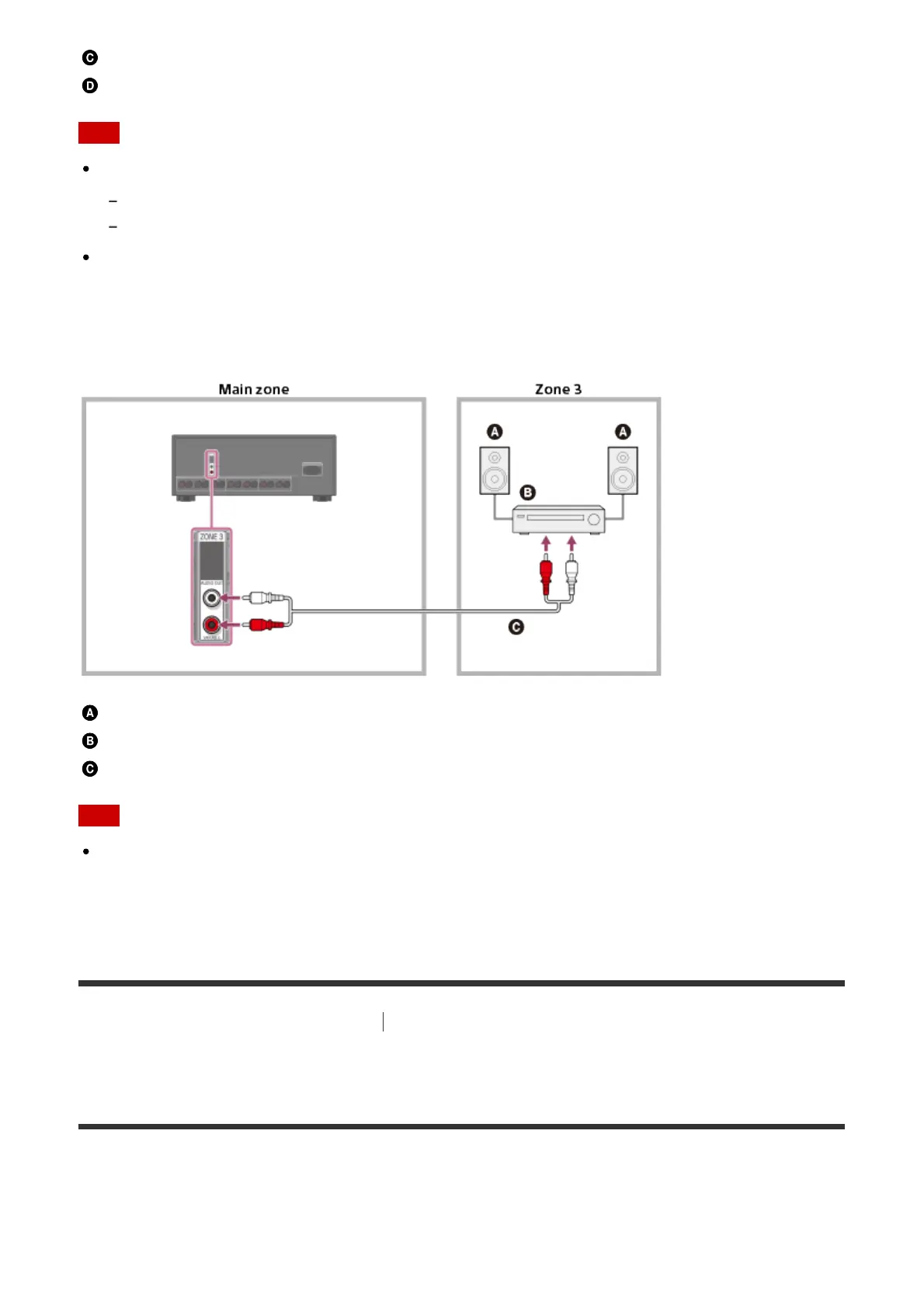
Connecting another amplifier using the ZONE 3 AUDIO OUT jack
Speakers
Other amplifier/receiver
Audio cable (not supplied)
Note
Only devices connected to the analog audio input jacks and the built-in tuner (FM/AM)
can output signals to Zone 3. No signals are output from devices connected to only the
digital input jacks.
[41] Using the Multi-Zone Features
Enjoying sound in two rooms (multi-zone feature
using the receiver and another amplifier)
Setting the volume control for zone 2/3 (Line Out)
You can set variable or fixed volume control for the ZONE 2 AUDIO OUT/ZONE 3 AUDIO
OUT jacks.
1. Select [Setup] - [Zone Setup] from the home menu.



 To Next Page