EasyManua.ls Logo

Sony Trinitron KV-13VM30 - Page 33

Sony Trinitron KV-13VM30
116 pages
Print Icon
To Next Page IconTo Next Page
To Previous Page IconTo Previous Page
Loading...
OO]
C
[20
MENU
(ny
ps)
BACK
SPACE
RETURN
ver
Plug,
WMERON
SCREEN
CLEAR
INDEX
MARK
ERASE
RM-Y138/W
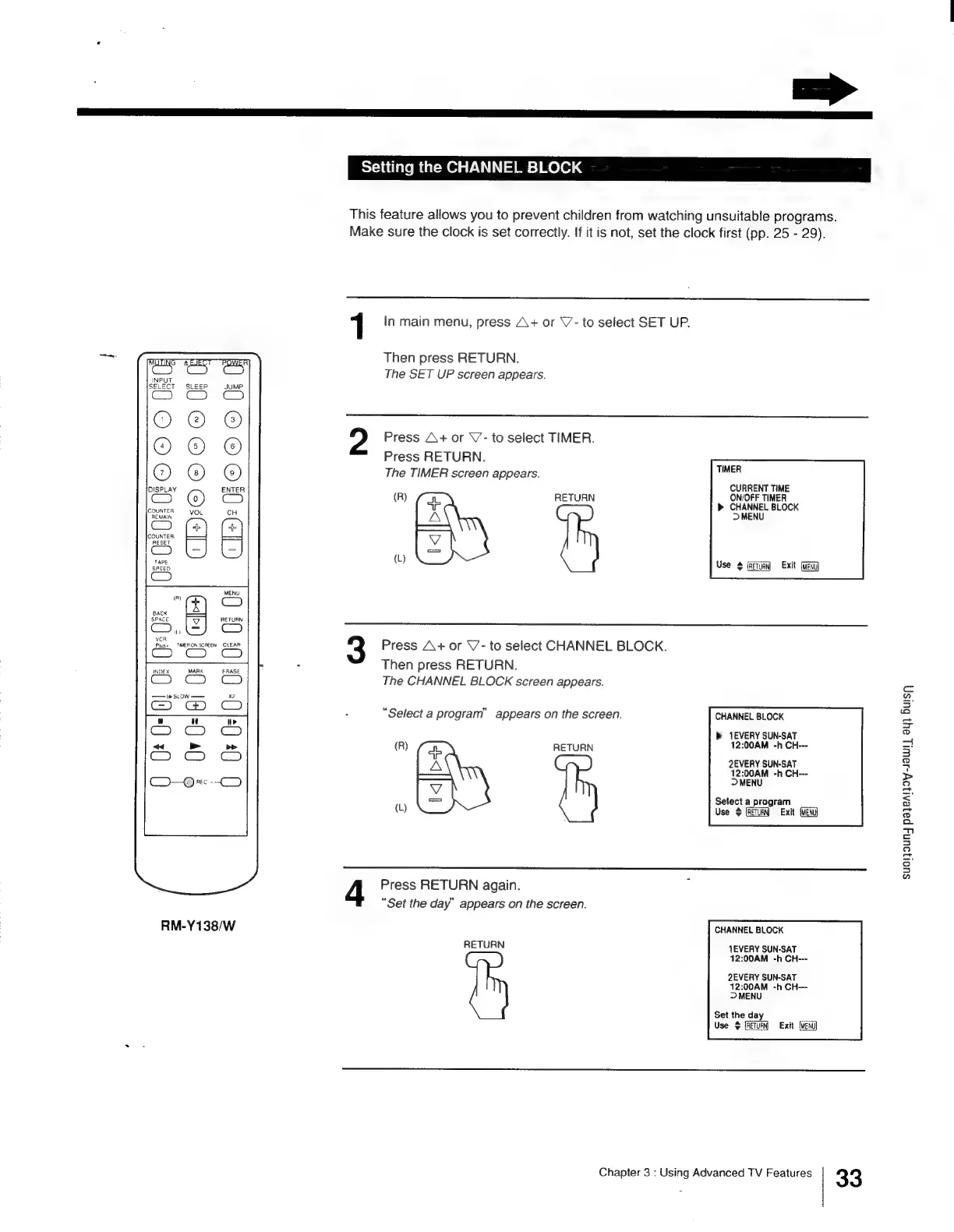
Setting
the
CHANNEL
BLOCK
This
feature
allows
you
to
prevent
children
from
watching
unsuitable
programs.
Make
sure
the
clock
is
set
correctly.
If
it
is
not,
set
the
clock
first
(pp.
25
-
29).
1
In
main
menu,
press
A+
or
\’-
to
select
SET
UP.
Then
press
RETURN.
The
SET
UP
screen
appears.
Press
A+
or
\’-
to
select
TIMER.
Press
RETURN.
The
TIMER
screen
appears.
TIMER
CURRENT
TIME
(R)
RETURN
ON/OFF
TIMER
>
CHANNEL
BLOCK
>
MENU
eat
|
(
e3
Use
Exit
Press
A+
or
V-
to
select
CHANNEL
BLOCK.
Then
press
RETURN.
The
CHANNEL
BLOCK
screen
appears.
CHANNEL
BLOCK
b>
EVERY
SUN-SAT
(R)
RETURN
12:00AM
-h
CH-~
fea
2EVERY
SUN-SAT
th
sor
-h
CH---
es
Setect
a
program
(L)
Use
$
Exit
Press
RETURN
again.
“Set
the
day”
appears
on
the
screen.
“Select
a
program”
appears
on
the
screen.
CHANNEL
BLOCK
RETURN
JEVERY
SUN-SAT
12:00AM
-h
CH---
2EVERY
SUN-SAT
12:00AM
-h
CH---
~>
MENU
Set
the
day
Use
$
{RETURN
Exit
Chapter
3
:
Using
Advanced
TV
Features
33
SUOI]
DUN
pazeAi}oy-JawWl]
ay)
Bus

Other manuals for Sony Trinitron KV-13VM30

Related product manuals