EasyManua.ls Logo

Sony Trinitron KV-13VM30 - Page 34

Sony Trinitron KV-13VM30
116 pages
Print Icon
To Next Page IconTo Next Page
To Previous Page IconTo Previous Page
Loading...
Using
the
Timer-Activated
Functions
34
F3
o)
ic
=|
G
no
Mg
m
m
no)
aw
iS
=
a)
OOO
CT27}sO
©O©
©
0
©OOOEC)
CT)
0
a
z
a
m
D
a
SPACE
RETURN
ver
Pius.
TMERON
SCREEN
CLEAR
INDEX
MARK
ERASE
CO
SS
Qo
©
Ld
i
Ww
CG):
(Ce
"Ee
“~
>
>>
Ca)
Ge
oe)
CO—@
rec
CTC)
RM-Y138/W
Chapter
3
:
Using
Advanced
TV
Features
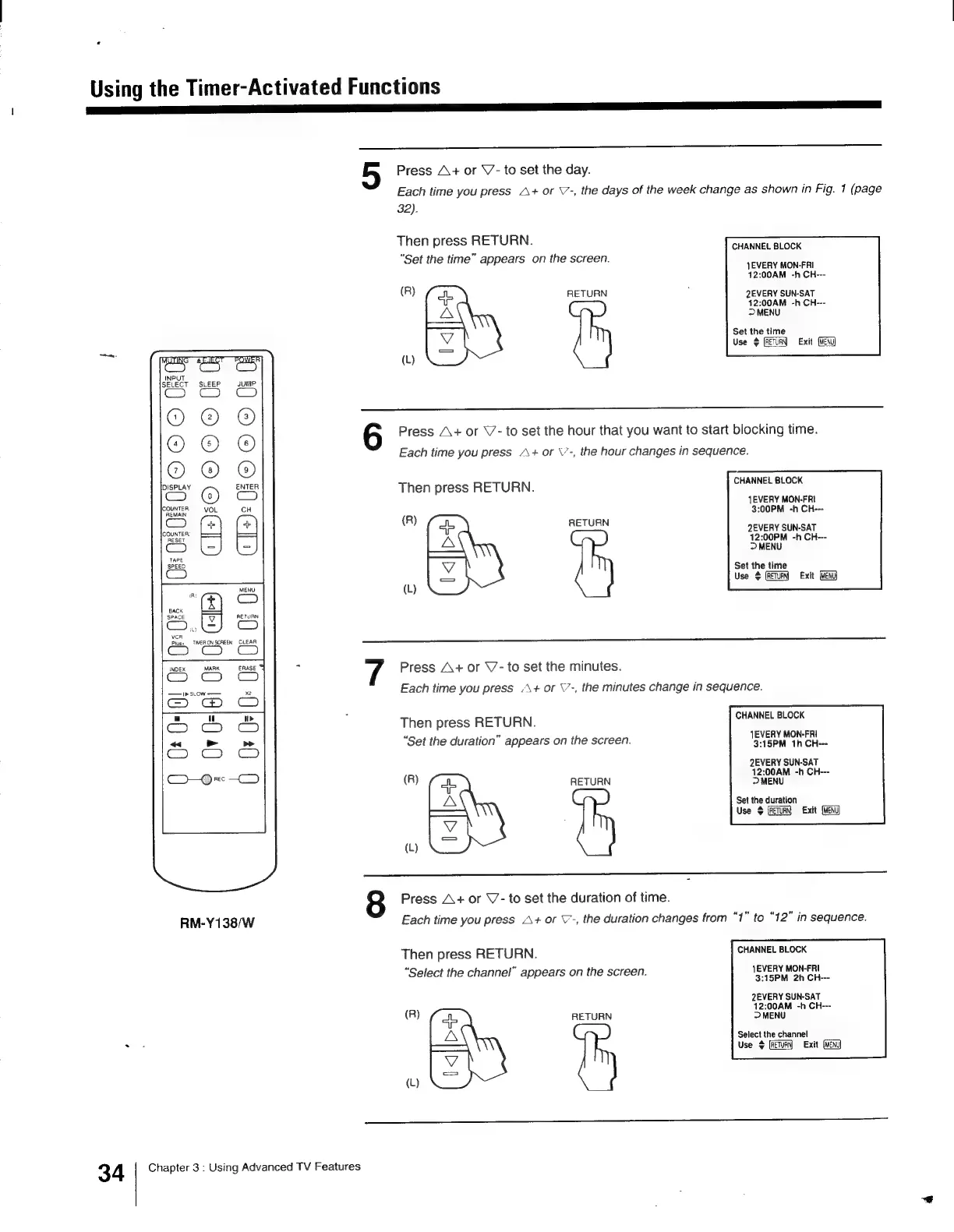
5
Press
A+
or
V7-
to
set
the
day.
Each
time
you
press
A+
or
\7-,
the
days
of
the
week
change
as
shown
in
Fig.
1
(page
32).
Then
press
RETURN.
“Set
the
time”
appears
on
the
screen.
CHANNEL
BLOCK
{EVERY
MON-FRI
12:00AM
-h
CH---
(R)
RETURN
QEVERY
SUN-SAT
12:00AM
-h
CH--
D>MENU
AS,
Set
the
time
Use
Exit
(L)
Press
A+
or
V7-
to
set
the
hour
that
you
want
to
start
blocking
time.
Each
time
you
press
A+
or
\’-,
the
hour
changes
in
sequence.
CHANNEL
BLOCK
JEVERY
MON-FRI
3:00PM
-h
CH---
(R)
RETURN
2EVERY
SUN-SAT
12:00PM
-h
CH---
>
MENU
-—
Set the
time
Use
$
Exit
(Heng
(L)
Press
A+
or
\7-
to
set
the
minutes.
Each
time
you
press
-\+
or
\’-,
the
minutes
change
in
sequence.
Then
press
RETURN.
CHANNEL
BLOCK
1EVERY
MON-FRI
3:15PM
1h
CH---
2EVERY
SUN-SAT
12:00AM
-h
CH---
(R)
RETURN
D
MENU
Set the
duration
——
Use
Exit
(L)
&
Press
A+
or
V/-
to
set
the
duration
of
time.
Each
time
you
press
A+
or
V-,
the
duration
changes
from
“1”
to
“12”
in
sequence.
Then
press
RETURN.
“Set
the
duration”
appears
on
the
screen.
Then
press
RETURN.
CHANNEL
BLOCK
“Select
the
channel”
appears
on
the
screen.
1EVERY
MON-FRI
3:15PM
2h
CH---
2EVERY
SUN-SAT
12:00AM
-h
CH---
(R}
RETURN
>
MENU
Select
the
channel
—)\
Use
$
[ReTuaN)
Exit
(MENU)
(L)
[

Other manuals for Sony Trinitron KV-13VM30

Related product manuals