EasyManua.ls Logo

Sony Trinitron KV-13VM30 - Page 35

Sony Trinitron KV-13VM30
116 pages
Print Icon
To Next Page IconTo Next Page
To Previous Page IconTo Previous Page
Loading...
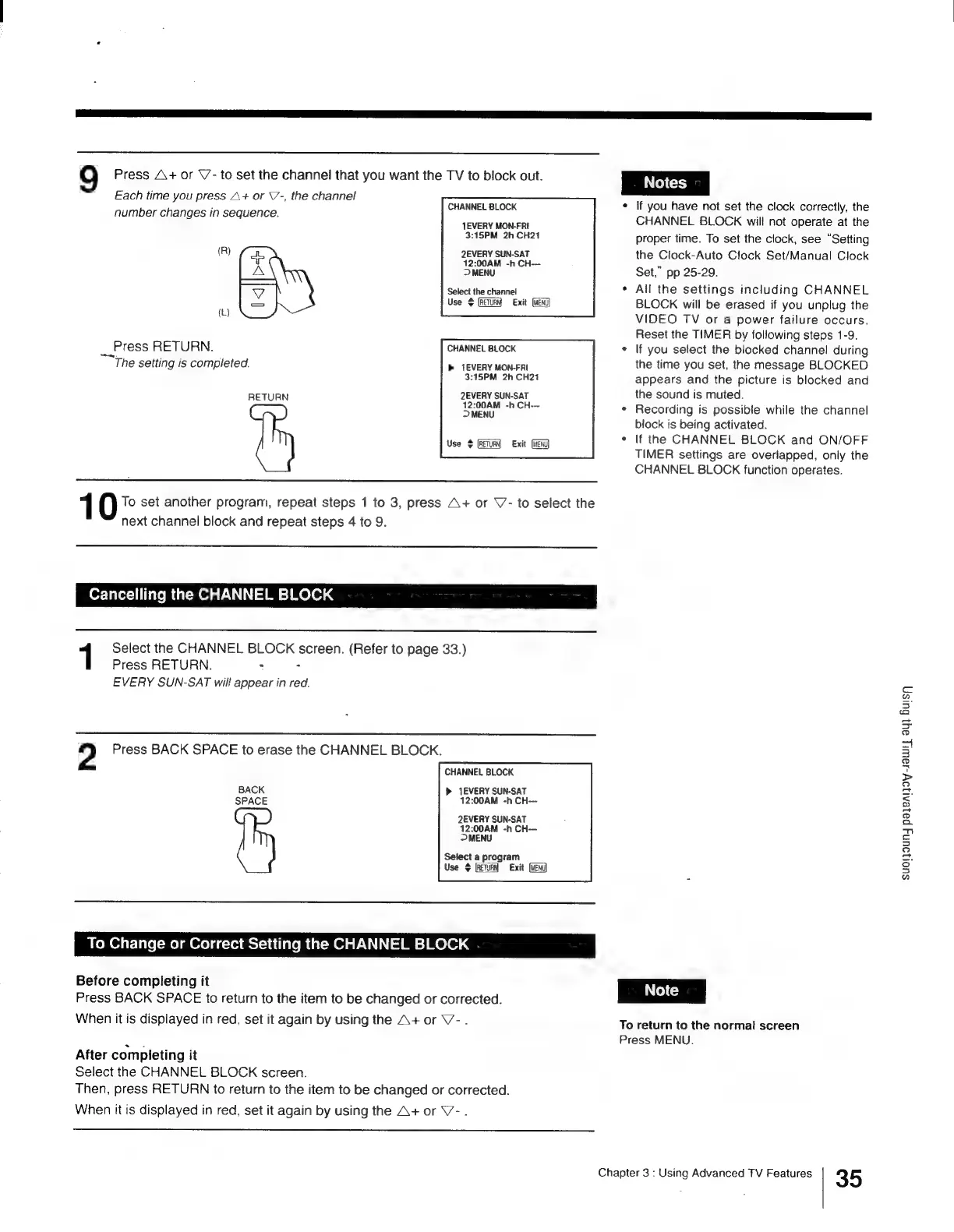
9
Press
A+
or
V’-
to
set
the
channel
that
you
want
the
TV
to
block
out.
Each
time
you
press
A+
or
V’-,
the
channel
:
CHANNEL
BLOCK
number
changes
in
sequence.
JEVERY
MON-FRI
3:15PM
2h
CH21
(R)
2EVERY
SUN-SAT
>
MENU
Select
the
channel
Use
>
Exit
(L)
Press
RETURN.
CHANNEL
BLOCK
The
setting
is
completed.
>
1EVERY
MON-FRI
12:00AM
-h
CH---
3:15PM
2h
CH21
RETURN
2EVERY
SUN-SAT
12:00AM
-h
CH---
>
MENU
Use
¢
Exit
(vend)
1
To
set
another
program,
repeat
steps
1
to
3,
press
A+
or
V-
to
next
channel
block
and
repeat
steps
4
to
9.
select
the
bor-Tatet=1i
Italo
Mm
(a(-m
Ola
/-\)
1) |=
Mm =]
MOlO1
4
Select
the
CHANNEL
BLOCK
screen.
(Refer
to
page
33.)
Press
RETURN.
:
:
EVERY
SUN-SAT
will
appear
in
red.
2
Press
BACK
SPACE
to
erase
the
CHANNEL
BLOCK.
CHANNEL
BLOCK
BACK
»
EVERY
SUN-SAT
SPACE
12:00AM
-h
CH---
2EVERY
SUN-SAT
12:00AM
-h
CH
>
MENU
Select
a
program
Use
$
Exit
(vend)
To
Change
or
Correct
Setting
the
CHANNEL
BLOCK
Before
completing
it
Press
BACK
SPACE
to
return
to
the
item
to
be
changed
or
corrected.
When
it
is
displayed
in
red,
set
it
again
by
using
the
A+
or
V-.
After
completing
it
Select
the
CHANNEL
BLOCK
screen.
Then,
press
RETURN
to
return
to
the
item
to
be
changed
or
corrected.
When
it
is
displayed
in
red,
set
it
again
by
using
the
A+
or
V7-.
If
you
have
not
set
the
clock
correctly,
the
CHANNEL
BLOCK
will
not
operate
at
the
proper
time.
To
set
the
clock,
see
“Setting
the
Clock-Auto
Clock
Set/Manual
Clock
Set,”
pp
25-29.
All
the
settings
including
CHANNEL
BLOCK
will
be
erased
if
you
unplug
the
VIDEO
TV
or
a
power
failure
occurs.
Reset
the
TIMER
by
following
steps
1-9.
If
you
select
the
blocked
channel!
during
the
time
you
set,
the
message
BLOCKED
appears
and
the
picture
is
blocked
and
the
sound
is
muted.
Recording
is
possible
while
the
channel
block
is
being
activated.
If
the
CHANNEL
BLOCK
and
ON/OFF
TIMER
settings
are
overlapped,
only
the
CHANNEL
BLOCK
function
operates.
To
return
to
the
normal
screen
Press
MENU.
Chapter
3
:
Using
Advanced
TV
Features
35
SUOI]OUNY
paleAljoy-JaWiL
ay}
Busy

Other manuals for Sony Trinitron KV-13VM30

Related product manuals