12
Advanced Operations
SOUND MODE
PIC MODE
Selecting the
picture and sound
modes
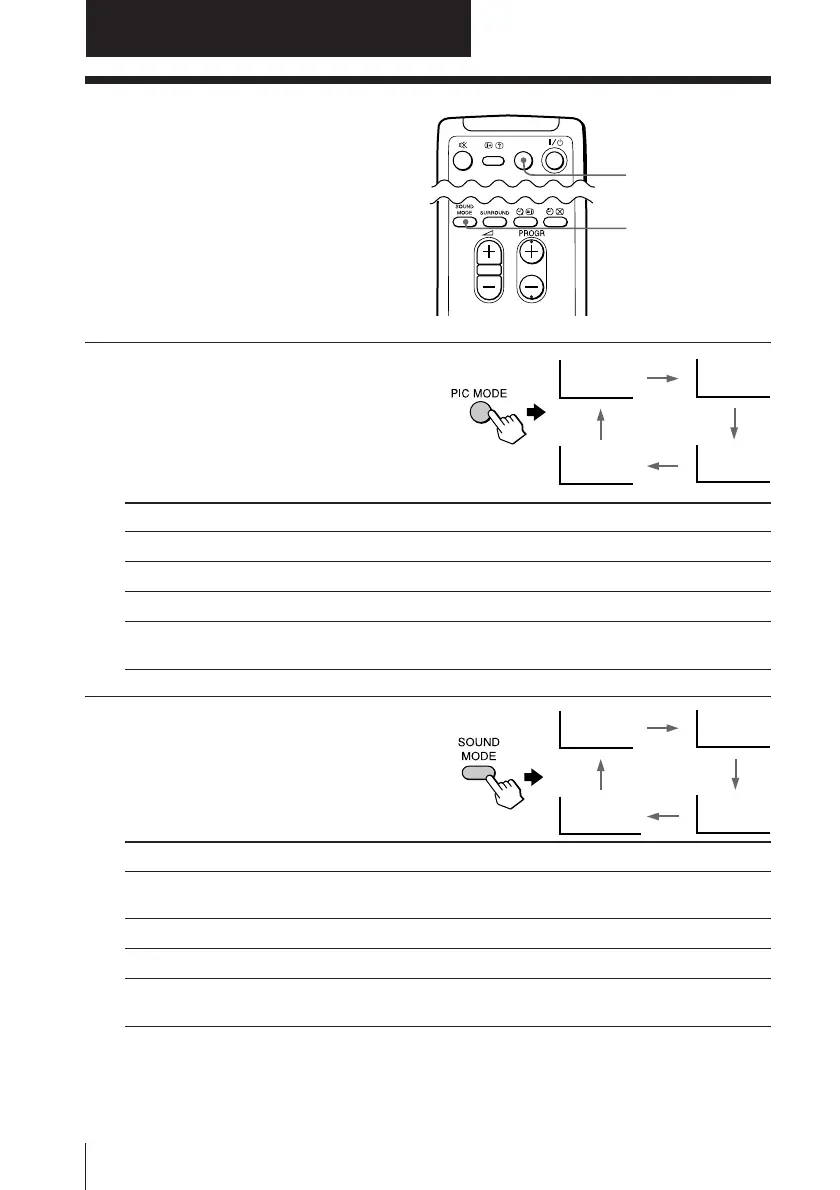
You can select picture and sound modes
and adjust the setting to your preference
in “PERSONAL” option.
Selecting the picture mode
Press PIC MODE
repeatedly until you get
the desired picture mode.
Select To
“DYNAMIC” view high contrast pictures.
“STANDARD” view normal contrast pictures.
“SOFT” view mild pictures.
“PERSONAL” view the last adjusted picture setting from the “ADJUST”
option in the “PICTURE” menu (see page 22).
Selecting the sound mode
Press SOUND MODE
repeatedly until you get
the desired sound mode.
Select To
“DYNAMIC” listen to dynamic and clear sound that emphasizes the low and
high tones.
“DRAMA” listen to sound that emphasizes voice and high tones.
“SOFT” listen to soft sound.
“PERSONAL ” receive the last adjusted sound setting from the “ADJUST”
option in the “SOUND” menu (see page 24).
Tip
• You can also set the picture and sound modes using the menu (see
Changing the “PICTURE” setting on page 22 and Changing the
“SOUND” setting on page 24).
PERSONAL
SOFT
STANDARDDYNAMIC
≥
DYNAMIC
≥
DRAMA
≥
SOFT
≥
PERSONAL
PIC MODE
Advanced Operations








 To Next Page