27Adjusting Your Setup (MENU)
Changing the
“SETUP” setting
The “SETUP” menu allows you to
change the menu language, adjust the
picture position, adjust the program
number setting and select color system.
1
2
3
4
5
6
7
8
0
-/--
9
FAVORITE
PIP PROGR
PIP PROGR
ENTER
MENU
Number buttons
V/b/v/B/ENTER
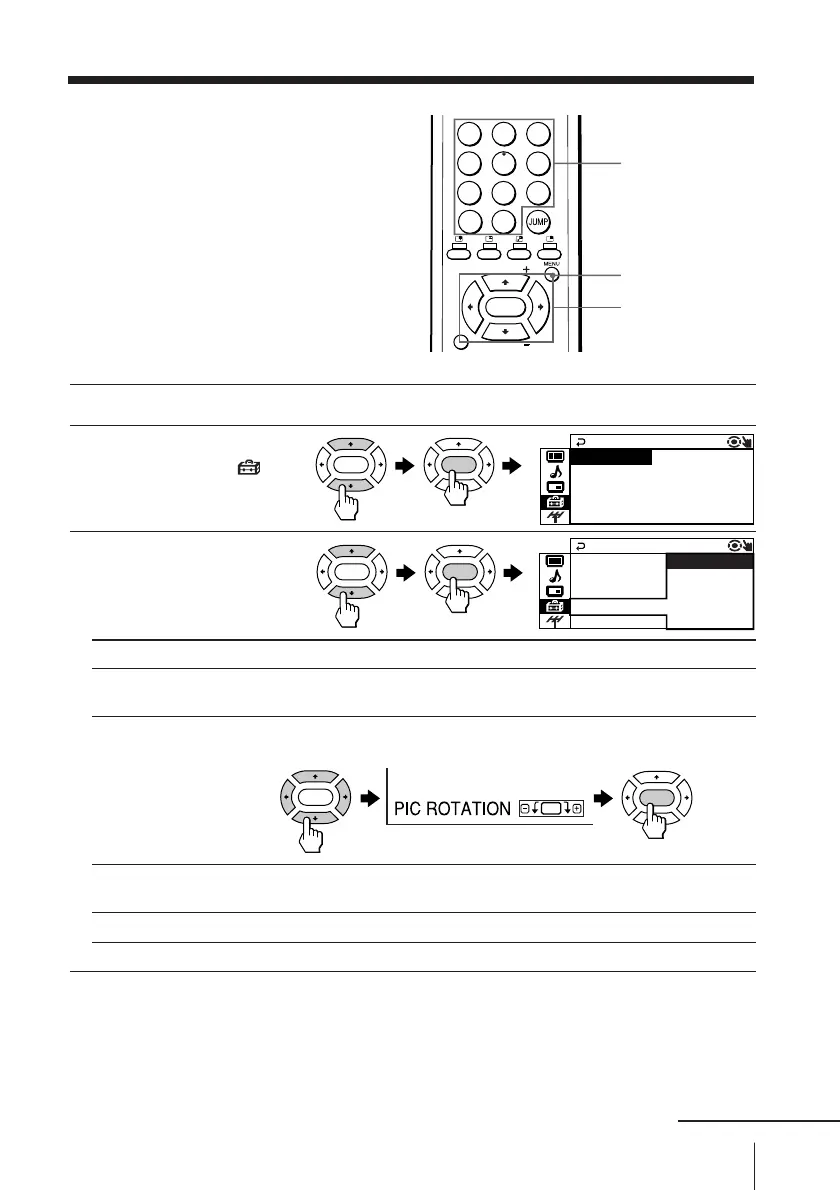
1
Press MENU.
2
Press V or v to select
“SETUP” icon (
),
then press ENTER.
3
Press V or v to select
the desired item (e.g.,
“COLOR SYS”), then
press ENTER.
Select To
“LANGUAGE” change the menu language (see Changing the menu language
on page 10).
“PIC ROTATION” adjust the picture position when it is not aligned to the TV screen.
Press V, b, v or B to adjust the picture position, then press ENTER.
“PROGRAM SETUP” adjust each program number settings. (see Adjusting each
program number settings (PROGRAM SETUP) on page 28).
“COLOR SYS” change the color system. Normally, set this to “AUTO”.
To return to the normal screen
Press MENU.
ENTER ENTER
ENTER ENTER
ENTER
ENTER
E
COLOR SYS : AUTO
SETUP
PROGRAM SETUP
PIC ROT A T I ON
NGL I SH
LANGUAGE :
LANGUAGE : E
COLOR SYS : NTS
SETUP
C3.58
PROGRAM SE SECAM
PIC ROT A T I PAL
AUTO
NTSC4.43
continued








 To Next Page