29Adjusting Your Setup (MENU)
1
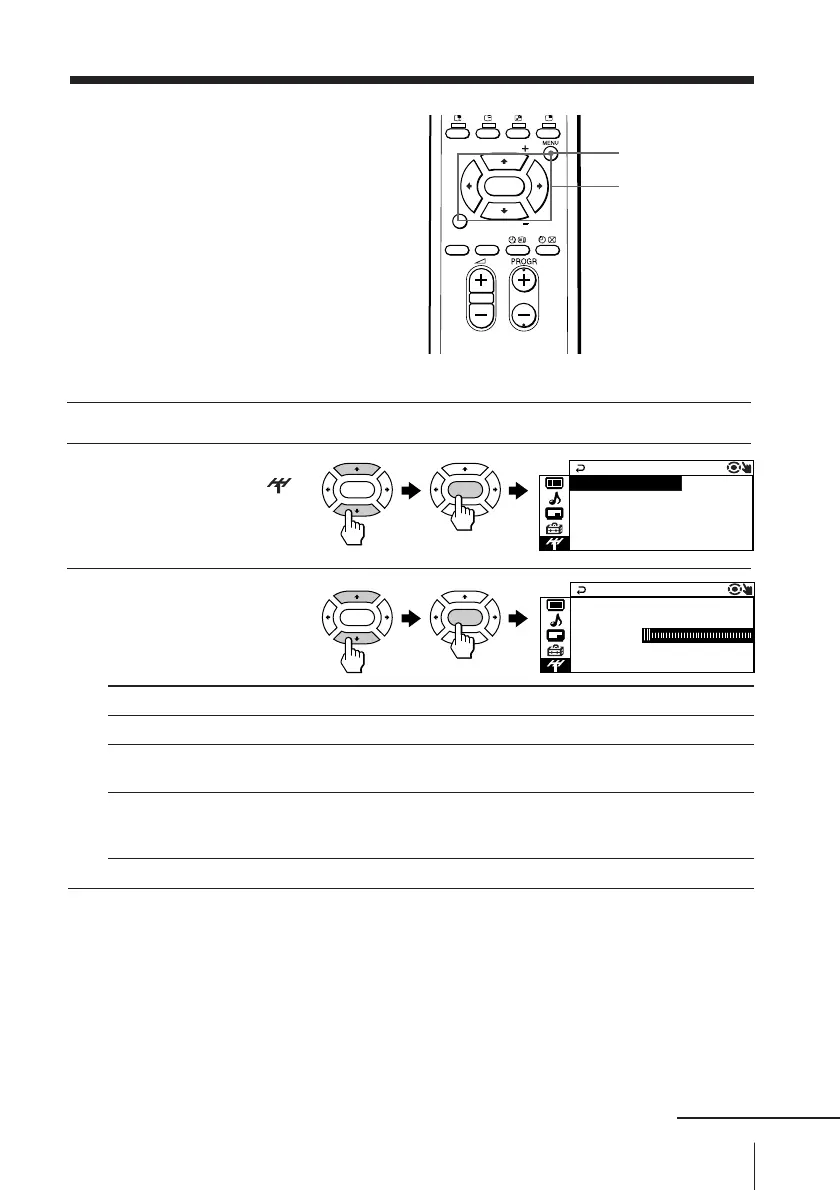
Press MENU.
2
Press V or v to select the
“CH PRESET” icon (
),
then press ENTER.
3
Press V or v to select the
desired item (e.g.,
“AUTO PROGRAM”),
then press ENTER.
Select
“AUTO PROGRAM”
“MANUAL PROGRAM”
“TV SYS”
To return to the normal screen
Press MENU.
Tip
• For details on the menu system and how to use the menu, refer to
Introducing the menu system on page 19.
RAM
VH
AUTO PROG
FLOW
TV
PR
SYS : B / G
01:
R
TV
CH PRESET
SYS:B/G
MANUAL PROGRAM
AM+ + +
OPROGAUT
To
preset channels automatically.
preset channels manually. See Presetting channels
manually on page 30.
change the TV system.
Press V or v to select either “B/G”, “I”, “D/K” or “M”,
then press ENTER.
Changing the
Channel Preset
(“CH PRESET”)
setting
The “CH PRESET” menu allows you to
adjust the setup of your TV. For
example, you can receive a channel with
a weak signal that fails to be tuned in by
automatic presetting.
FAVORITE
SOUND
MODE
SURROUND
PIP PROGR
PIP PROGR
ENTER
V/b/v/B/ENTER
MENU
ENTER ENTER
ENTER ENTER
continued








 To Next Page