16
Advanced Operations
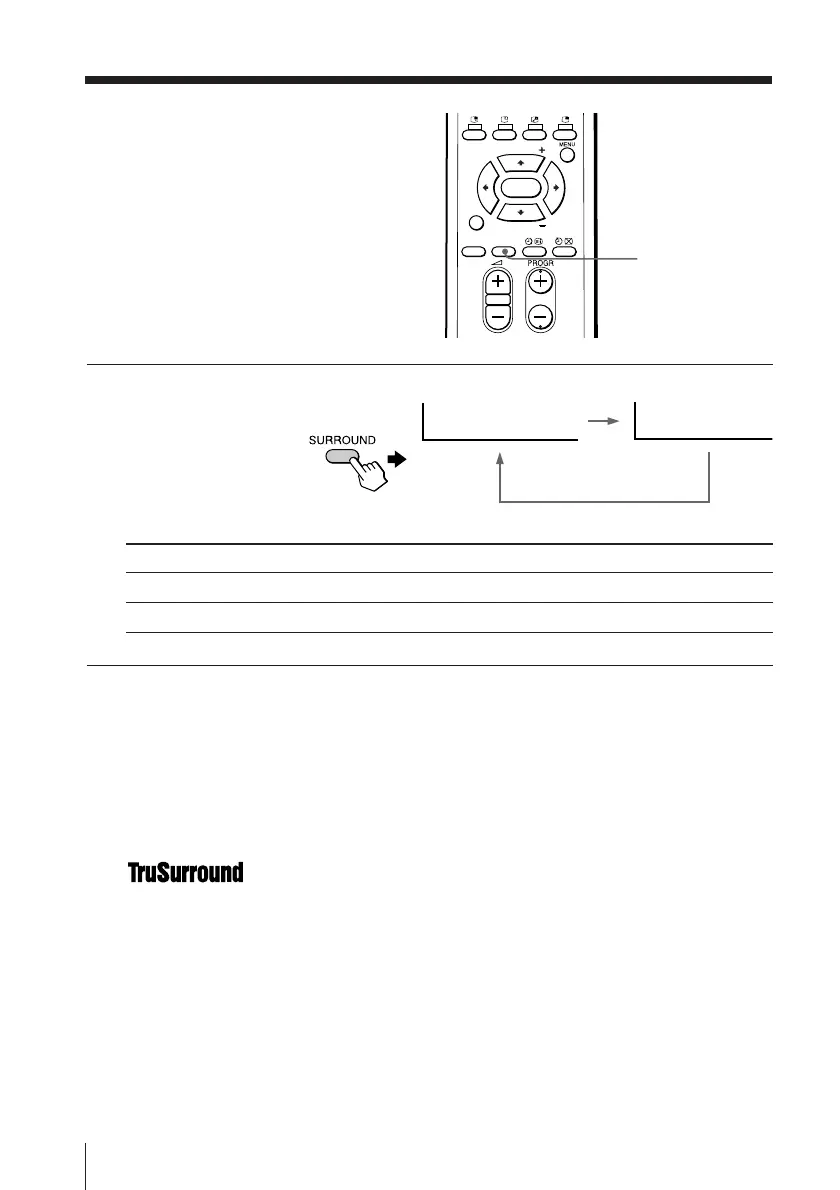
Press SURROUND
repeatedly until you
receive the desired
surround sound.
Select To
“TruSurround” listen to the surround sound that spreads out to the rear of a room.
“OFF” turn off the surround sound.
Tip
• You can also select the surround option using the menu (see Changing the
“SOUND” setting on page 24).
The surround of your TV is categorized as TruSurround.
TM
is a trademark of SRS Labs, Inc. SRS and the SRS symbol are
registered trademarks of SRS Labs, Inc. in the United States and selected foreign
countries. SRS and TruSurround are incorporated under license from SRS Labs,
Inc. and are protected under United States Patent Nos. 4,748,669 and 4,841,572
with numerous additional issued and pending foreign patents.
Listening with
surround sound
The surround feature enables you to
enjoy the sound effects of a concert hall
or movie theater.
FAVORITE
SOUND
MODE
SURROUND
PIP PROGR
PIP PROGR
ENTER
SURROUND: OFF
SURROUND: TruSurround
SURROUND








 To Next Page