6
Using Your New TV
123
L(MONO)
R
R L Y C
B
C
R
Connecting optional components
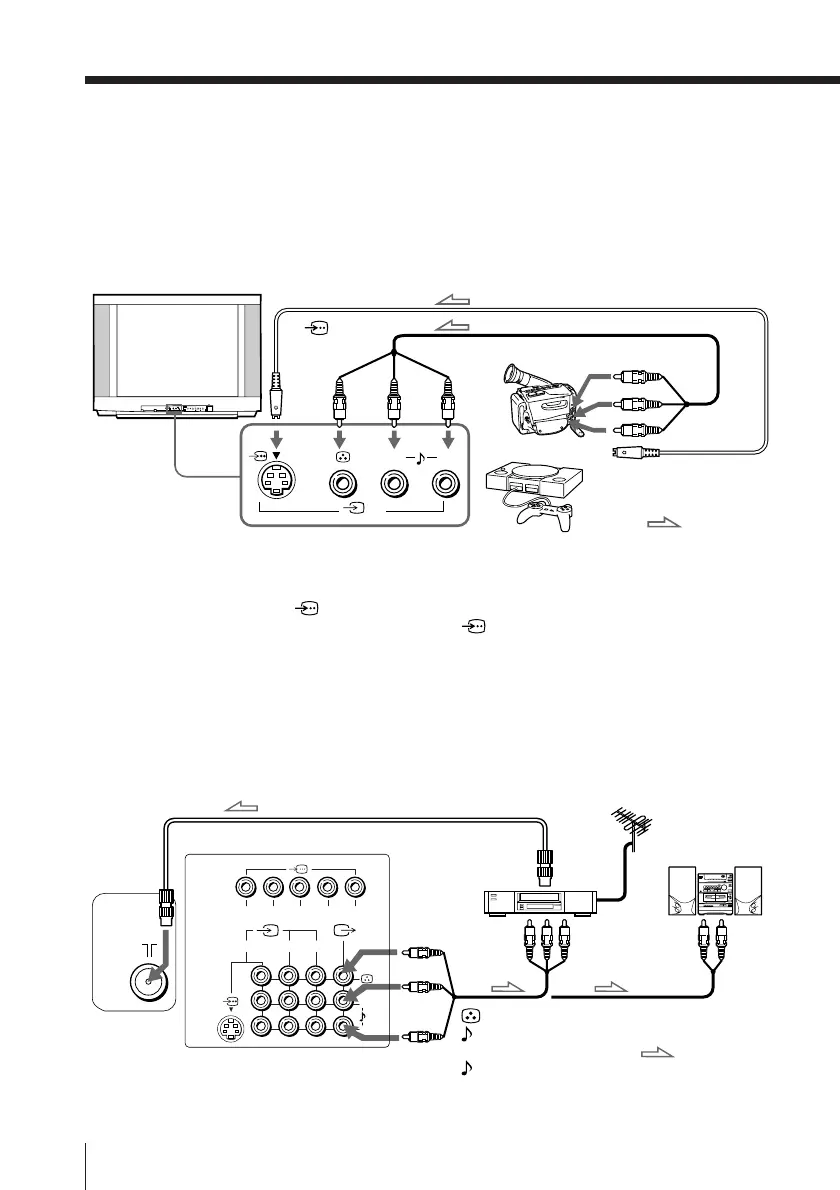
You can connect optional audio/video components, such as a VCR, multi disc player,
DVD, camcorder, video game or stereo system. To watch the picture of the connected
equipment, press t (see page 10).
Connecting a camcorder/video game equipment
using the t (video input) jacks
Notes
• You can also connect video equipment to the t 1, 2 or 3 (video input)
jacks at the rear of your TV.
• If both (S video input) and t 3 (video input) at the front of your TV
are input at the same time, the (S video input) is automatically
selected. To view the video input to t 3 (video input), disconnect the
S video cable.
• Do not connect video equipment to the t 3 (video input) jacks at the
front and the rear of your TV at the same time; otherwise the picture will
not be displayed properly on the screen.
Connecting audio/video equipment using the T
(monitor output) jacks
Note
• If you select “DVD” on your TV screen, no signal will be output at the T
(monitor output) jacks (see page 10).
To S video output
Front of TV
Camcorder
Video game
equipment
To video and
audio outputs
(yellow)
-L (MONO)
(white)
-R (red)
Rear of TV
To
antenna
output
To video and
audio inputs
or
Audio system
To
audio
inputs
VCR
: Signal flow
: Signal flow
To
(S video
input)
To t 3 (video input)
To T
(monitor
output)
or
Audio/Video cable (not supplied)
S video cable (not supplied)
Antenna cable (not supplied)
Audio/Video cable
(not supplied)
PROGRMENU
AUTO
PROGR
ENTER SELECT
L(MONO)
3
L (MONO)
R
3








 To Next Page