19Adjusting Your Setup (MENU)
Introducing the menu system
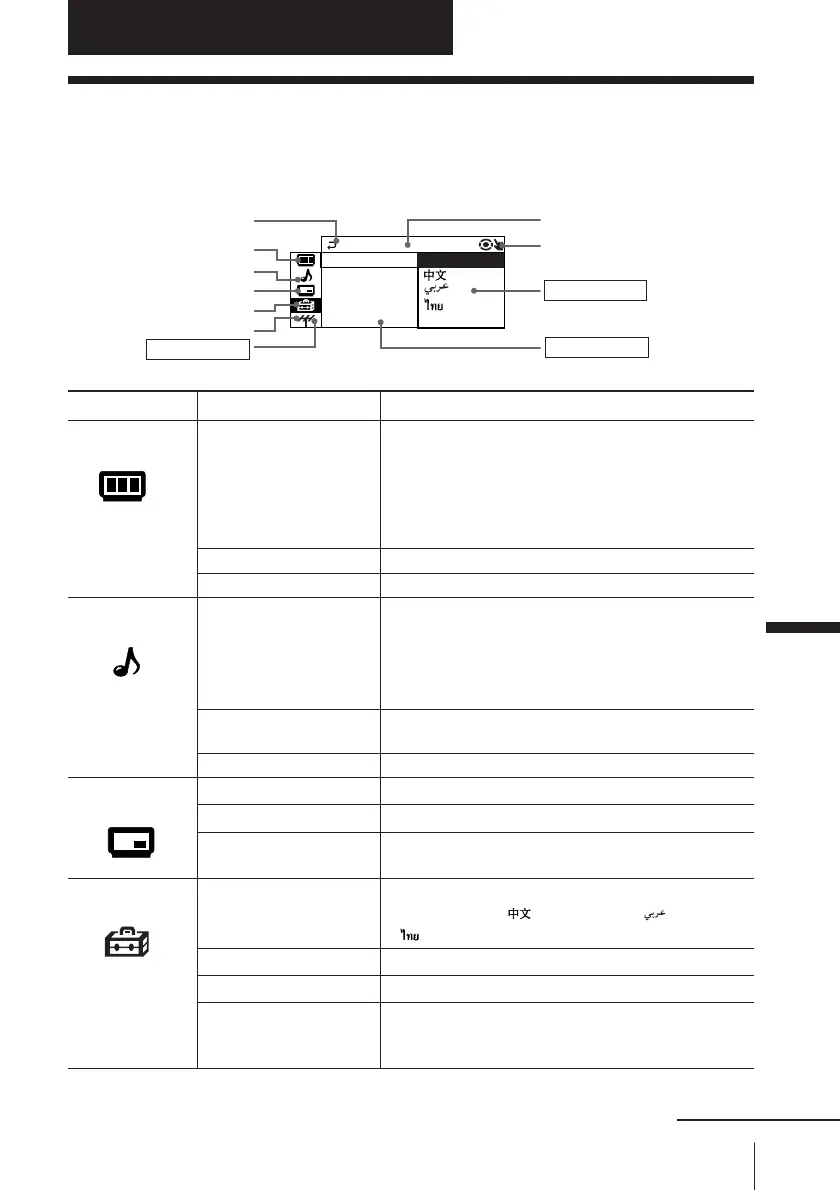
The MENU button lets you open a menu and change the settings of your TV. Here’s
an overview of the menu system.
Level 1 Level 2 Level 3/Function
“PICTURE”
“PICTURE MODE” Select the picture mode:
“DYNAMIC”t “STANDARD”t “SOFT”t
“PERSONAL”t “ADJUST”
“ADJUST” Adjust the “PERSONAL” option:
“PICTURE” t “COLOR”t “BRIGHT”t
“HUE”t “SHARP”
“WIDE MODE” Change the picture size.
“INTELLIGENT PIC” Optimize picture quality.
“SOUND” “SOUND MODE” Select the sound mode:
“DYNAMIC”t “DRAMA” t “SOFT” t
“PERSONAL“ t “ADJUST”
“ADJUST” Adjust the “PERSONAL” option:
“BASS” t “TREBLE”t “BALANCE”t “BBE”*
“SURROUND” Select the surround mode:
“TruSurround” t “OFF”
“INTELLIGENT VOL” Adjust volume automatically.
“PIP” “POSITION” Change the position of the sub screen.
“PIP” Display a sub screen within the main picture.
“SWAP” Exchange pictures between main screen and sub
screen.
“SETUP” “LANGUAGE” Change the menu language:
“ENGLISH” t“ ”(Chinese) t “ ”(Arabic) t
“ ” (Thai)
“PIC ROTATION” Rotate the picture.
“PROGRAM SETUP” Adjust each program number settings.
“COLOR SYS” Change the color system:
“AUTO” t “PAL” t “SECAM” t
“NTSC3.58” t “NTSC4.43”
Return icon
“PICTURE” icon
“PIP” icon
“CH PRESET” icon
Name of the current menu
Menu level 3
Menu level 2
Adjusting Your Setup (MENU)
Menu level 1
“SETUP” icon
Menu guide icon
L ANGUAGE :
COLOR SYS :
SETUP
PROGRAM SE
PIC ROTAT I
ENGL I SH
“SOUND” icon
Adjusting Your Setup (MENU)
continued








 To Next Page