18
Advanced Operations
Additional Teletext tasks
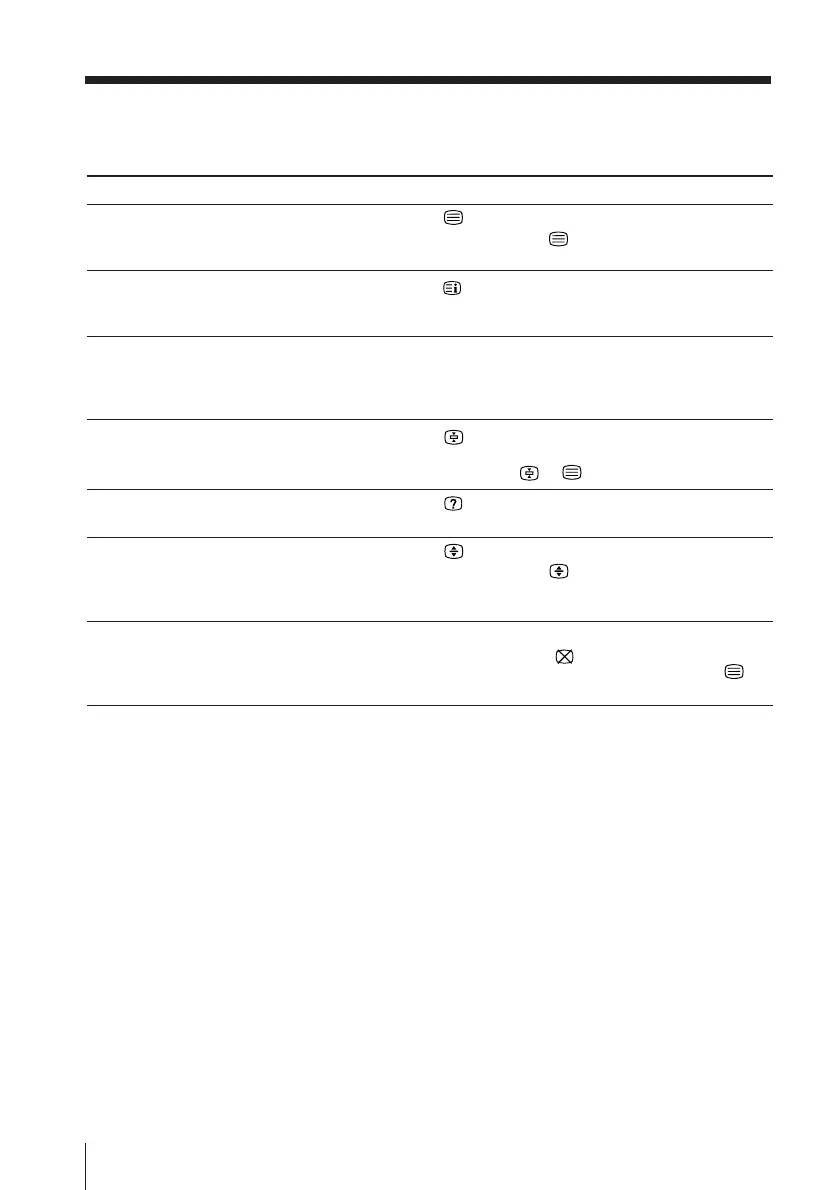
To
display a Teletext page on the TV
picture
check the contents of a Teletext service
select a Teletext page
hold (pause) a Teletext display
reveal concealed information
(e.g., an answer to a quiz)
enlarge the Teletext display
wait for a Teletext page while watching
a TV program
* You can also select a Teletext page that appears in the colored columns at
the bottom of the screen using the corresponding color-coded buttons on
the remote.
Using FASTEXT
This feature allows you to quickly access a Teletext page that uses
FASTEXT. When a FASTEXT program is broadcasted, the colored
menus appear at the bottom of the screen. The colors of the menus
correspond to the red, green, yellow, and blue color-coded buttons
on the remote.
To access a FASTEXT menu
Press the color-coded button on the remote corresponding to the
menu you want. The menu page appears on the screen after several
seconds.
Do this
Press .
Each time you press , the screen changes as
follows: Teletext t Teletext and TV t TV.
Press
.
An overview of the Teletext contents and page
numbers appear on the screen.
Press the number buttons to enter the three-digit
page number of the desired Teletext page.* If you
make a mistake, reenter the correct page number. To
access the next or previous page, press PROGR +/–.
Press to display the symbol “z” at the top left
corner of the screen. To resume normal Teletext
operation, press
or .
Press .
To conceal the information, press the button again.
Press .
Each time you press , the Teletext display
changes as follows: Enlarge upper half t Enlarge
lower half t Normal size.
1 Enter the Teletext page number that you want to
refer to, then press .
2 When the page number is displayed, press to
show the text.
Viewing Teletext (continued)








 To Next Page