28
Adjusting Your Setup (MENU)
Adjusting each program number settings (PROGRAM SETUP)
1
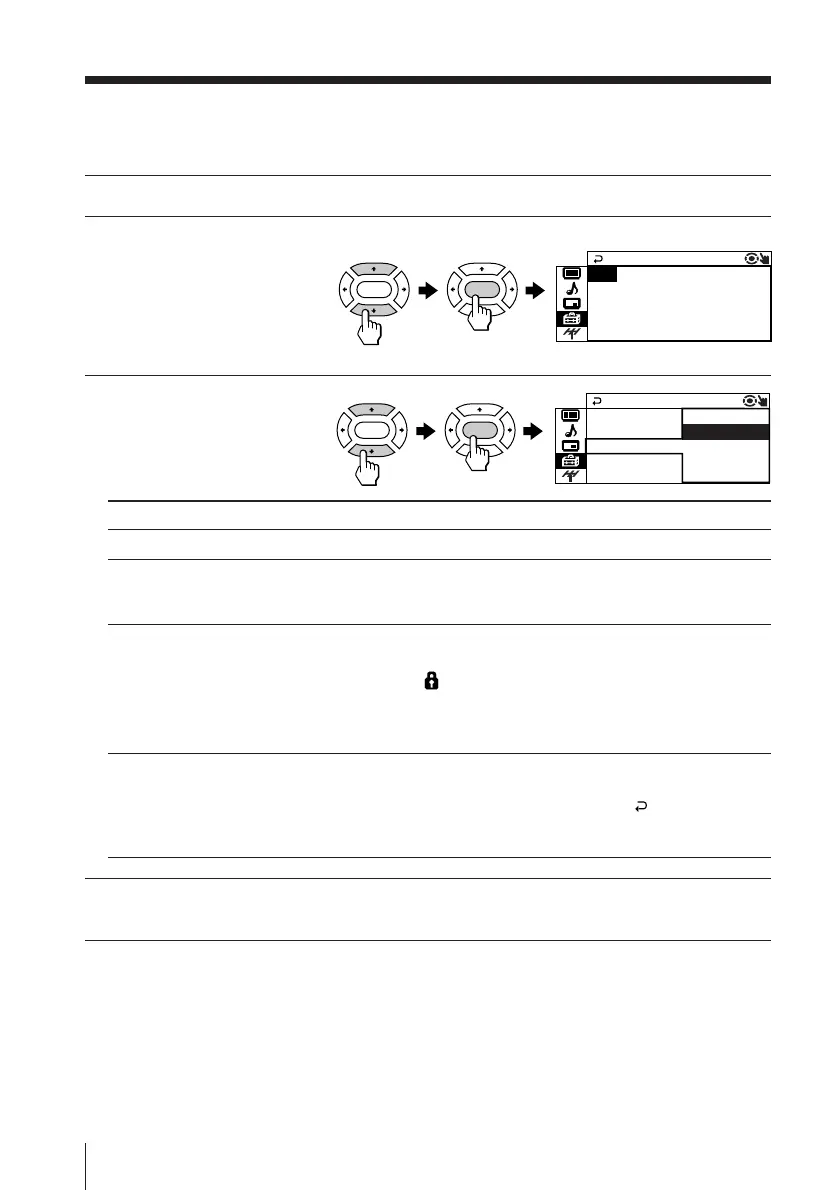
Select “PROGRAM SETUP” from the “SETUP” menu.
2
Select “PR” and press
ENTER. Press V or v to
select the desired
program number you
want to adjust, then
press ENTER.
3
Press V or v to select
the desired item (e.g.,
”CHILD LOCK”), then
press ENTER.
Select To
“PR” select the desired program number.
“SKIP” skip unwanted or unused program number.
Press V or v to select “ON”, then press ENTER.
To cancel, select “OFF”, then press ENTER.
“CHILD LOCK” prevent children from watching this selected program number.
Press V or v to select “ON”, then press ENTER.
The lock symbol ( ) appears on the screen.
To cancel, select “OFF”, then press ENTER.
If you preset a locked program number, that program number will
be unlocked automatically.
“FAVORITE CH” program favorite channels for direct selection.
Press V or v to select one of the six favorite channel numbers
(if you decide not to make any changes, select “ ”),
then press ENTER.
To view the selected favorite channel, refer page 13.
4
To continue adjusting other program numbers, press V or v to select “PR”,
then repeat steps 2 and 3.
To return to the normal screen
Press MENU.
UP
FAVOR I TE CH : – –
PROGRAM S E T
CH I L D LOCK : OF F
SK I P :OFF
PR : 14
ENTER ENTER
ENTER ENTER
UP
FAVOR I TE C : ––
PROGRAM S E T
CH I L D LOCK :
SK I P :ON
PR : 1 4
ON
OFF
Changing the “SETUP” setting (continued)








 To Next Page