Location and Function of Parts and Controls
23
Location and Function of Parts and Controls
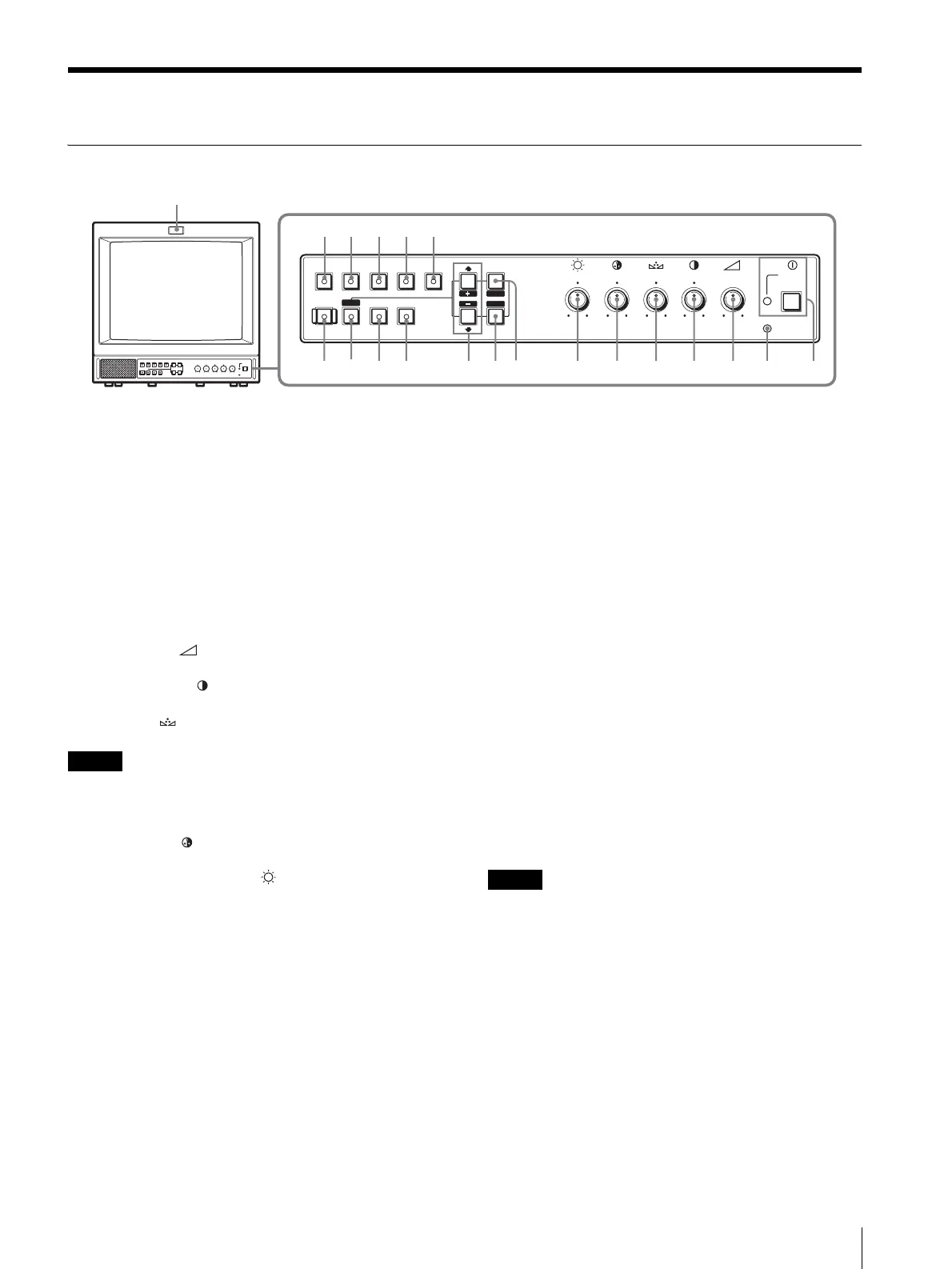
Control Panel
a POWER ! switch and lamp
Press this switch to turn on the monitor. The lamp will
light up. Press this switch again to turn off the monitor.
The lamp will go out.
b REMOTE indicator
This indicator lights up in the conditions below:
– When PRESET is set to ON in the menu.
– If you choose SERIAL REMOTE on the REMOTE
(RS-232C) menu of the Screen menu, and RMT ON
or RMT & LCL has been set.
c VOLUME
control
d CONTRAST
control
e PHASE
control
Note
When you use a PAL, component or RGB signal, phase
cannot be adjusted.
f CHROMA
control
g BRIGHT (brightness)
control
h MENU/EXIT button
Press this button to show or hide on-screen menus.
i ENTER/SELECT button
Press this button to confirm an item selected on the menu.
j M/+ (move the cursor up/adjust the value)
button
m/– (move the cursor down/adjust the value)
button
Press these buttons to move the cursor or adjust an item
selected on the menu.
k OVERSCAN button and lamp
Press this button to change to the Overscan mode. The
display size is increased by approximately 20%, so that
the center portion of the screen becomes easier to view.
To return to the original display size, press this button
again.
l UNDERSCAN button and lamp
Press this button for underscanning.
The display size is reduced by approximately 5% so that
the four corners of the picture are visible.
To return to the original display size, press this button
again.
m RESET button and lamp
You can reset the menu item setting to the previous one
by pressing RESET button while the new item is being
selected and adjusted.
n DEGAUSS button and lamp
Press this button only once. The screen will be
demagnetized. Wait for 10 minutes or more before using
this button again.
Note
The DEGAUSS button is disabled when the screen
menu is being displayed.
To manually degauss the monitor, first, exit the screen
menu by pressing the MENU/EXIT button.
o LINE A button and lamp
Press this button to monitor the signal input through the
LINE A connectors.
;
POWER
REMOTE
VOLUME
CONTRAST
PHASECHROMABRIGHT
MENU
–+
MIN
MAX
PUR GRN MIN MAX MIN MAX
EXIT
SELECT
RESET
OPTION
2
UNDER
SCAN
DEGAUSS
134567890qa 2qsqdqf
ql
qkqjqhqg
RGB/
COMPONENT
OPTION
1
LINE
A
LINE
B
OVER
SCAN
ENTER




 To Next Page