35
KV-21FK120
KV-21FK120
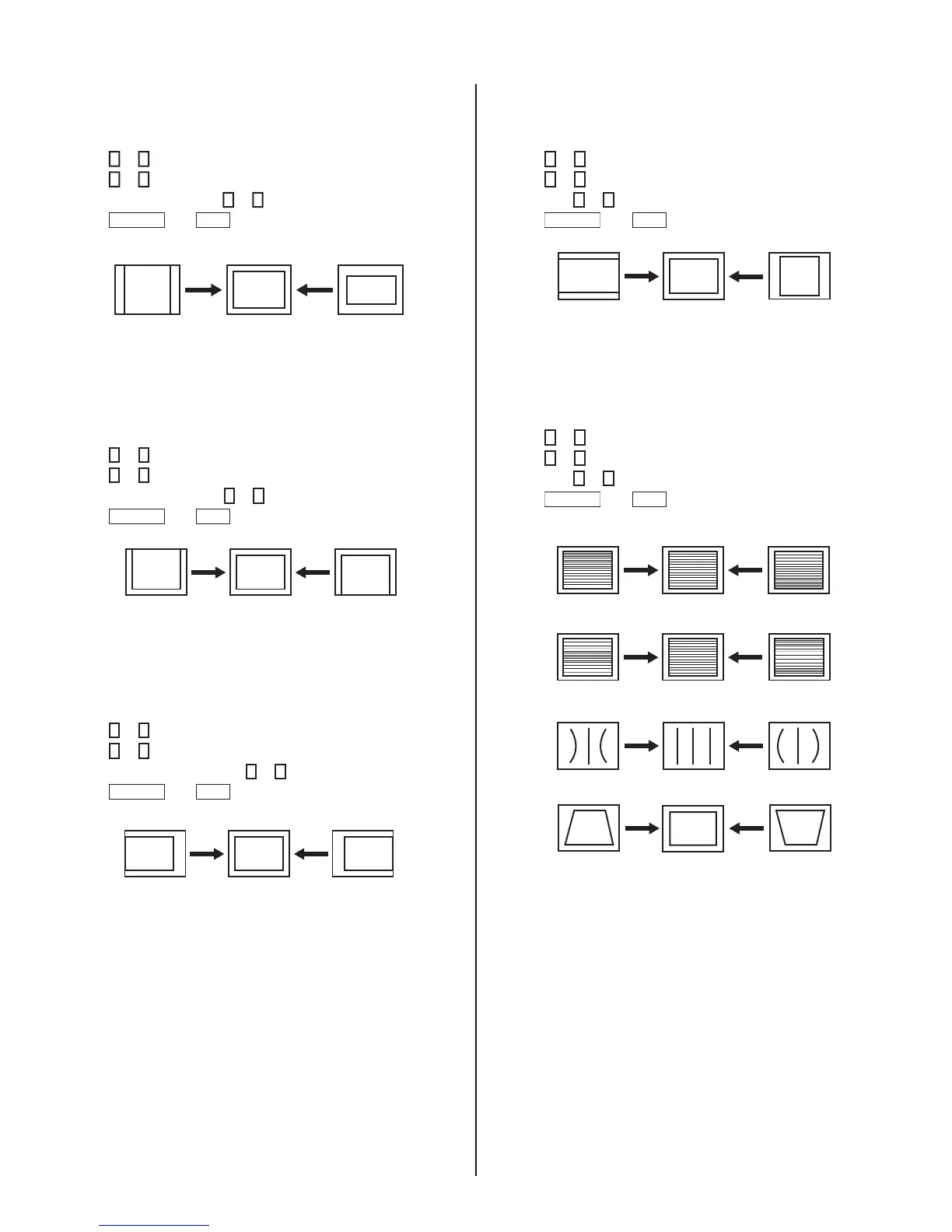
V. Size Adjustment (VSIZ)
1. Input a crosshatch signal.
2.
Access the Service Adjustment Mode.
3.
Press
2
or
5
to select the DEF Categor
y.
4.
Press
1
or
4
to select VSIZ.
5.
Adjust value of VPOS with
3
or
6
for the best vertical center.
6.
Press
MUTING
then
ENT
to write into the memory.
V. Center Adjustment (VPOS)
Perform this adjustment after performing H. Frequency
(Free Run) Check.
1.
Input a crosshatch signal.
2.
Access the Service Adjustment Mode.
3.
Press
2
or
5
to select the DEF Categor
y.
4.
Press
1
or
4
to select VPOS.
5.
Adjust value of VPOS with
3
or
6
for the best vertical cente
r.
6.
Press
MUTING
then
ENT
to write into the memory.
H. Center Adjustment (HPOS)
Perform this adjustment after performing H. Frequency
(Free Run) Check.
1.
Input a crosshatch signal.
2.
Access the Service Adjustment Mode.
3.
Press
2
or
5
to select the DEF Categor
y.
4.
Press
1
or
4
to select HPOS.
5.
Adjust the value of HPOS with
3
or
6
for the best horizontal cente
r.
6.
Press
MUTING
then
ENT
to write into the memory.
H. Size Adjustment (HSIZ)
1. Input a monoscope signal.
2.
Access the Service Adjustment Mode.
3.
Press
2
or
5
to select the DEF Categor
y.
4.
Press
1
or
4
to select HSIZ.
5.
Adjust with
3
or
6
for the best horizontal size.
6.
Press
MUTING
then
ENT
to write into the memory.
V. Linearity (VLIN), V. Correction (SCOR),
PIN Amp (PAMP), and Vertical
Trapezoid (TRAP) Adjustments
1. Input a crosshatch signal.
2.
Access the Service Adjustment Mode.
3.
Press
2
or
5
to select the 16:09 Categor
y.
4.
Press
1
or
4
to select VLIN, SC
OR, PAMP, or TRAP.
5.
Adjust with
3
or
6
for the best horizontal size.
6.
Press
MUTING
then
ENT
to write into the memory.
V LINEARITY (VLIN)
V CORRECTION (SCOR)
PIN AMP (PAMP)
VERTICAL TRAPEZOID (TRAP)








 To Next Page