11
Sony KV-HW21N63 Group A12 (GB)_4-094-461-11 (1)
Advanced Operations
Advanced Operations
TV
1
2
3
4
6
7
8
9
0
5
MENU
MUTING
DISPLAY
POWER
TV/VIDEOMTS/SAP
PICTURE
MODE
SOUND
MODE
SLEEP
RESET
CH
VOL
JUMP ENT
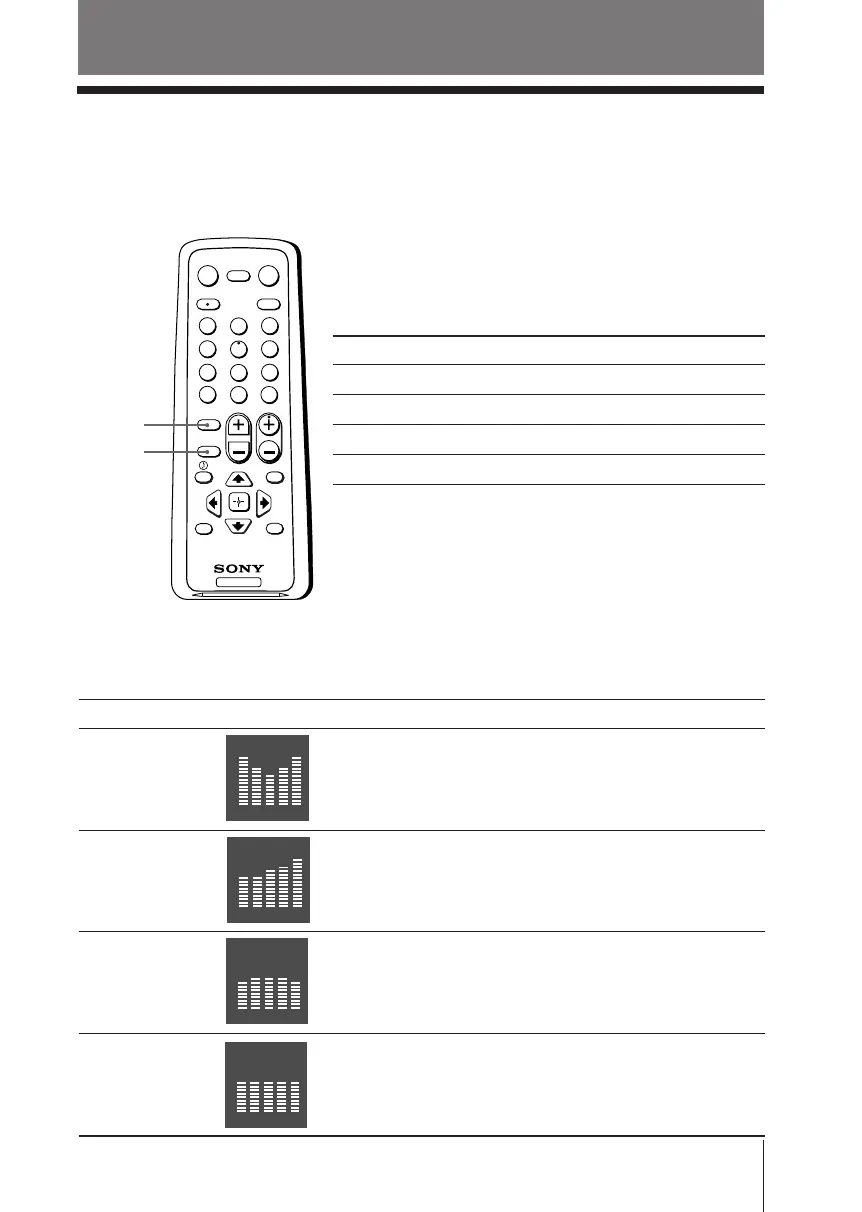
Selecting the sound mode
Press SOUND MODE on the remote control (or the top control panel) to select the
desired sound mode with a 5-Band Graphic Equalizer display.
Select To listen to
“Movie” dynamic and clear sound that emphasizes the low
and high tones.
“News” sound that emphasizes vocals.
“Soft” soft, natural and relaxing sounds.
“Standard” standard flat sounds.
x Selecting the picture and sound
modes
You can select picture and sound modes and adjust the setting to your personal
preference.
Selecting the picture mode
Press PICTURE MODE to select the desired picture
mode.
Select To view
“Vivid” contrast and sharp pictures.
“Standard” standard pictures.
“Movie” finely detailed pictures.
“Sports” bright pictures.
PICTURE
MODE
SOUND
MODE
Movie
100 300 1k 3k 8k
100 300 1k 3k 8k
News
100 300 1k 3k 8k
Soft
100 300 1k 3k 8k
Standard
01GB05AVD-PHI.p65 29/08/03, 3:33 PM11






 To Next Page