8 Overview of Controls
Sony KV-HW21N63 Group A12 (GB)_4-094-461-11 (1)
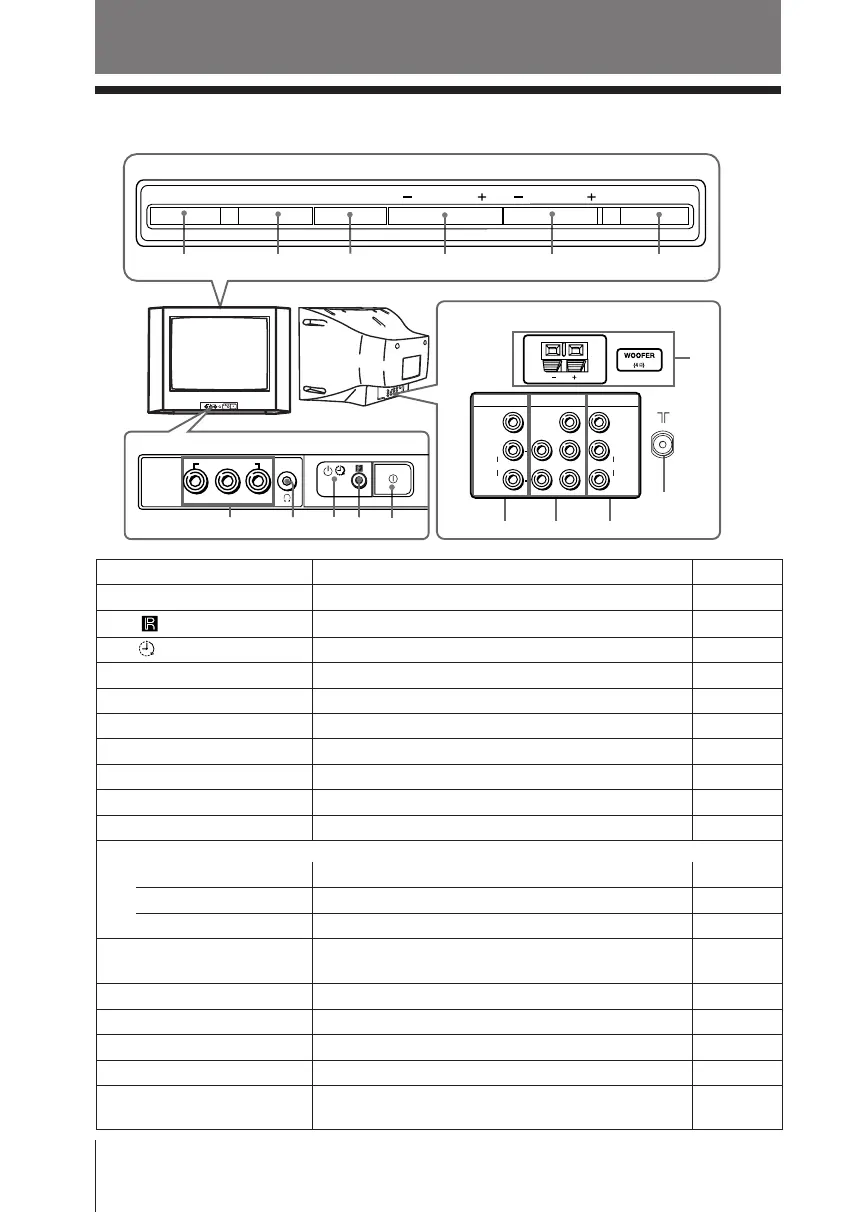
Overview of Controls
Y
C
B
C
R
CHANNEL POWER
MENU TV/VIDEO VOLUMESOUND MODE
qa 0 9 8 7 6
2
qh
VIDEOVIDEO
VIDEO 1 IN
VIDEO 3 IN
MONITOR OUT
(MONO)
AUDIO
R
L
(MONO)
AUDIO
L
R
qs
qg qf
qd
3
4
2
5
1
L
R
VIDEO 2 INPUT
VIDEO
AUDIO
(MONO)
TV front panel
TV rear panel
x TV top control, front and rear panels
TV top control panel
Button/Terminal Function Page
1 ! Turn off or turn on the TV. 6
2 Remote control sensor. –
3 Wake Up indicator. 21
3 1 Standby indicator. 6
4 i Headphone jack. –
5 VIDEO 2 INPUT Video input terminal 2. 23
6 POWER Turn off temporarily or turn on the TV. –
7 CHANNEL +/– Select channel number. –
8 VOLUME +/– Adjust volume. –
9 TV/VIDEO Select TV or video input. 23
Menu operations
8 VOLUME +/– Select and adjust items. –
9 TV/VIDEO Confirm selected items. –
0 MENU Display or cancel the menu. –
qa SOUND MODE Select sound mode options with a 5-Band Graphic 11
Equalizer display.
qs 8 Antenna input terminal. 23
qd MONITOR OUT Monitor output terminal. 24
qf VIDEO 3 IN Component video input terminal. 24
qg VIDEO 1 IN Video input terminal 1. 23
qh WOOFER Enjoy high quality sound. 23
(KV-HW21N63 only)
01GB04INS-PHI.p65 29/08/03, 3:32 PM8






 To Next Page