13
Sony KV-HW21N63 Group A12 (GB)_4-094-461-11 (1)
Menu Adjustment
Menu Adjustment
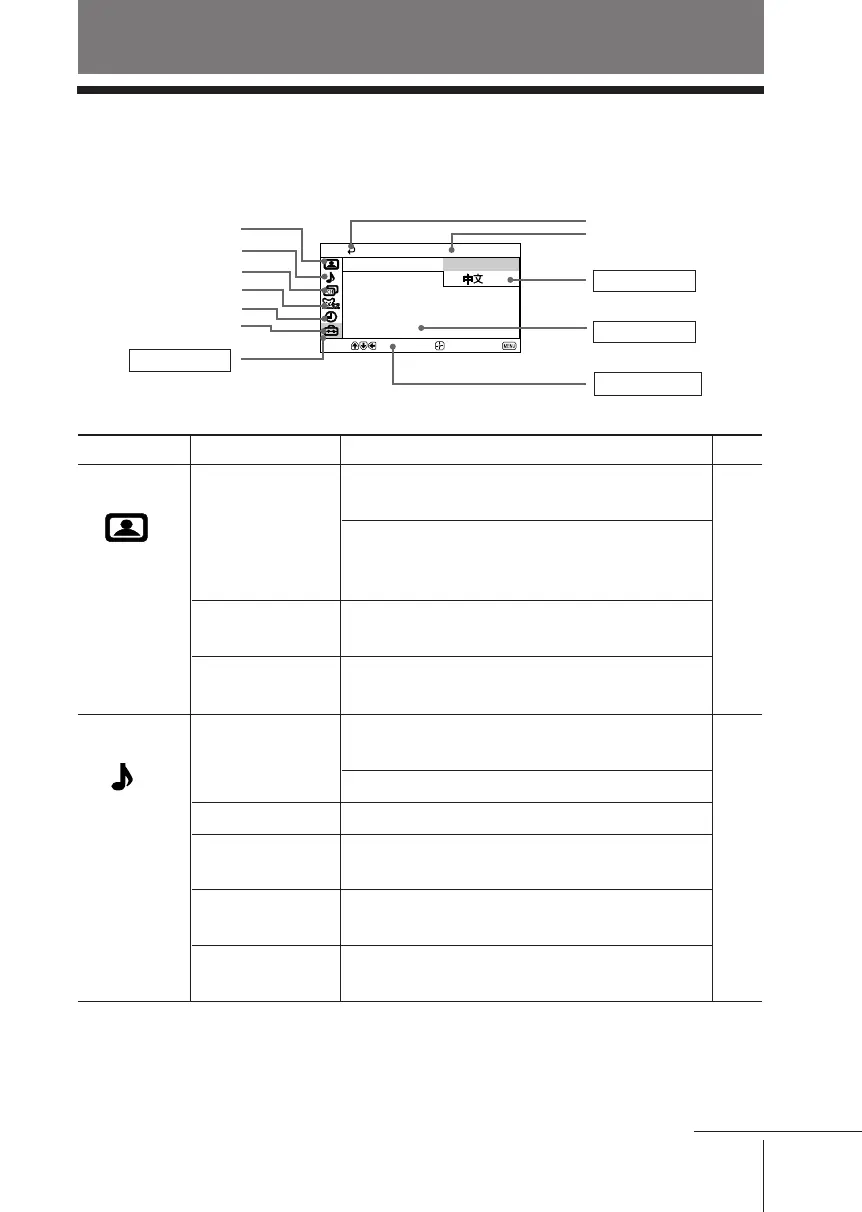
x Introducing the menu system
The MENU button lets you open a menu and change the settings of your TV.
The following is an overview of the menu system.
Return icon
Setup icon
Channel Block icon
Channel Setup icon
Name of the current
menu
Video icon
Menu level 3
Menu level 2
User Guidance
Menu level 1
Level 1
“Video”
“Audio”
Level 2
“Mode”
“Picture Controls”
“Color Temp.”
“Intelligent Picture”
“Mode”
“Sound Controls”
“Balance”
“Steady Sound”
“Effect”
“MTS”
Level 3/Function
Select the picture mode:
“Vivid” t “Standard” t “Movie” t “Sports”
Adjust the picture mode option:
“Picture” t “Brightness” t “Color” t
“Hue” t “Sharpness”
Adjust white color tint:
“Cool” t “Neutral” t “Warm”
Optimize picture quality:
“On” t “Off”
Select the sound mode:
“Movie” t “News” t “Soft” t “Standard”
Adjust sound frequency settings.
Select to emphasize the left and right speakers.
Adjust volume automatically:
“On” t “Off”
Select audio effect mode:
“Off” t “Simulated” t “Surround”
Select stereo/bilingual mode:
“Stereo” t “Auto SAP” t “Mono”
Page
16
17
Select
End
Setup
16:9 Enhanced:
Caption Vision:
Language: English
Video Label
Move
Audio icon
Timer icon
continue
01GB05AVD-PHI.p65 29/08/03, 3:33 PM13






 To Next Page