14 Menu Adjustment
Sony KV-HW21N63 Group A12 (GB)_4-094-461-11 (1)
continued
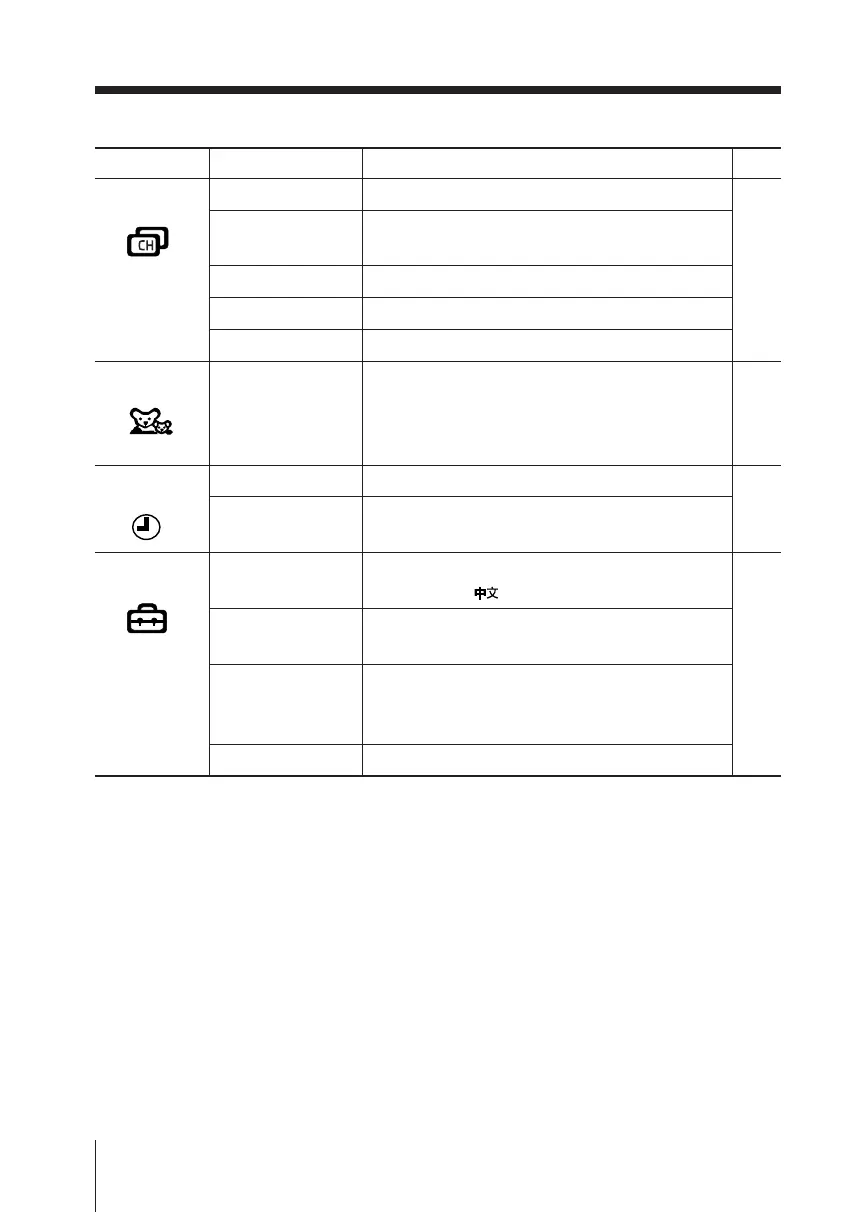
Level 1
“Channel Setup”
“Channel Block”
“Timer”
“Setup”
Level 2
“Favorite Channels”
“Cable”
“Auto Program”
“Channel Skip/Add”
“Channel Label”
“Sleep”
“Wake Up Timer”
“Language”
“16:9 Enhanced”
“Caption Vision”
“Video Label”
Level 3/Function
Quick access to favorite channels.
Watch cable TV programs:
“On” t “Off”
Preset channels automatically.
Skip unwanted channels or add new ones.
Label the channel number.
Block unwanted channels.
Set TV to turn off automatically.
Set TV to turn on automatically.
Change the menu language:
“English” t “ ” (Chinese)
Change the picture size:
“On” t “Off”
Select the closed caption mode:
“Off” t “CC1/2/3/4” t “Text1/2/3/4” t
“Info”
Label the connected equipment.
Page
19
20
21
22
_
01GB05AVD-PHI.p65 29/08/03, 3:33 PM14






 To Next Page