15
Sony KV-HW21N63 Group A12 (GB)_4-094-461-11 (1)
Menu Adjustment
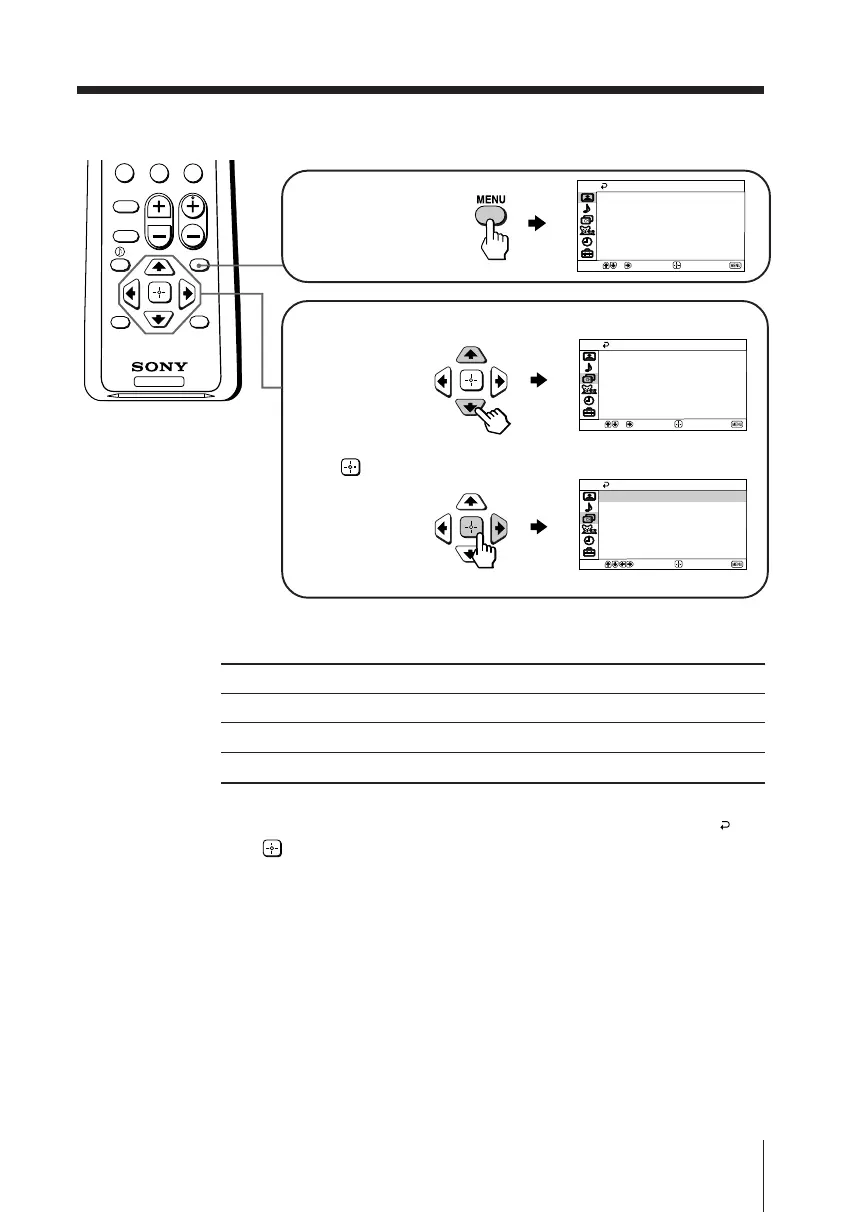
How to use the menu
Other menu operations
Tips
• If you want to exit from Menu level 2 to Menu level 1, press V or v until the return icon ( ) is
highlighted, then press .
• The MENU, TV/VIDEO and VOLUME +/– buttons on the top control panel can also be used
for the operations above (see page 8).
To
Adjust the setting value
Move to the next/previous menu level
Cancel the menu
Press
V, v, B or b.
B or b.
MENU.
Press V or v to select
the desired item.
Press
(or b) to
confirm your
selection and
go to the next
level.
Press MENU to
display the menu.
TV
0
MENU
PICTURE
MODE
SOUND
MODE
SLEEP
RESET
CH
VOL
JUMP ENT
Move
End
Video
Color Temp.:
Intelligent Picture:
Vivid
On
Cool
Picture Controls
Select
Mode:
Move
End
Channel Setup
Auto Program
Channel Skip/Add
Channel Label
On
Cable:
Select
Favorite Channels
Move
End
Channel Setup
Auto Program
Channel Skip/Add
Channel Label
On
Cable:
Select
Favorite Channels
01GB05AVD-PHI.p65 29/08/03, 3:33 PM15






 To Next Page