Introduction
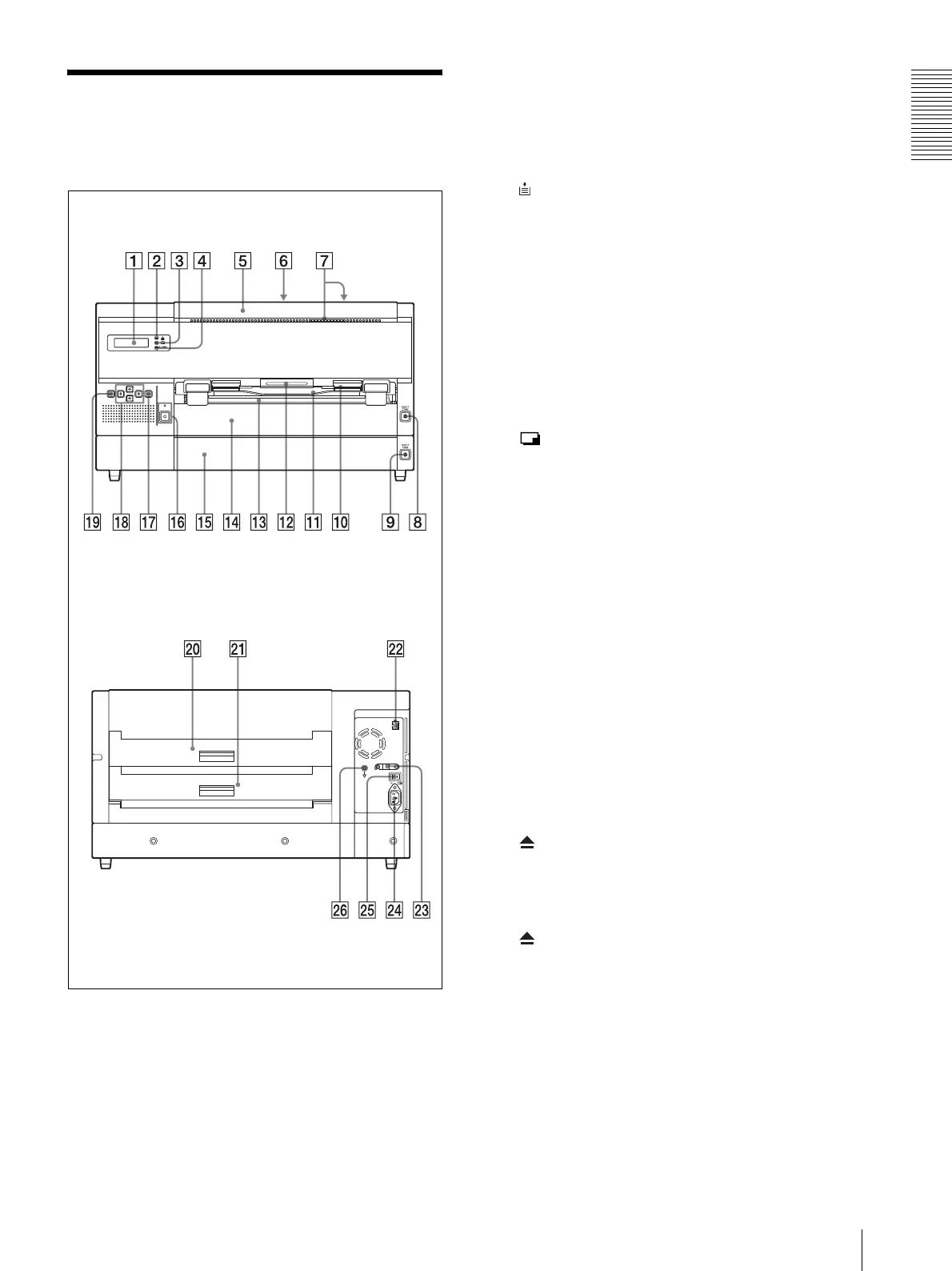
Location and Function of Parts and Controls
13
Location and Function
of Parts and Controls
For details, refer to the pages given in parentheses.
A Liquid Crystal Display (LCD) (19)
Displays the size and remaining amount of film
sheets loaded in the trays.
Upper row: Displays the size and the remaining
amount of film sheets loaded in film tray 1. Film
tray 1 is reserved for use with UPT-517BL film
sheets.
Lower row: Displays the size and the remaining
amount of film sheets loaded in film tray 2.
Menus are displayed during a menu operation.
Error messages are displayed when an error
condition occurs.
B Film remaining confirmation indicator (19)
Allows you to check the remaining amount of film
sheets in the film tray.
When the film sheets are loaded in both trays:
Lights in green.
When the film sheets loaded in either film tray 1
or film tray 2 have been used up: Lights in yellow,
and the message is displayed on the LCD.
When the film sheets loaded in both trays have
been used up: Goes off. The ALARM indicator
lights in orange and the message is displayed on the
LCD.
C PRINT indicator
Lights in green while the unit is printing.
D ALARM indicator (40)
Lights in orange when film sheets have been used
up in both film trays, film sheet jams occur, or other
problems occur.
E Front cover (44)
Open when you clean the thermal head and filters,
and when you replace the cleaning roller with a new
one. Also open this when you remove a jammed
film sheets.
F TOP cover (43)
Open when removing a jammed film sheet.
G Ventilation holes
There is a built-in fan to prevent the thermal head
from overheating.
H EJECT TRAY button
Push this button to pull film tray 1 out. This button
is activated when the power is on and all covers are
closed.
I EJECT TRAY button
Push this button to pull film tray 2 out. This button
is activated when the power is on and all covers are
closed.
J Film output slot
Printed film sheets (printouts) are ejected from film
tray 2 here.
K Output tray (15)
Printed film sheets (printouts) ejected from film
tray 2 are accumulated on this output tray.
Front panel
Rear panel



 To Next Page