45
Copying Videos
By connecting a camera to this unit via DV
(i.LINK) cable, you can copy video
recorded on a DV tape to disc.
1 Prepare for recording.
Initially, turn on this unit (page 28),
insert a disc (page 29) and connect a DV
(i.LINK) cable for recording (page 32).
z Hint
• If all the preparations are complete for copying,
this unit detects a signal from a camcorder
connecting to the DV IN connector, and the
display window in step 5 appears automatically.
You can skip steps 2 to 4.
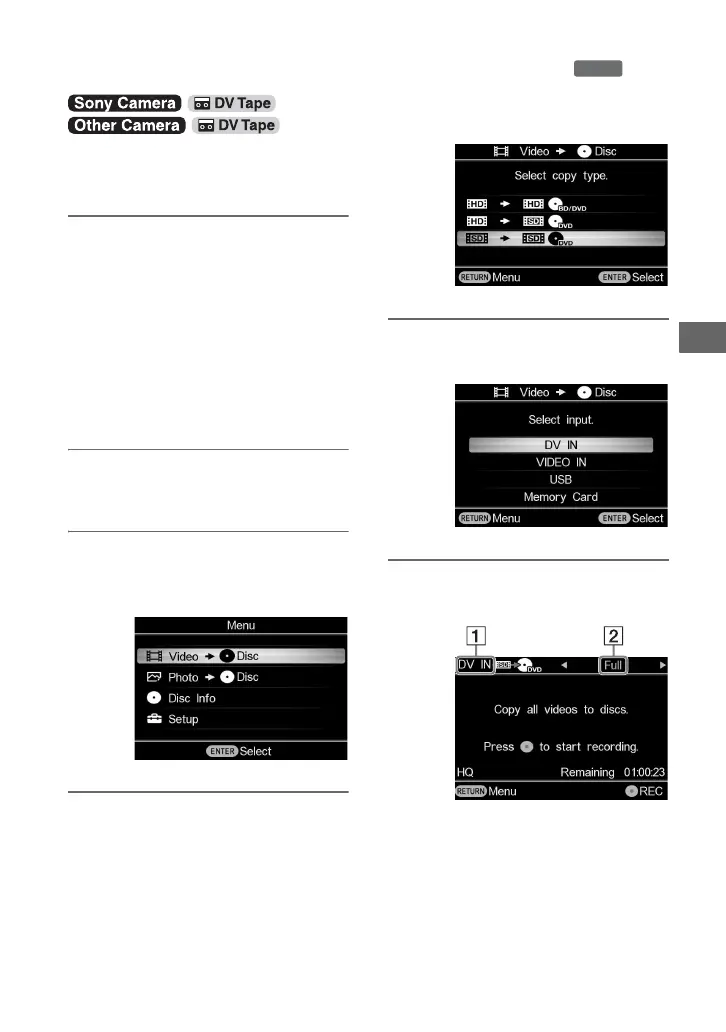
2 Press the RETURN button.
The [Menu] display appears.
3 Make sure that [Video b Disc] is
selected, and press the ENTER
button.
4 Press V or v to select [SD b SD]
and press the ENTER button.
5 Press V or v to select [DV IN] and
press the ENTER button.
6 Press B or b to display the copy
mode you want to use.
A Type of input
[DV IN]
Displays when connecting a camera
to this unit via DV (i.LINK) cable,
and [DV IN] is selected from the
input options.
Copying Videos with a DV (i.LINK) Cable
DVD



 To Next Page