60
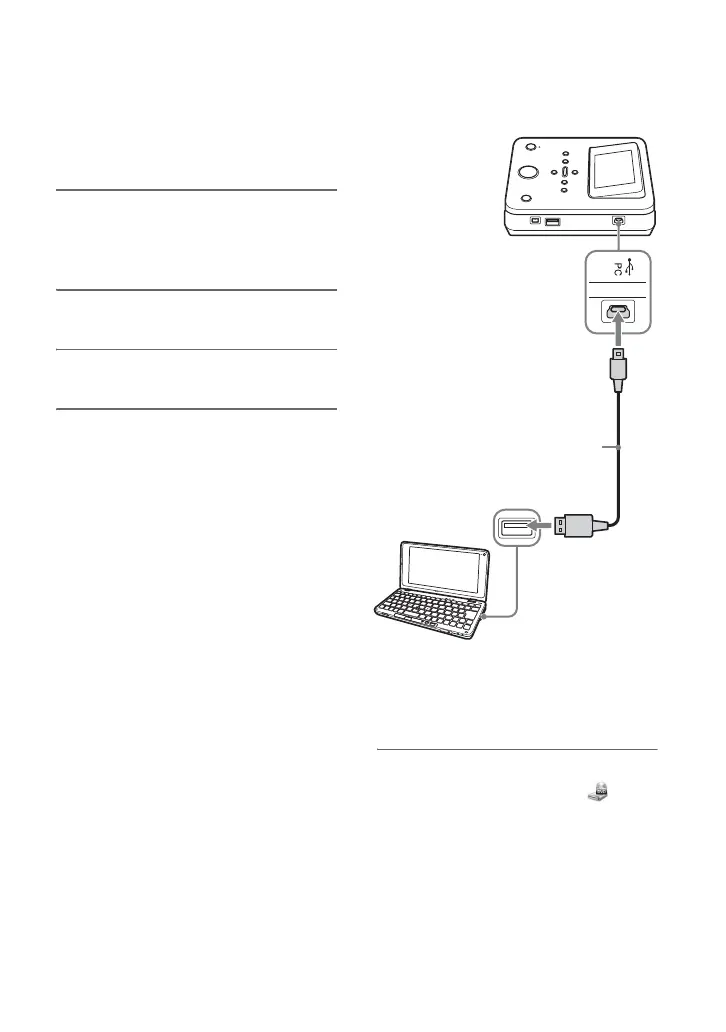
You can connect this unit to a computer
using the supplied USB cable.
1 Connect the supplied AC power
cord, the AC adapter, and this
unit (page 28).
2 Turn on this unit.
3 Turn on the computer.
4 Connect the computer to this
unit.
This unit is detected and identified by
the computer. [PC Mode] appears in the
display window.
b Notes
• Connect the computer immediately after turning
on this unit, or when displaying [Menu]. You
cannot connect the computer while copying
images or performing other operations, such as
setup or viewing disc information, etc.
• This unit may automatically detect an inserted
memory card/disc or connected camera, and
perform other operations (page 36) when you
press the 1 (power) button. In this case, press
the RETURN button to display [Menu], and
connect the computer to this unit.
z Hint
• When this unit is connected to your computer
for the first time, it takes a moment for the
computer to detect this unit.
5 Click [Start], and then click [My
Computer] to verify that (this
unit) has been added in the [My
Computer] window.
b Note
• Depending on the operating system, operation
method or displayed icon may vary.
Using with a Computer
Connecting to a Computer
USB port
(Type Mini B)
USB port (Type A)
USB cable (supplied)



 To Next Page