33
Preparations for Recording
1 Turn on the video device.
b Note
• Connect the AC adapter to the camera if one is supplied with the camera.
2 Operate the video device to start playback of video.
• Playback operation differs among video devices. For most cameras, switch the power/mode button to
playback, PLAY/EDIT or VTR mode to play video or perform recording. Cameras with multiple
media require specifying the media (HDD, memory card or Built-in memory). For details, refer to the
operating instructions of your video device.
• When connecting Handycam
®
using DV or D8 tape, the [A/V t DV OUT] settings on Handycam
®
must be set to [OFF] ([OFF] is the default setting).
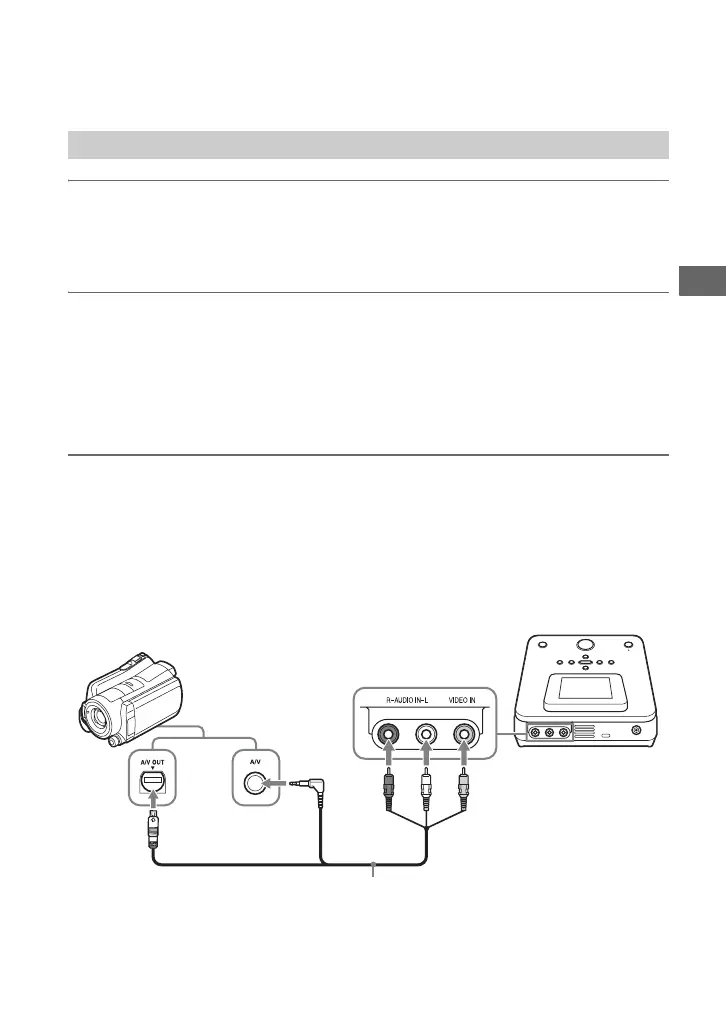
3 Connect the video device to this unit.
Use an audio/video cable (not supplied) or AV cable (not supplied) when connecting a
video device to this unit.
z Hint
• Connectors may differ between devices. Refer to the operating instructions for your device, and use an
appropriate cable.
Audio/video cable (AV cable)
AUDIO IN connectors
A/V OUT connector
VIDEO IN connector
AV cable (not supplied or supplied with the video device)
or
Connecting a camera with A/V OUT connector:



 To Next Page