51
Copying Photos
You can copy photos onto a disc from a
camera connected to this unit, or a memory
card inserted into the memory card slot,
with a single touch of the (record)
button.
You can also copy photos selected by
viewing thumbnails.
b Note
• See “Supported/unsupported devices, images
and discs” on page 23 previously.
1 Prepare for recording.
Initially, turn on this unit (page 28),
insert a disc and connect cables (page
30) or insert memory card (page 35).
b Note
• To select the image and input type manually,
perform the recording procedure manually by
selecting options from the menu (
page 38).
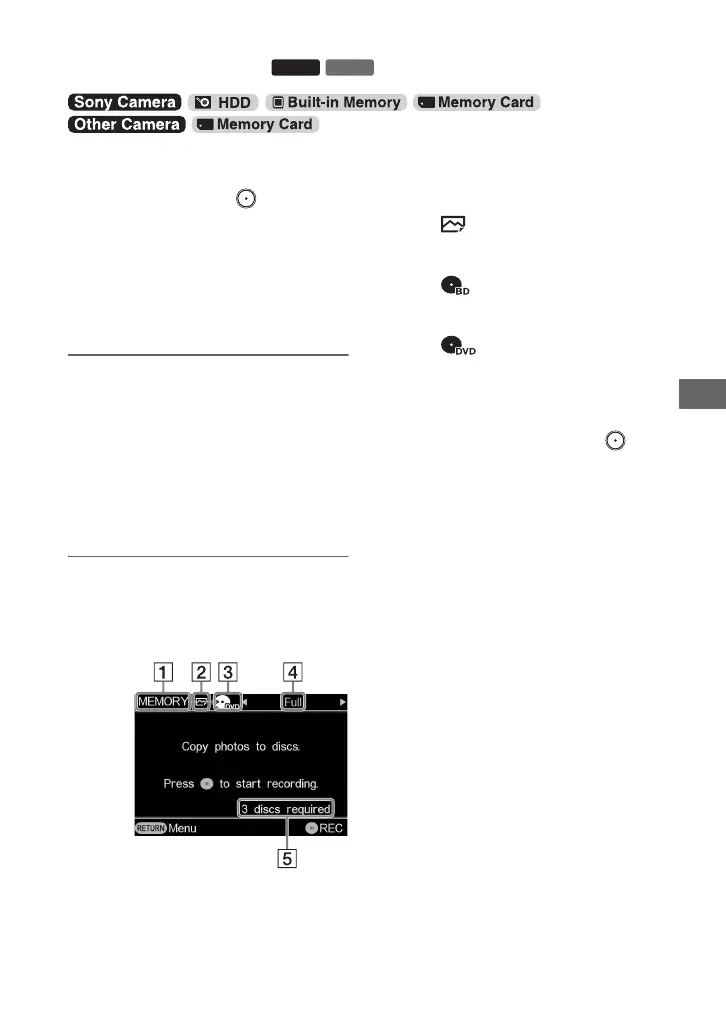
2 Confirm the message in the
display window, and press B or b
to display the copy mode you
want to use.
A Type of input
[USB]
Displays when connecting a camera
to this unit via USB cable.
[MEMORY]
Displays when a memory card is
inserted in the memory card slot.
B Type of image
[]
Displays when recording photos.
C Type of disc
[]
Displays when recording to
a Blu-ray Disc.
[]
Displays when recording to a DVD
disc.
D Copy mode
[Full]
With a single touch of the
(record) button, you can copy all
photos in the camera or memory
card.
[Select Photos]
[Thumbnail] /[Shooting Date]
You can copy photos selected by
viewing thumbnail images or
shooting date.
If you select copy mode [Select
Photos], press V or v to select
[Thumbnail] or [Shooting Date]
(page 53).
E Number of required discs
Copying Photos
Copying Photos
BD
DVD



 To Next Page