26
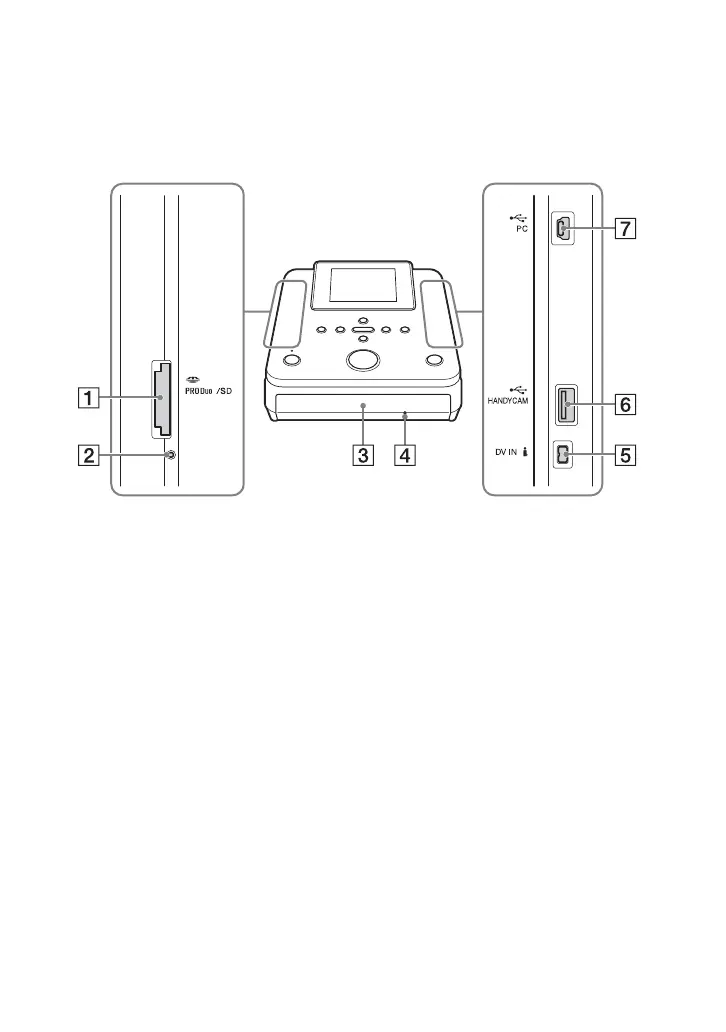
Front and sides
A Memory card slot (page 35)
Insert a “Memory Stick Duo” or SD
Card here.
b Note
• You cannot use this slot as a memory card
reader when connected to your computer.
B Memory card access LED
Lights amber when accessing a memory
card.
C Disc tray (page 29)
D Emergency eject hole
If you cannot open the disc tray with the
Z (eject) button, turn off this unit. Insert
a pin or straightened paper clip into this
hole to open the disc tray.
E DV IN connector (page 32)
F USB (Type A) port (page 30)
To copy images, connect the camera
here.
G USB (Type mini B) port (page 60)
To use as an external disc drive, connect
the computer here.
Parts and Controls



 To Next Page