27
Introducing
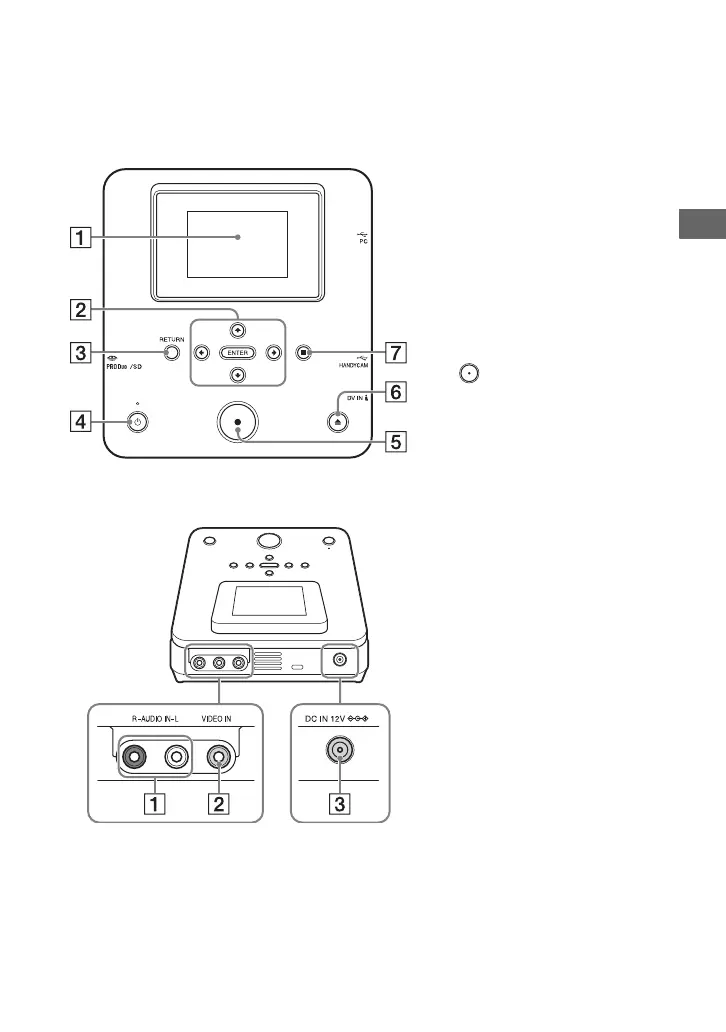
Top panel
Rear panel
A Display window
Displays the operation screen,
and images from a connected
device or memory card.
B V/v/B/b / ENTER buttons
(pages 45, 54)
C RETURN button (page 38, 56)
If you want to display the
[Menu], press this button.
D 1 (power) button (page 28)
E (record) button (pages 40,
49)
F Z (eject) button (page 29)
G x (stop) button (pages 41, 50,
55)
A AUDIO IN connectors (page 33)
B VIDEO IN connector (page 33)
C DC IN connector (page 29)
b Note
• Metallic parts, such as terminals, etc.,
may become warm after use. This is not
a malfunction.



 To Next Page