10
Connecting the Projector
• Audio output from the HDMI terminal is available only on VPL-EW348/EW345/EW315/EX345/
EX315.
• Use HDMI-compatible equipment which has the HDMI Logo.
• Use a high speed HDMI cable(s) on which the cable type logo is specified. (Sony products are
recommended.)
• The HDMI terminal of this projector is not compatible with DSD (Direct Stream Digital) Signal
or CEC (Consumer Electronics Control) Signal.
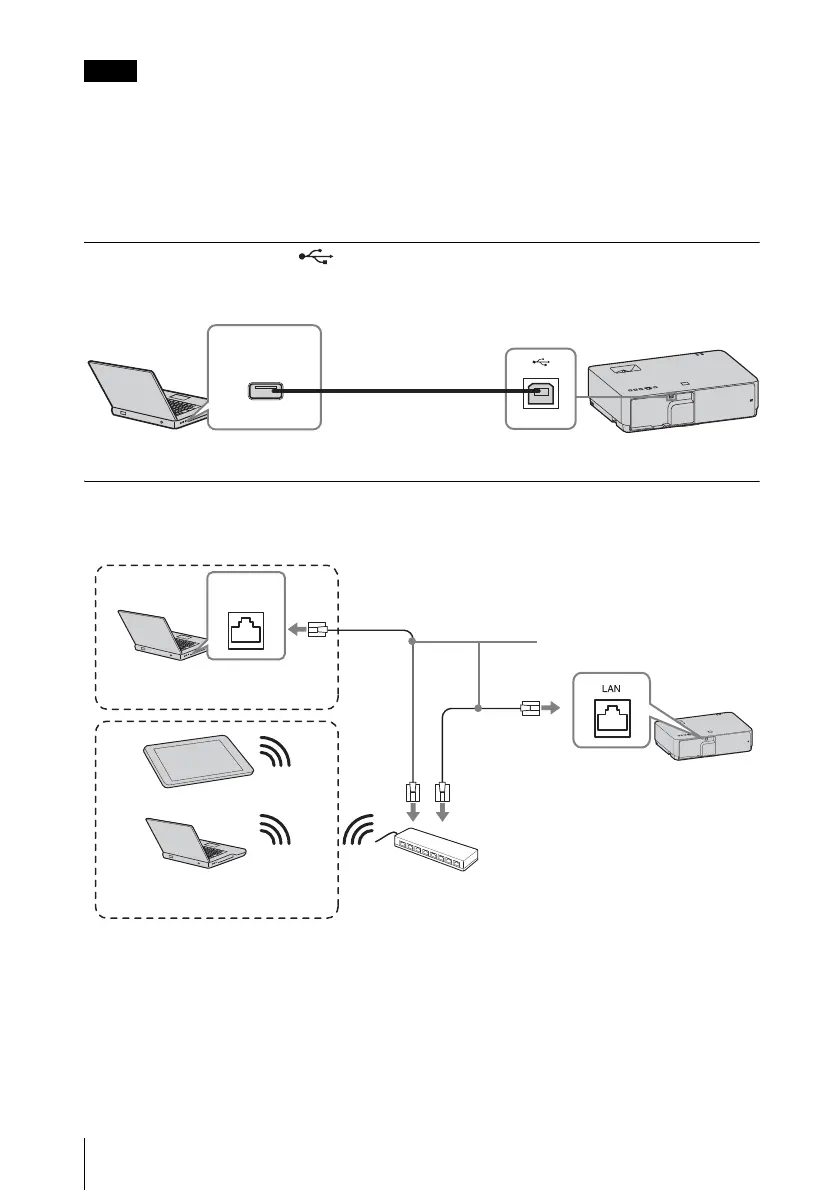
USB terminal (Type B) ( )
For connecting to a computer with a USB terminal (“Playing Video and Audio using USB
Connection” (page 54)).
LAN terminal
For connecting to a computer, tablet PC, or smartphone via a hub or router (“Presentation
Function via Network” (page 46)).
Notes
USB A-B cable
(not supplied)
Computer
USB terminal
(Type A)
LAN cable (straight type)
(not supplied)
Computer
LAN
terminal
Wired connection
Tablet PC/Smartphone
Computer
Wireless connection
Hub, router (wireless), etc.



 To Next Page