11
Connecting the Projector
Preparation
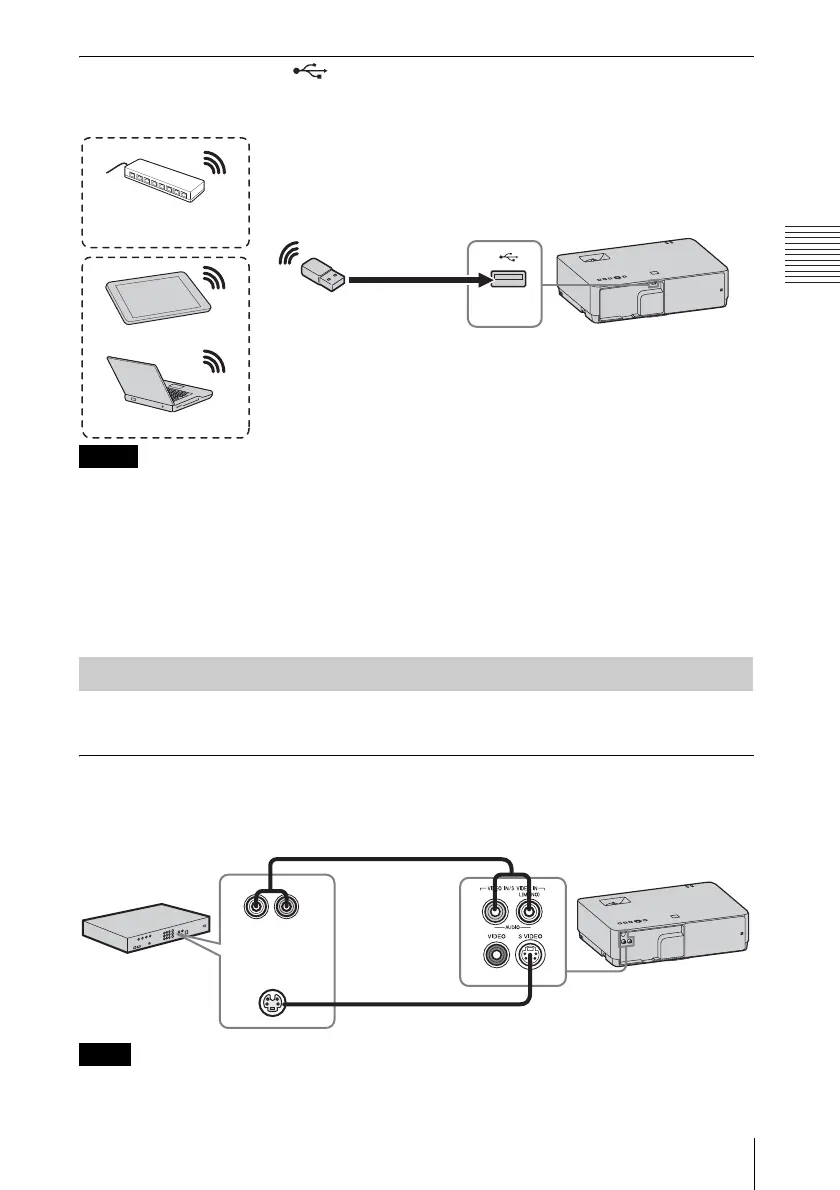
USB terminal (Type A) ( )
For connecting a USB wireless LAN module IFU-WLM3 (not supplied) (“Presentation
Function via Network” (page 46)).
• Undesignated USB wireless LAN modules do not work.
• When connecting/disconnecting the USB wireless LAN module, make sure that the projector is in
Standby mode (Standby Mode: “Low”), or the AC power cord is unplugged from the wall outlet.
• When wirelessly connecting a tablet PC/smartphone to the projector via USB wireless LAN
Module IFU-WLM3 (not supplied), set “WLAN Network” to “Access Pt.” in the projector’s
“WLAN Settings” (page 31).
• To connect to an access point, access the Web page, and input the settings for the access point to
connect to. For details, see “Setting the WLAN Network of the projector” (page 39).
Connections with a VHS video deck, DVD player, or BD player are explained for each input
signal.
S VIDEO IN
For connecting video equipment with an S-video output terminal.
The audio input terminal is available only on VPL-EW348/EW345/EW315/EX345/EX315.
Notes
Connecting a Video equipment
USB wireless LAN module
IFU-WLM3 (not supplied)
Tablet PC/Smartphone
Computer
Wireless router, access
point
Note
S video output
terminal
Audio output
terminal
S video cable (not supplied)
Computer
Audio cable (Phono plug × 2)
(not supplied)



 To Next Page