15
Connecting the Projector
Preparation
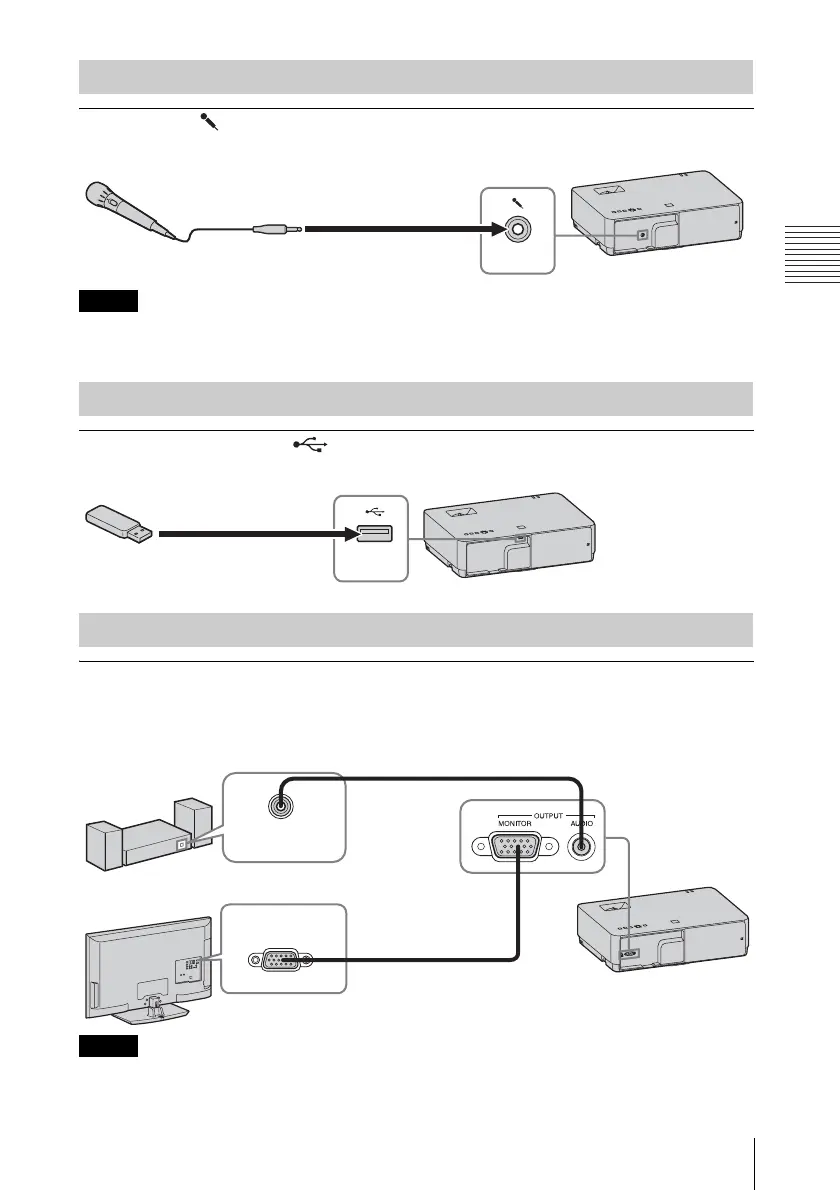
Microphone ( )
For connecting a microphone.
• The microphone input is available only on VPL-EW348/EW345/EW315/EX345/EX315.
• Only dynamic microphones are supported.
USB terminal (Type A) ( )
For connecting a USB memory device (“Using USB Media Viewer” (page 56)).
OUTPUT
Projected images or input audio can be output to display equipment such as a monitor or audio
equipment such as speakers with a built-in amplifier.
• The audio output terminal is available only on VPL-EW348/EW345/EW315/EX345/EX315.
• Projected images and audio can be output.
• Projected images can be output from INPUT A and INPUT B only.
Connecting a microphone
Notes
Connecting a USB memory device
Connecting an External Monitor and Audio Equipment
Notes
Microphone
(not supplied)
USB memory device
(not supplied)
Audio cable (stereo mini plug)
(not supplied)
Audio input
terminal
Mini D-sub 15-pin cable
(supplied)
RGB input
terminal
Audio equipment
Display equipment



 To Next Page