13
Connecting the Projector
Preparation
• Use a high speed HDMI cable(s) on which the cable type logo is specified. (Sony products are
recommended.)
• The HDMI terminal of this projector is not compatible with DSD (Direct Stream Digital) Signal
or CEC (Consumer Electronics Control) Signal.
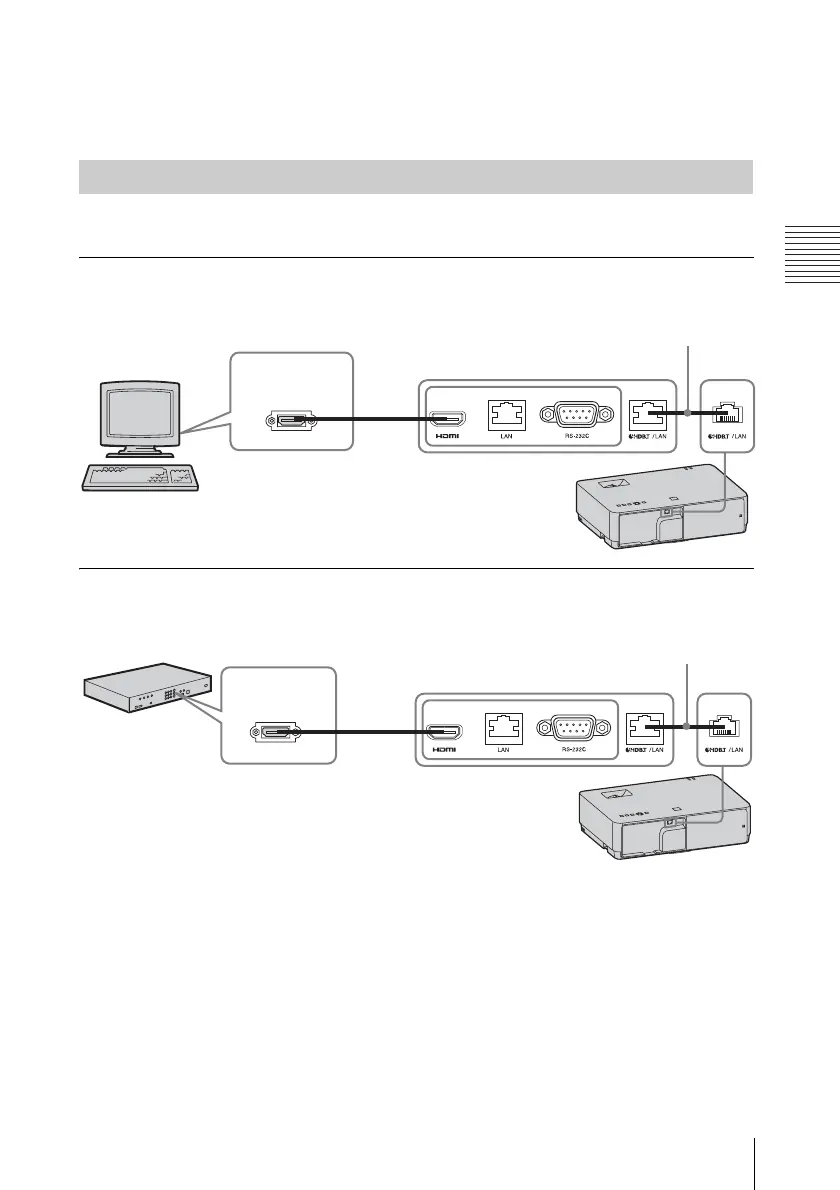
For connecting the computer, video equipment, and network equipment via the HDBaseT
transmitter.
Connecting to the computer
INPUT E
Connecting to the video equipment
INPUT E
Notes for connecting this unit and the HDBaseT transmitter
• Ask a professional or Sony dealer to perform wiring. If wiring is not correct, the transmission
characteristics of the cable will not be achieved, and image or sound may break up or you may
experience unstable performance.
• Connect the cable directly to the HDBaseT transmitter without going through a hub or router.
• Use cables that meet the following conditions.
-CAT5e or higher
-Shielded type (covering connectors)
-Straight wire connection
-Single wire
Connecting a HDBaseT
TM
equipment
Computer
HDMI output
terminal
HDMI cable (not supplied)
HDBaseT transmitter (not supplied)
LAN cable: STP type (CAT5e or
higher, straight, not supplied)
Video equipment
HDMI output
terminal
HDMI cable (not supplied)
HDBaseT transmitter (not supplied)
LAN cable: STP type (CAT5e or
higher, straight, not supplied)



 To Next Page