12
Connecting the Projector
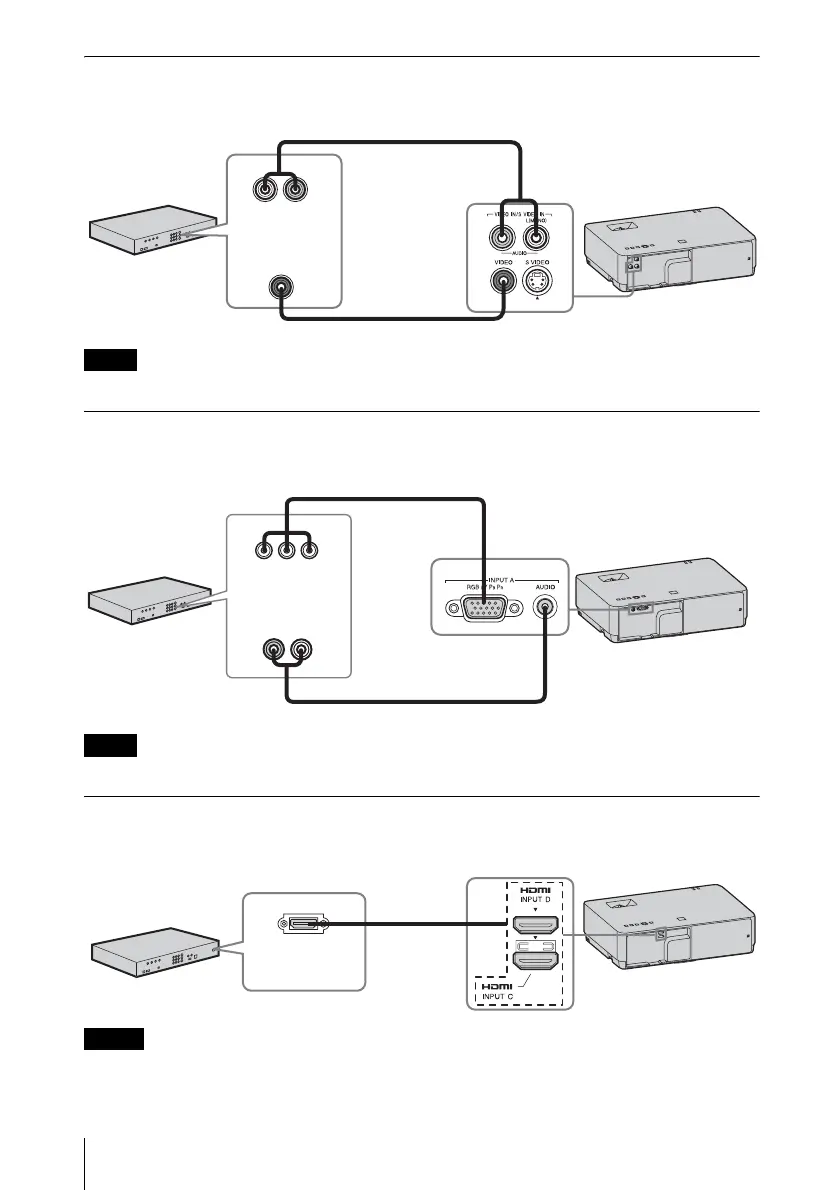
VIDEO IN
For connecting video equipment with a video output terminal.
The audio input terminal is available only on VPL-EW348/EW345/EW315/EX345/EX315.
INPUT A
For connecting video equipment with a YPBPR output terminal.
The audio input terminal is available only on VPL-EW348/EW345/EW315/EX345/EX315.
INPUT C/INPUT D
• Audio output from the HDMI terminal is available only on VPL-EW348/EW345/EW315/EX345/
EX315.
• Use HDMI-compatible equipment which has the HDMI Logo.
Note
Note
Notes
Video cable (not supplied)
Audio cable (Phono plug × 2 – stereo mini plug) (not supplied)
Video output
terminal
Audio output
terminal
Video equipment
Component – Mini D-sub 15-pin cable (not supplied)
Audio cable (Phono plug × 2 – stereo mini plug) (not supplied)
Video equipment
YP
BPR output
terminal
Audio output
terminal
Video equipment
HDMI cable
(not supplied)
HDMI output
terminal
For connecting video equipment with an HDMI output terminal.



 To Next Page