Page 29 of 34
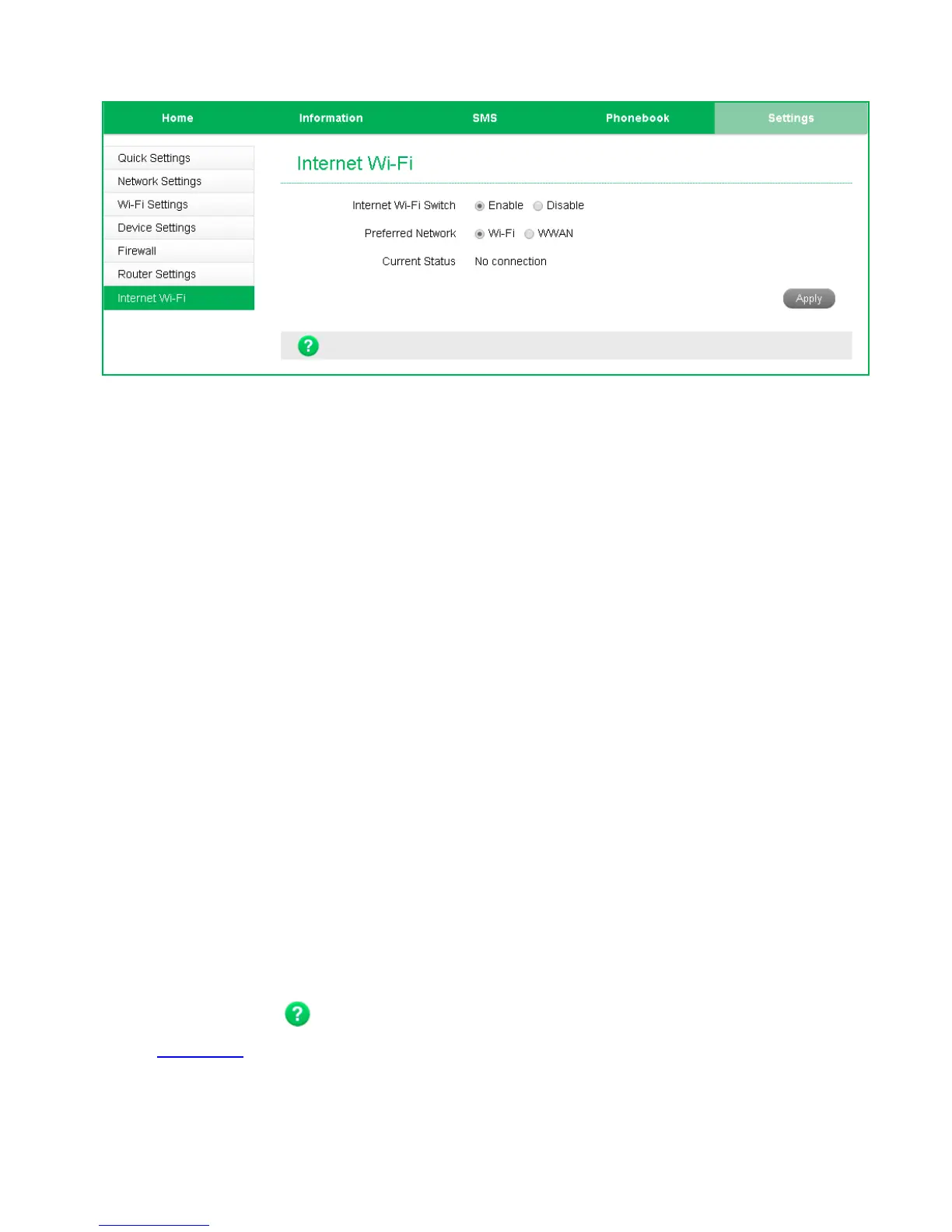
SETTINGS > INTERNET WI-FI
• Enable the Wi-Fi router to connect to another Hotspot to share that internet
connection.
• Internet Wi-Fi or the WAN side on your hotspot refers to the radio network
connection.
• When the Internet Wi-Fi Switch option is enabled, it is not possible to
disconnect the RF WAN side. The Disconnect button is greyed out. This is
because the Wi-Fi Switch function over-rides the manual disconnect feature.
When you fully connect to another local Wi-Fi hotspot then the WAN side data
(RF connection to the network) is disabled.
• When you connect to another Wi-Fi hotspot your local WAN is disconnected and
your Wi-Fi hotspot will receive its internet connection from the other hotspot
and share this with all your connected devices.
• This could be useful at home where your wireless hotspot can connect to your
home Wi-Fi when in range, and it can be used to extend your home Wi-Fi range
by locating the portable hotspot in another location. The devices connected to
your portable hotspot will get their internet connection from the other
connected Wi-Fi hotspot, eg your home network.
HELP
Click Help to access the system help
Click the Help icon to see in context help
Go to zte.co.nz
for FAQ’s, product and warranty support


 To Next Page