INDEX Page. 28 of 89
10. PROGRAMMING
The three keys: [SET], [◄▲] and [▼►], allow programming the amplifier.
They can be used in the following way:
[SET] Use this key to open a menu page, to validate choices and to exit from
a menu page.
[◄▲], [▼►] Use these keys to select options.
A green led illuminates during the programming process.
Programming the system is very easy. You will find your programming choices
confirmed by the items shown at the lower part of the display.
Note: Programming operations are only possible in ‘STANDBY’ mode.
Note: Programming changes take effect only after exiting from a menu page (the green
led turns off).
Pressing the [DISPLAY] key for more than 1 sec. it will immediately exit to
STANDBY with no programming effect.
10.1 Ways to operate
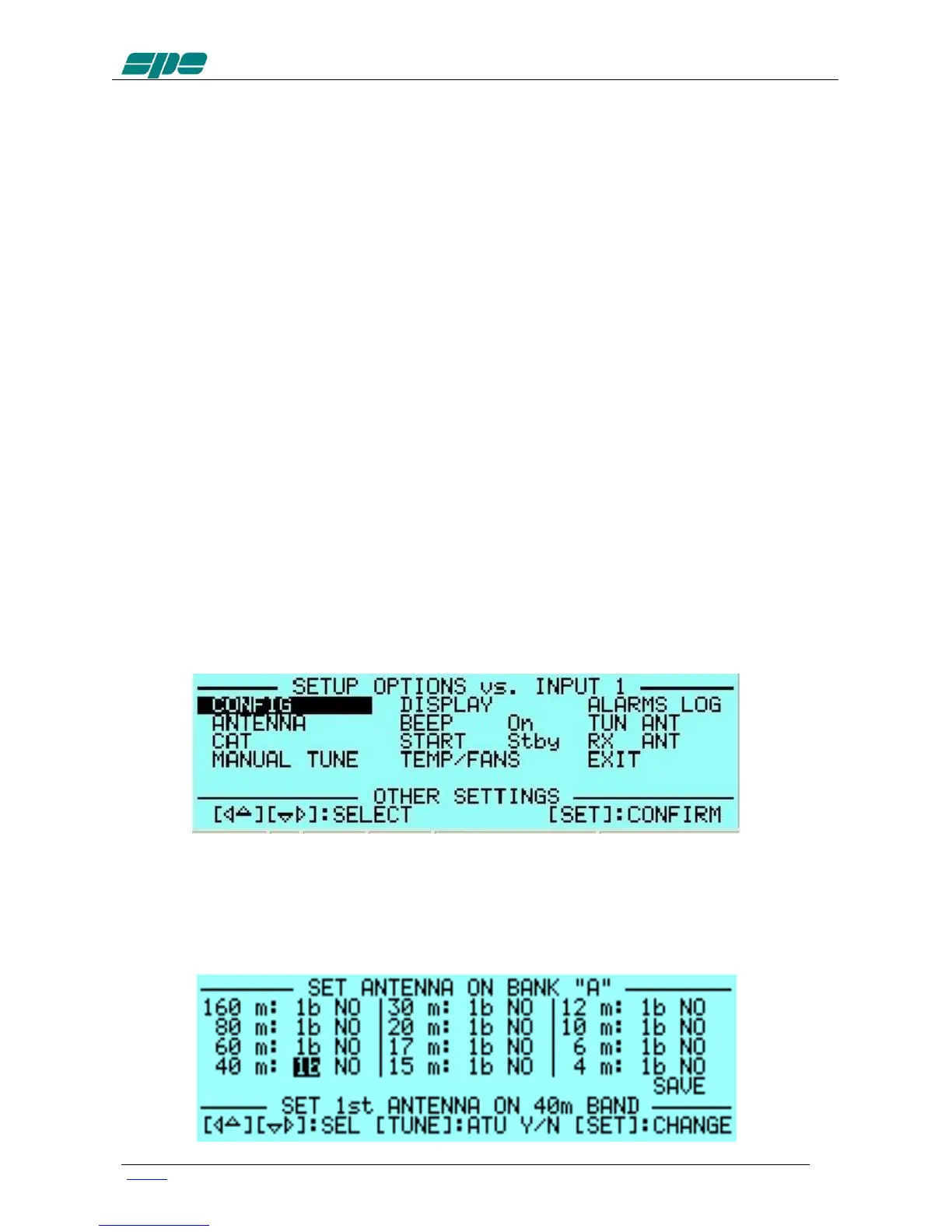
Pressing the [SET] key opens the menu page.
On the display there are the following options:
a) CONFIG: Select “BANK A” or “BANK B” (see item 4.6).
b) ANTENNA: An antenna may be assigned to each band selecting the
(ANT 1, ANT 2, ANT 3, ANT 4) connector.
If you don’t have an antenna for a particular band, set it to “NO”.



 To Next Page