INDEX Page. 41 of 89
ALC with Flex-Radio
Since the analog ALC input is not usable in a Flex-Radio transceiver, its driving power
must be manually programmed in order to avoid the EXPERT’s overdrive protection
system intervention.
Connect the CAT connector with the CAT connector of the Flex (read the specific Flex
manual), in the menu page set FLEX as CAT, then set the power limits.
These following settings have to be done while in OPERATE Mode according to the
following:
For every ham band three settings are allowed (storage memories):
One setting for MAX mode.
One setting for MID mode.
One setting for LOW mode.
The following table shows an overall vision of these settings:
The user has to set, for every band of interest, the power limit concerning the input
power needed. To do that using the keyboard without transmitting, you must set a
parametric value having the format “[PC=xxx]” (where xxx is a numerical value having a
range from 000 to 100 which represents the transceiver’s power output expressed in
percentage).
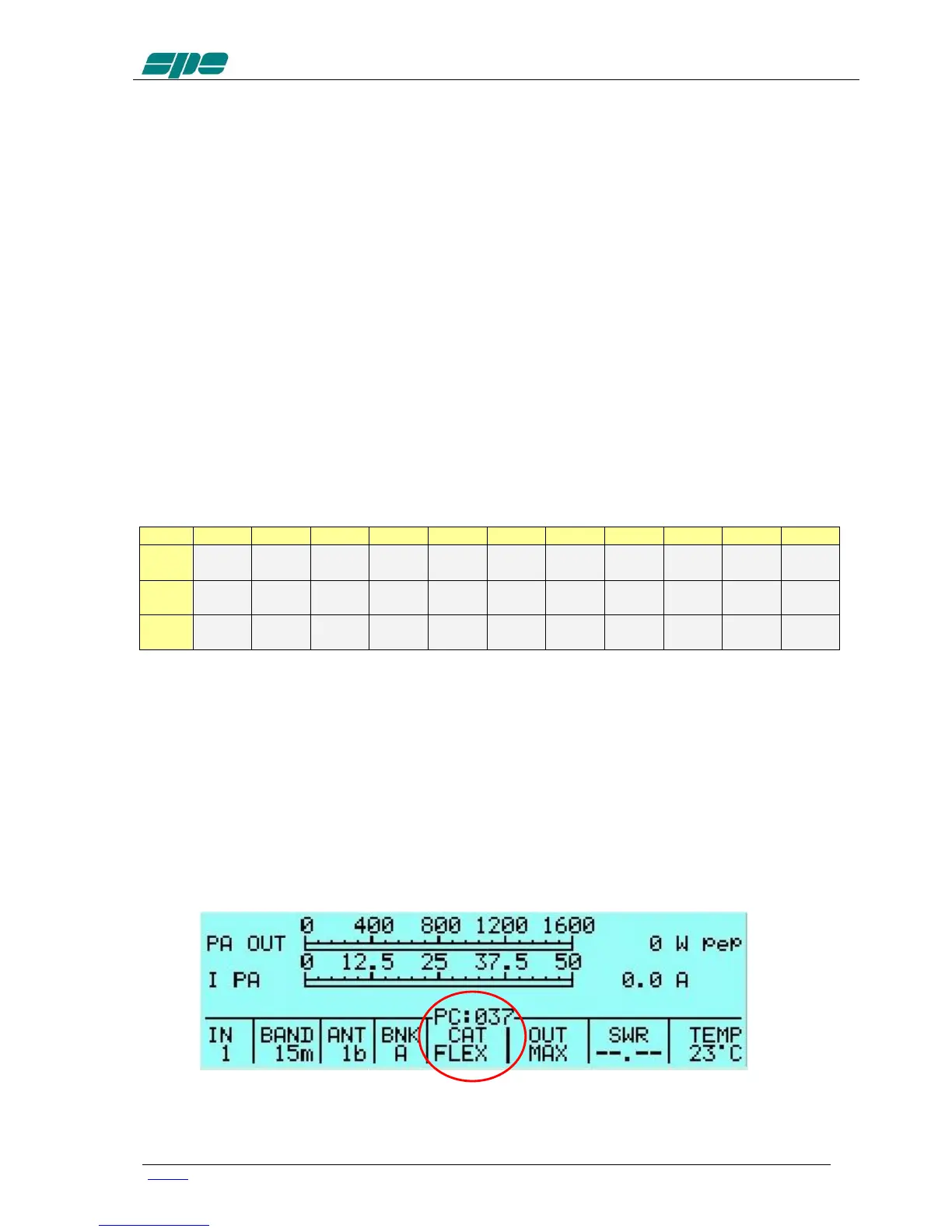
This value will appear just over the BAND label of the Status Bar.
This value is related to the tuned band and to the selected power modes of MAX, MID
and LOW.
The following picture shows (as an example) the Power Control of the 15 m band in
MAX power mode:
Pressing the arrow keys ([◄▲] [▼►]) this value can be decremented/incremented
until it reaches the desired value. At the completion of this operation, a time-out period



 To Next Page