INDEX Page. 65 of 89
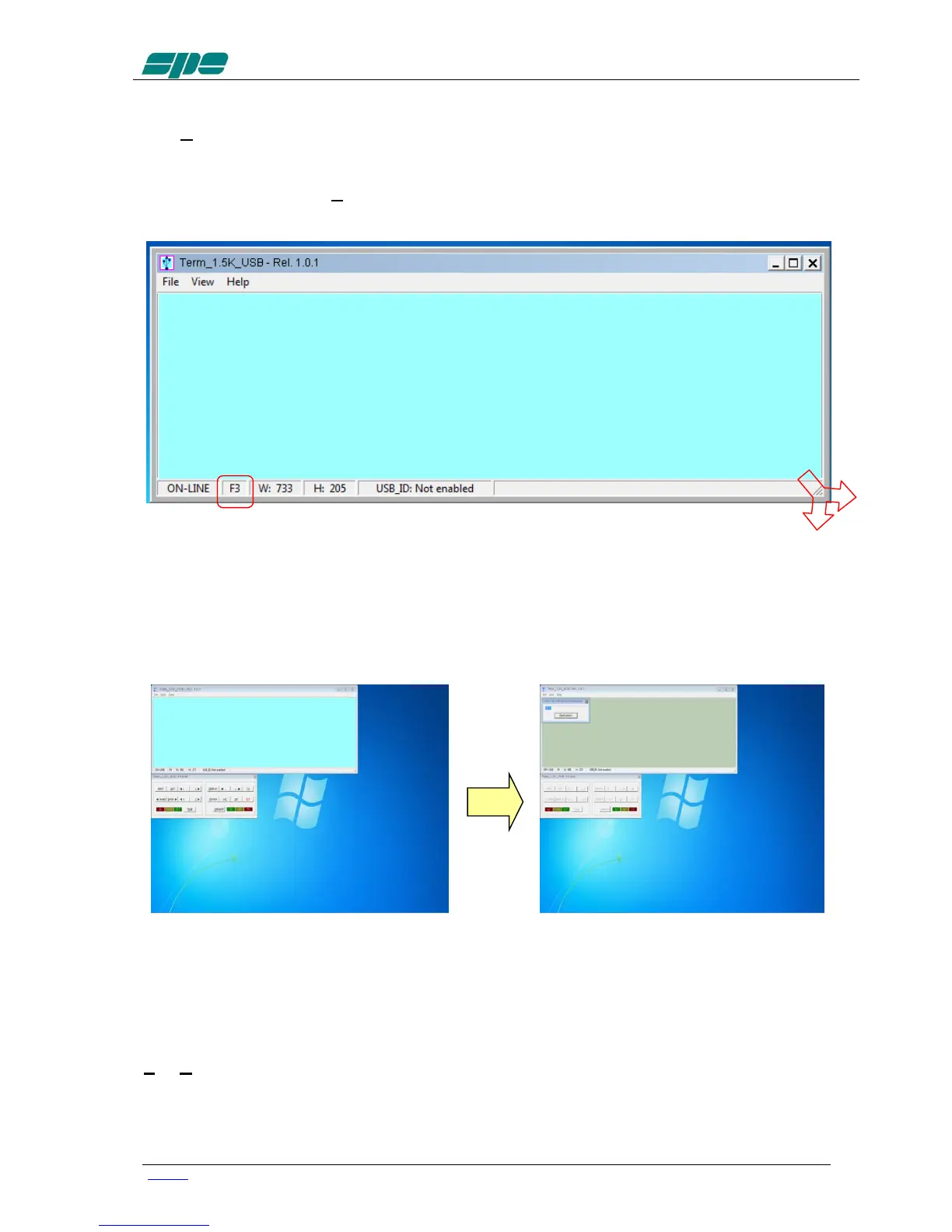
The View menu also contains five items related to the application window size presets
which can be either selected by the menu itself or by their equivalent [F1 … F5] shortcut
keys.
Feel free to test all the View menu options in order to find an optimal and comfortable
vision of the display main window.
The display window can easily be resized. That is, either enlarged or reduced by
acting on the right-bottom corner of the window. Also by using the mouse as shown in
the picture above and in the same way as any other window-resizing operation.
In case the user wants to restore the original size-preset lying behind any [F1…F5] key,
you must select the Fx preset and, then, press the Ctrl+Fx key combination on his PC
keyboard.
When Term_1.5K_USB.exe gets launched an automatic Connect command also starts
and if a USB link to the linear amplifier was already active, it should have shown a result
similar to the picture sequence above.
In case this doesn’t happen, there’s also a chance to try connecting by using the
File/Connect menu item (or by using its equivalent Ctrl+Q shortcut key…).
The final visual result will be a “bright backlight” display and a function-keys enabling of
the virtual keypad.



 To Next Page