92
2.4.4 QoS
QoS(Quality of Service, QoS) module provides different services according to the priority of
applications, users, or data flows. In a word, it can guarantee a certain level of performance
to a data flow.
2.4.4.1 Airtime Fairness
The ATF(Airtime Fairness, ATF) module supports mixing rates of WiFi devices to achieve
better performance in busy/intense environments.
Steps to set ATF:
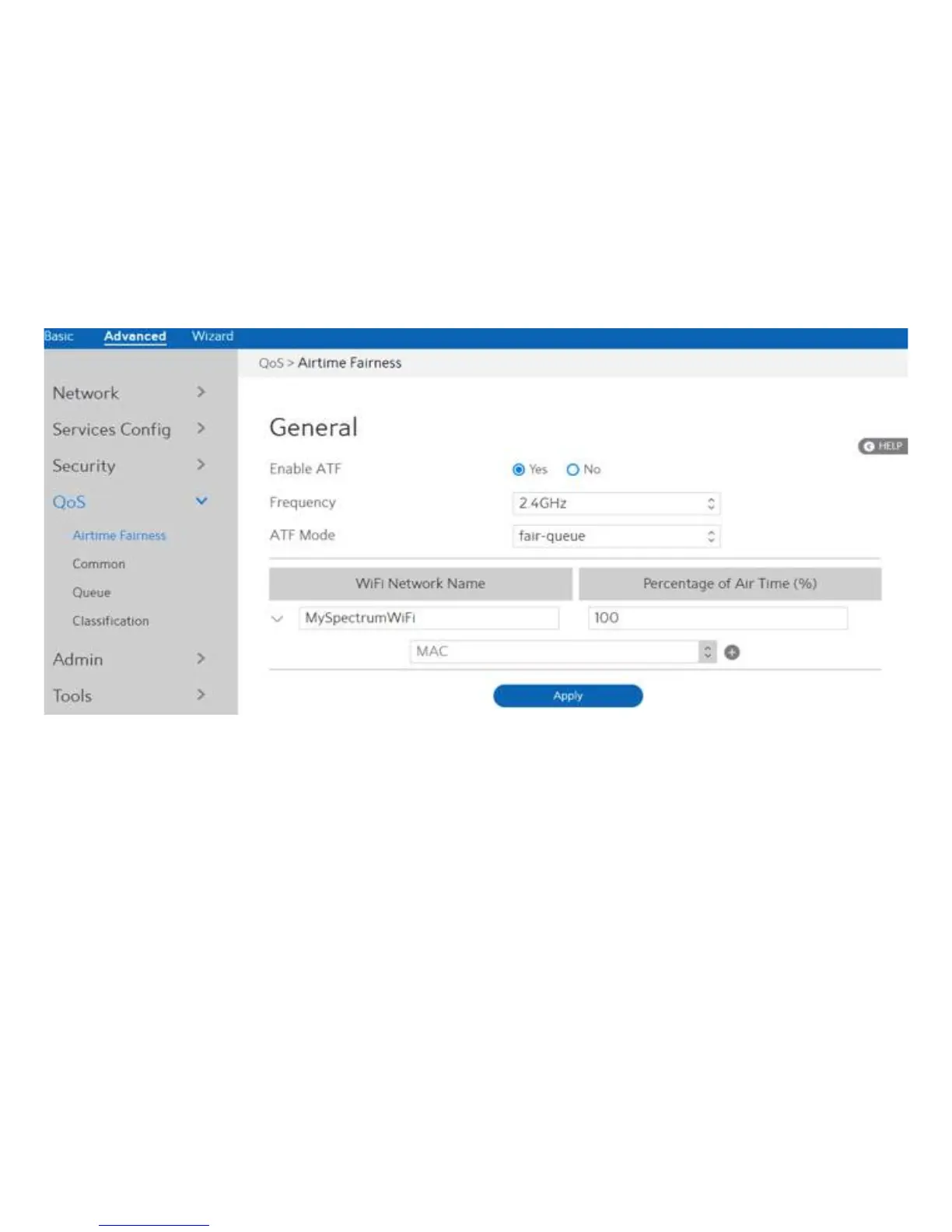
1. From the navigation panel, go to Advanced > QoS > Airtime Fairness.
2. Enable ATF: Enable or disable. ATF require primarily focuses on scheduling
fairness for transmission of traffic from Access Point (AP), and
efficient WiFi bandwidth utilization.
3. Frequency: In the frequency field, select the frequency band that you want to
use for the ATF settings.
4. ATF Mode:
Airtime Fairness implements 2 scheduling algorithms:
strict-queue and fair-queue algorithm, which are mutually exclusive. Strict-queue
algorithm follows strict airtime allocation as configured by the user and does not try and
utilize any unused bandwidth. Fair-queue algorithm guarantees the configured airtime in
congested environments and it also utilizes any unused bandwidth.
5. WiFi Network Name: Set the network name (SSID) which will be controlled by ATF.


 To Next Page
 Loading...