13
Proportional Action:
the term whose contribution to the output is proportional to the deviation of the input (the deviation is the difference between the measured
variable and the set-point).
Derivative Action:
the term whose contribution to the output is proportional to the rate of variation of the input signal deviation.
Integral Action:
the term whose contribution to the output is proportional to the integral with time of the input signal deviation.
The influence that the Proportional, Derivative and Integral terms have on the process under control
* An increase in the P.B. reduces the oscillations but increases the deviation.
* A reduction of the P.B. reduces the deviation but provokes oscillation of the controlled variable (if the value of the P.B. is too low, the system
will tend to be unstable).
* An increase in the Derivative Action, which corresponds to an increase of the Derivative Time, reduces the deviation and also prevents
oscillation up to a critical value of the Derivative Time, above which the deviation increases and prolonged oscillations will occur.
* An increase of the Integral Action, which corresponds to a reduction of the Integral Time, helps to remove the deviation between the
controlled variable and the set-point when the system has settled down.
If the value of the Integral Time is too long (Weak integral action) it is possible that there will be a persistent deviation between the input and
the set-point.
Contact SPIRAX-SARCO to receive further information concerning controls action
12 • NOTES ON THE CONTROL ACTIONS
13 • MANUAL TUNING
A) Enter the set-point at its working value.
B) Set the proportional band at 0,1% (with a cycle time set at zero to have on-off action with a relay output).
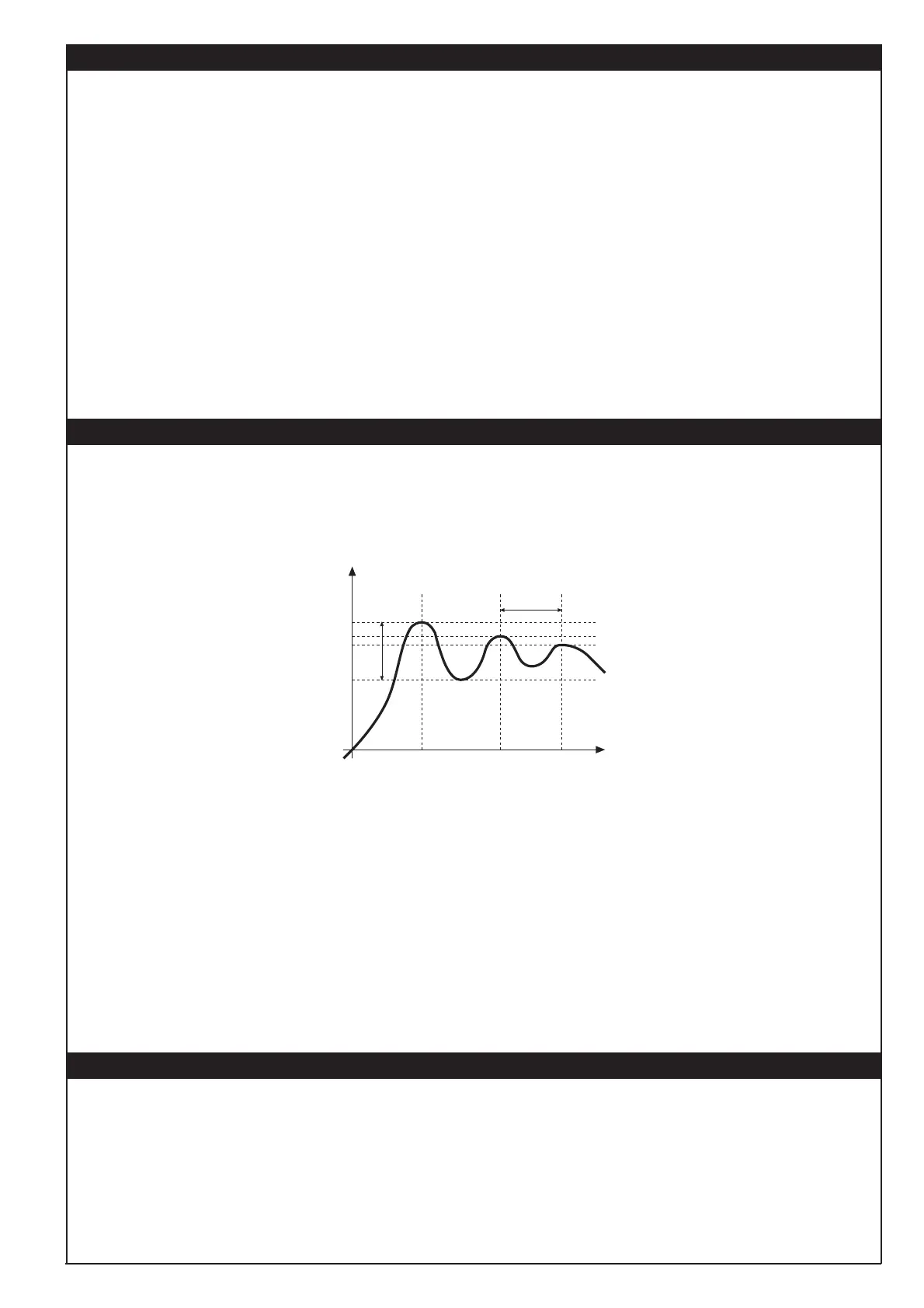
C) Switch to automatic and observe the behaviour of the variable.
It will be similar to that in the illustration:
D) The PID parameters are calculated s follows: Proportional band
Peak
P.B.= ---------------------------------------- x 100
(V max - V min)
(V max - V min) is the scale range.
Integral time: It = 1,5 x T
Derivative time: dt = It/4
E) Switch the instrument in manual, enter the calculated values. Return to PID action by setting the appropriate relay output cycle time, and
switch back to Automatic.
F) If possible, to evaluate the optimised parameters, change the set-point and observe how the system reacts to the transitory change.
If an oscillation persists, increase the proportional band. If the response is too slow, reduce it.
Process
Variable
Time
T
Peak
14 • SOFTWARE ON / OFF SWITCHING FUNCTION
How to switch OFF: hold down the “ F ” and “Raise” keys together for 5 seconds to disactivate the instrument, which puts itself in the OFF
state while keeping the line supply connected, keeping the process value displayed, while the SV display is OFF.
All the outputs (alarm as well as control) are in the OFF state (logic 0 or relay disenergised) and all the functions of the instrument are disabled
except the switch-on function and the digital communication.
How to switch ON: hold down the “ F ” key for 5 seconds and the instrument will pass from the OFF state to the ON state.
If the power is removed during the OFF state, the next time the power is connected, the instrument will find itself in the same OFF state (the
ON or OFF state is memorised).
The function is normally enabled. The function can be disabled by setting the parameter Prot = Prot +16.
This function can be executed through a digital input (d.i.F.1 or d.i.F.2).




 To Next Page