3
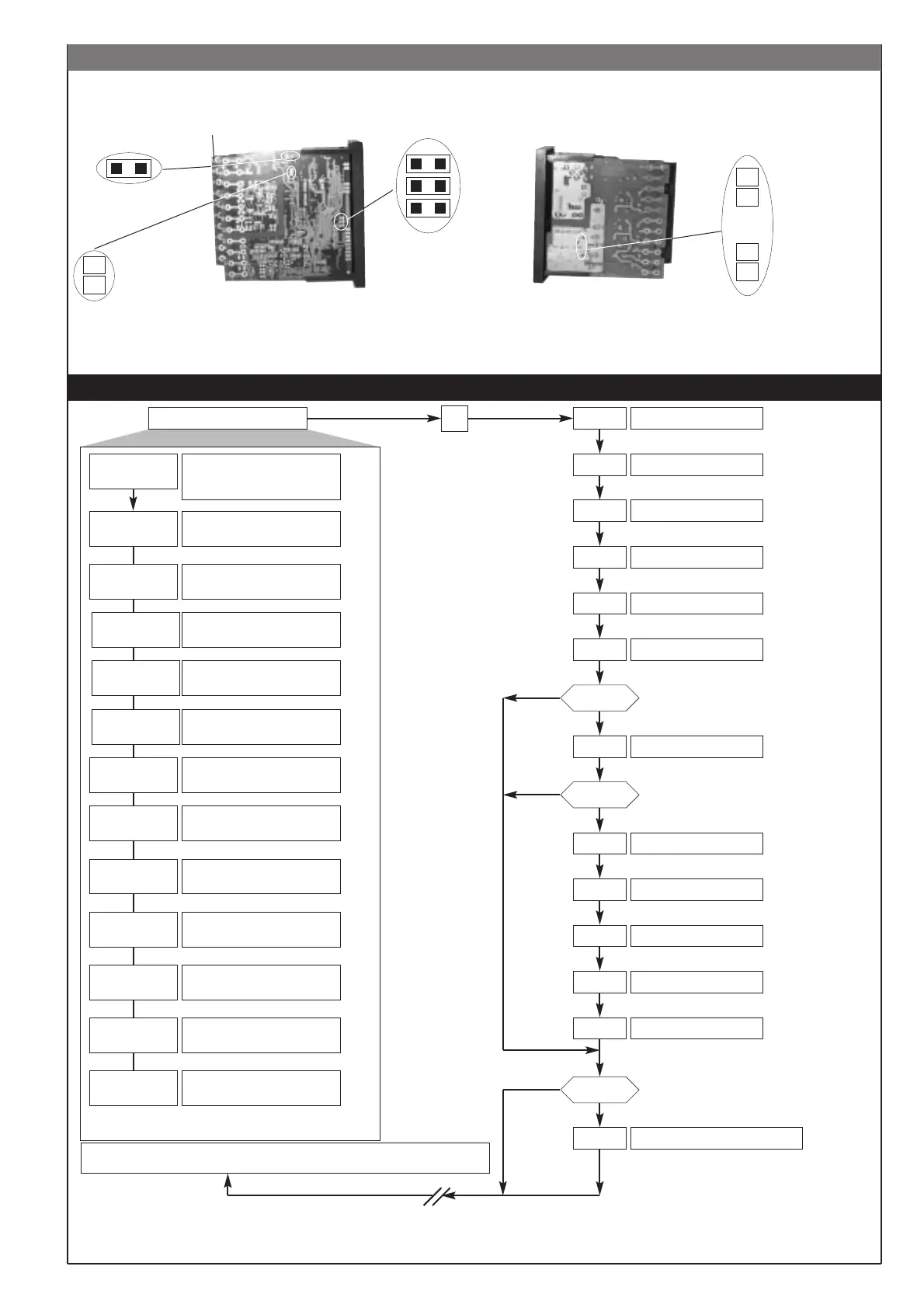
Instrument layout
CPU Board
S4
S5
S6
S14 (S3) close
Configuartion and Calibration
enable
Relay state at powerr
ON
S2 relay Out4
A = OFF
B = ON
OutW/ serial Board
Power Supply enable
B
A
S3 relay Out3
A = OFF
B = ON
Relay state at power ON
S2 relay Out2
S4 close = Calibration enable
B
A
A
B
sp.i
ts
inp.2
al.1
al.2
al.3
al.xb
0vt.p
212
5 • PROGRAMMING and CONFIGURATION
F
After 30sec, if no keys are pressed, the instrument returns automatically to PV/SV display.
This function is not present in INFO and dAtA menu.
INFO
P.V. / S.V.
Process variable (PV display)
Current setpoint (SV display)
or manual control output
Value of auxiliary input, remote
setpoint or valve position
(with auxiliary input enabled)
Alarm point 1 (scale points)
Alarm point 2 (scale points)
Alarm point 3 (scale points)
Heater break alarm point
(scale points of current transformer
input)
Control output value
(+Heat / -Cool)
Press for
approx. 2sec
Control parameters
dAtA
CFG
SEr
InP
Out
PASS = 99
Prot
Lin
CuSt
Serial communications
Input settings
Output settings
Hardware configuration
Input linearisation
Custom “dAtA” menu
_CAL
Select calibration menu [ 0...12 ]
YES
NO
Keep the F key
pressed to browse
the menus
Release the F key
to enter the
displayed menu
Press the F key to
browse the
parameters
Keep the F key
pressed to exit any
menu at any time
Keeping pressed
F+Auto/Man keys
(whichener is the
selected menu) for
2sec, the display
immediately
changes to level 1
(*)
(*)
S3 = ON
Setpoint value
LEVEL 1 MENU
PASS
NO
YES
Hrd
U.CAL
S4 = ON
YES
NO
Menù custom
Password
User calibration
Protection code
(*) The automatic return
PV/SV
display is disabled for this parameters
1
2
3
4
5
6
7
Information display
Setpoint 1
Setpoint 2
Setpoint 3
Setpoint 4
Timer Setpoint
0 ... 9999 sec
N.B.: Once a particular configuration is entered, all unnecessary parameters are no longer displayed
213
214
215
217
SP
-
-
-
sp.2
-
sp.3
-
sp.4
-
--
-
-
-




 To Next Page