Basic Operations 21
Portrait and Landscape Screen Orientation
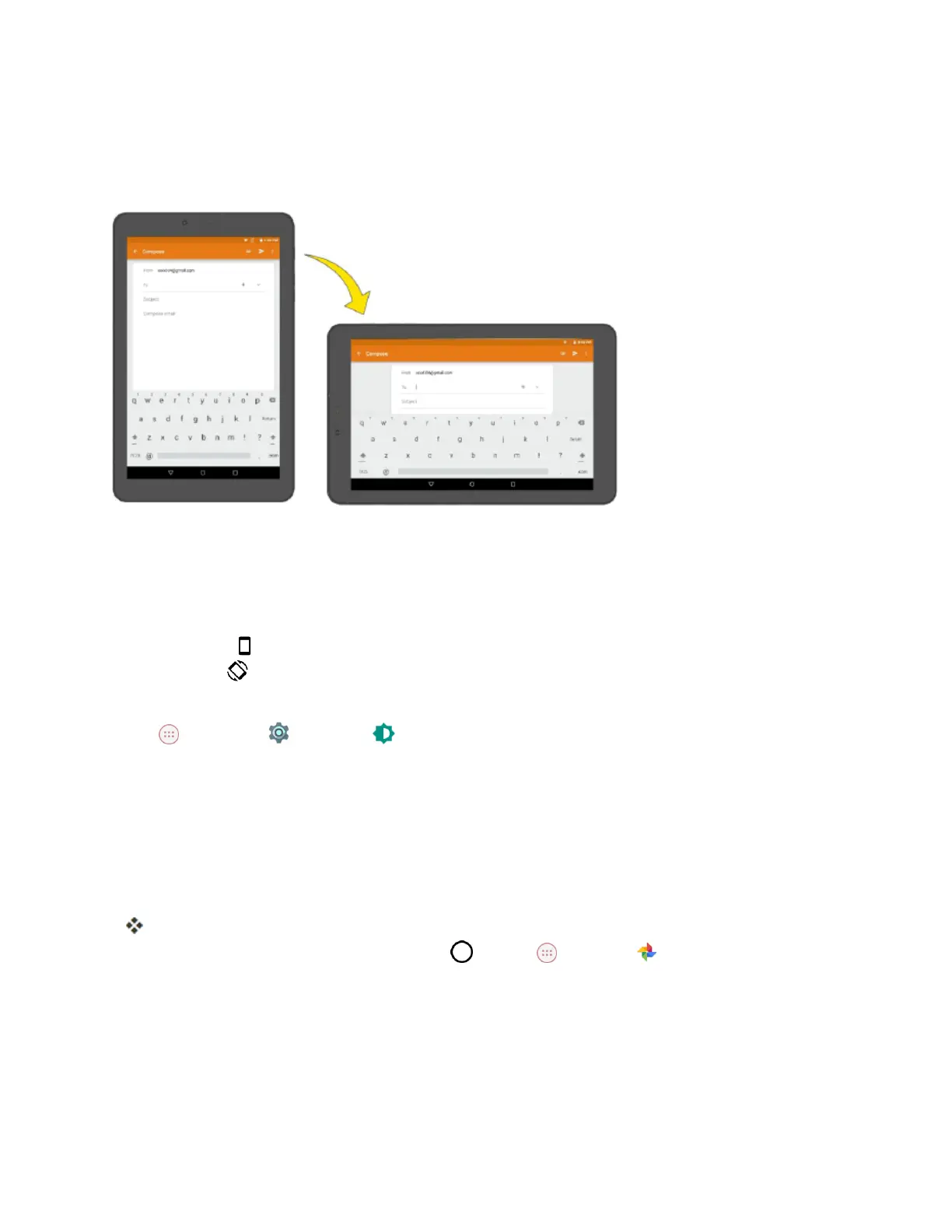
Thedefaultorientationforyourtablet’sscreenisportrait(vertical),butmanyappswillchangeto
landscapeorientation(widescreen)whenyourotatethetabletsideways.
Note:Notallscreenswilladjustforlandscapeorientation.
Turn Screen Rotation On or Off
1. Pulldownthestatusbartwicetodisplaythequicksettingsmenu.
2.
TapPortrait toturntheScreenrotationon.Whenthefunctionisenabled,thedisplayediconis
switchedto .
Note:Youcanalsosettherotationoptionfromthemainsettingsmenu.Fromthehomescreen,tap
Apps >Settings >Display >When device is rotated>Rotate the contents of the
screen.
Capture Screenshots
Youcanuseyourtablet’spowerandvolumebuttonstocapturescreenshots.
n PressandholdthePower/lockbuttonandtheVolume Downbuttonatthesametimeto
captureascreenshotofthecurrentscreen.
ThecurrentscreenshotwillbecapturedandstoredintheScreenshotsalbuminyourtablet.To
viewthescreenshots,taptheHomekey >Apps >Photos .
Applications
Thefollowingtopicsdescribehowtoaccesstheapplications(apps)listandlaunchappsonyour
tablet.


 To Next Page