Get Started 2
Get Started
ThefollowingtopicsgiveyoualltheinformationyouneedtosetupyourtabletandSprintservicethe
firsttime.
Parts and Functions
Thesetopicsillustrateyourtablet’sprimarypartsandkeyfunctions.
Note:Yourtablet'sscreensandappslayoutsaresubjecttochange.Thisuserguideusessample
imagesonly.
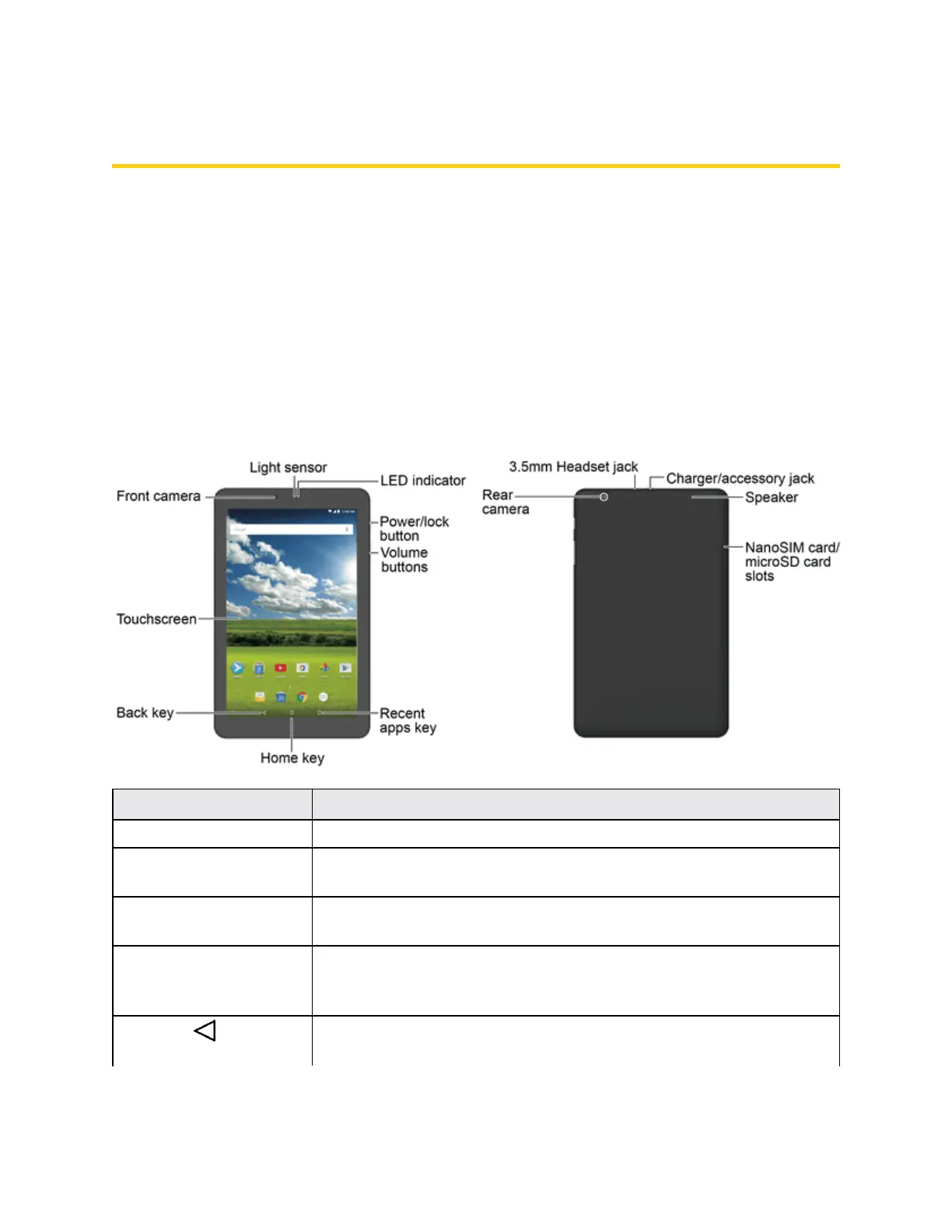
Tablet Layout
Thefollowingillustrationoutlinesyourtablet'sprimaryexternalfeaturesandkeys.
Part Description
LED indicator Displaysatabletnotification,chargingstatus,oralert.
Light sensor Automaticallyadjuststhedisplaybrightnessbasedontheambient
lighting.
Front camera Takespicturesandrecordsvideoswhilefacingthescreenandallows
youtovideoconference.
Touchscreen Displaysalltheinformationneededtooperateyourtablet,suchasthe
applications,theContactslist,thedateandtime,andthesignaland
batterystrength.
Back key
Letsyoureturntothepreviousscreen,orcloseadialogbox,options
menu,thenotificationpanel,oronscreenkeyboard.



 To Next Page