Basic Operations 39
Lock and Unlock Your Screen
Yourtabletallowsyoutoquicklyturnthescreenoffwhennotinuseandtoturnitbackonandunlock
itwhenyouneedit.
Turn the Screen Off When Not in Use
n Toquicklyturnthescreenoff,pressthePower/lockbutton.PressingthePower/lockbutton
againorwillturnonyourtabletscreenandshowthelockscreen.
Tosavebatterypower,thetabletautomaticallyturnsoffthescreenafteracertainperiodoftime
whenyouleaveitidle.Youwillstillbeabletoreceivemessageswhilethetablet’sscreenisoff.
Note:Forinformationonhowtoadjustthetimebeforethescreenturnsoff,seeDisplaySettings.
Turn the Screen On and Unlock It
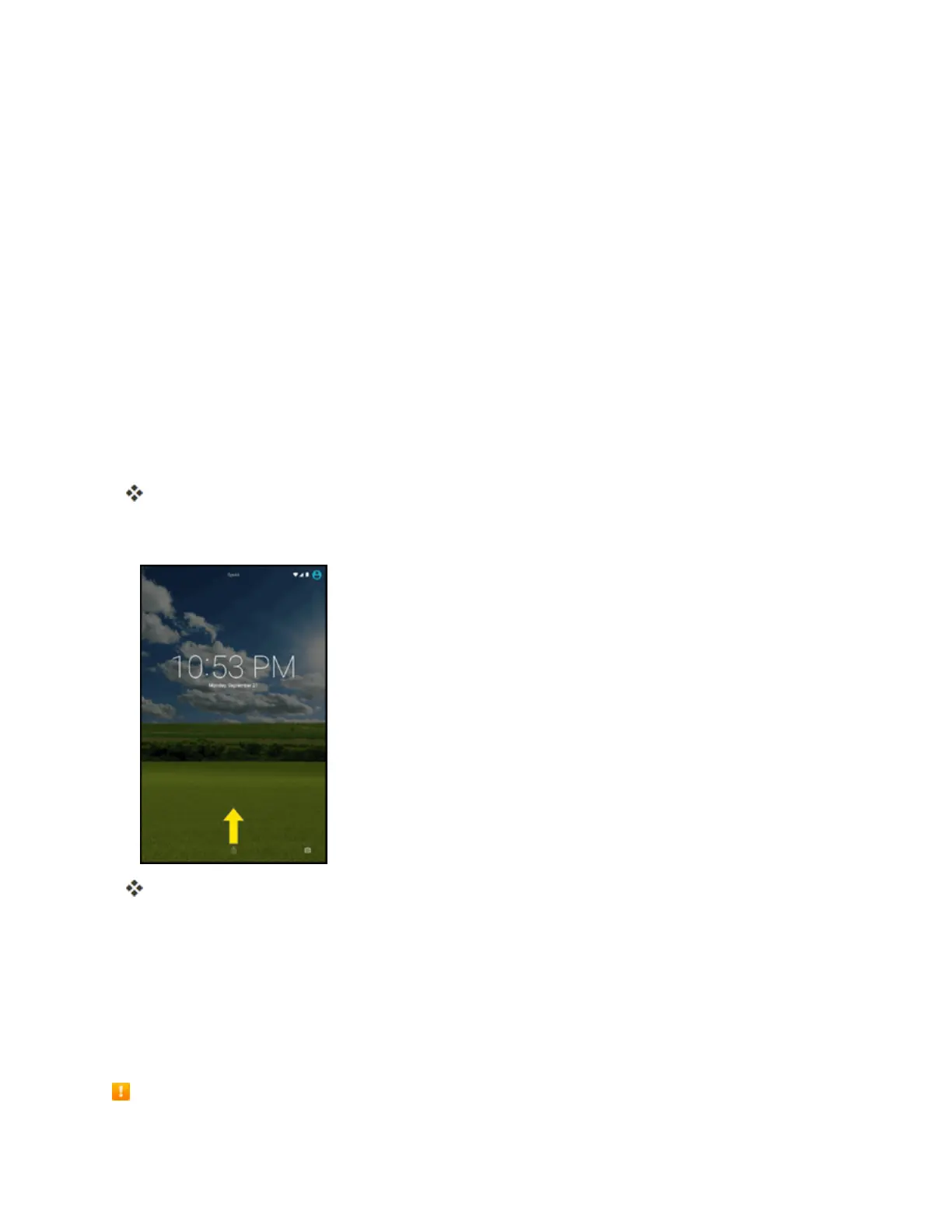
1. Toturnthescreenon,pressthePower/lockbutton.
Thelockscreenappears.
2. Swipeyourfingerupwardtounlockit.
Thescreenisunlocked.
l Ifyouhavesetupascreenlock,youwillbepromptedtodrawthepatternorenterthe
passwordorPIN.SeeScreenLock.
Update Your Tablet
Fromtimetotime,updatesmaybecomeavailableforyourtablet.Youcandownloadandapply
updatesthroughtheSettings>System Updatemenu.
Software Update Cautions


 To Next Page