LINK-MICRO-LTESPYPOINT
11
INSTALLING YOUR CAMERA
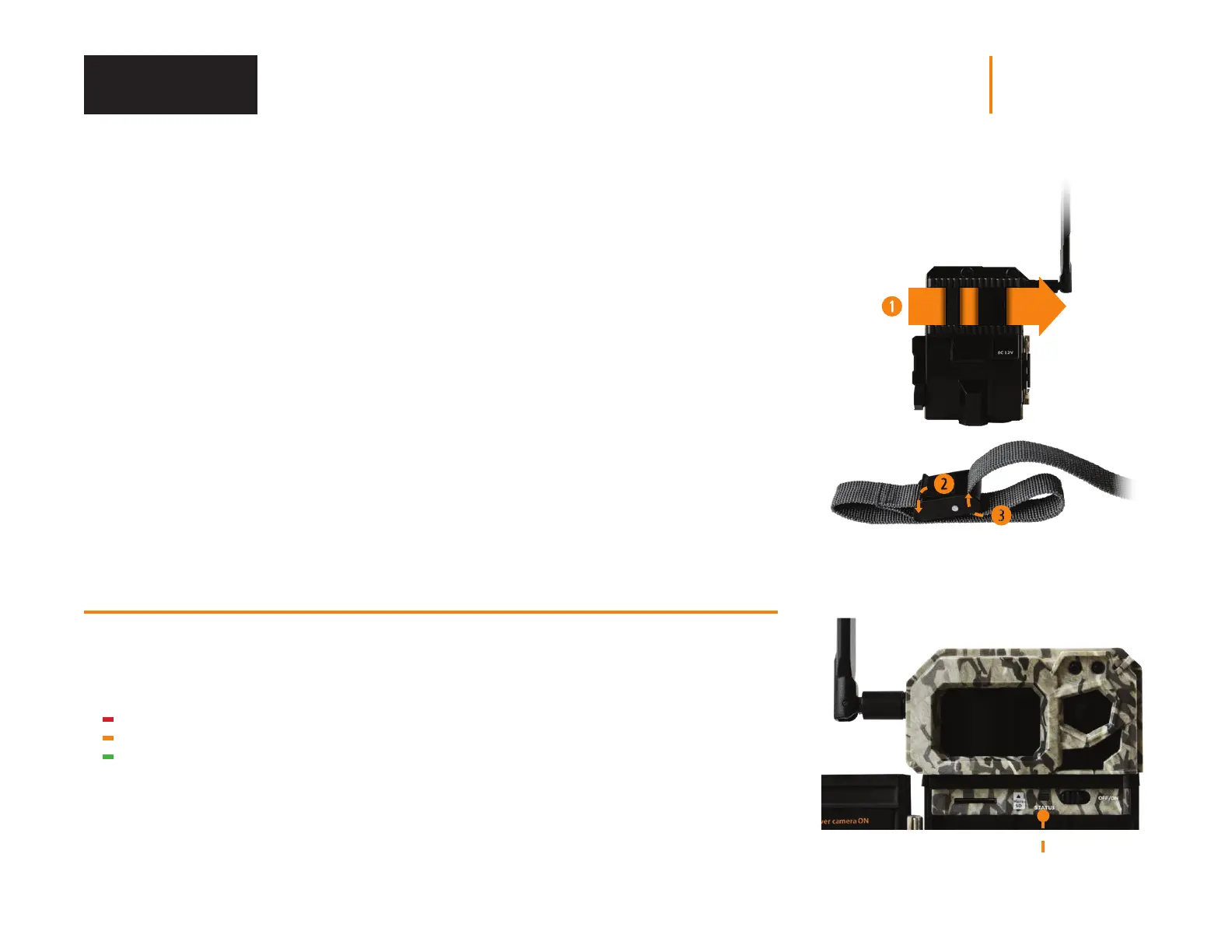
1. To install the camera, loop the installation strap through the intended slot (see diagram).
2. Choose a solid tree that does not move in the wind, as movement will cause false detections.
3. Make sure the area immediately in front of your camera is free of branches or twigs that could
be blown away by the wind.
4. The camera should be at the same height of the animal’s mid-body.
5. The targeted animal should be at 25 feet (7.5 meters) away from the camera.
6. To produce brighter photos at night, there should be items reecting the camera's ash
in the background.
STARTING YOUR CAMERA
IMPORTANT VERIFICATIONS BEFORE STARTING YOUR CAMERA:
M The antenna is freed
(antenna support removed).
M The 8 AA batteries are inserted
in the camera’s battery compartment.
M The microSD card is formatted
and inserted in the camera.
M The camera is activated.
M The camera is securely installed.
1. Turn ON the camera.
2. The green STATUS light will ash while searching for a signal (can take a few minutes).
3. The STATUS light will light up in one of the following 3 colors:
Red: Insucient signal
Orange: Acceptable signal
Green: Optimal signal
4. When the top right light ashes red, 30 seconds remain before the photo mode is turned ON.
This allows you to leave the area without being photographed.
5. The camera is ready for use when all the lights are turned OFF.
STATUS light
Installation















 To Next Page