17
LINK-MICRO-LTESPYPOINT
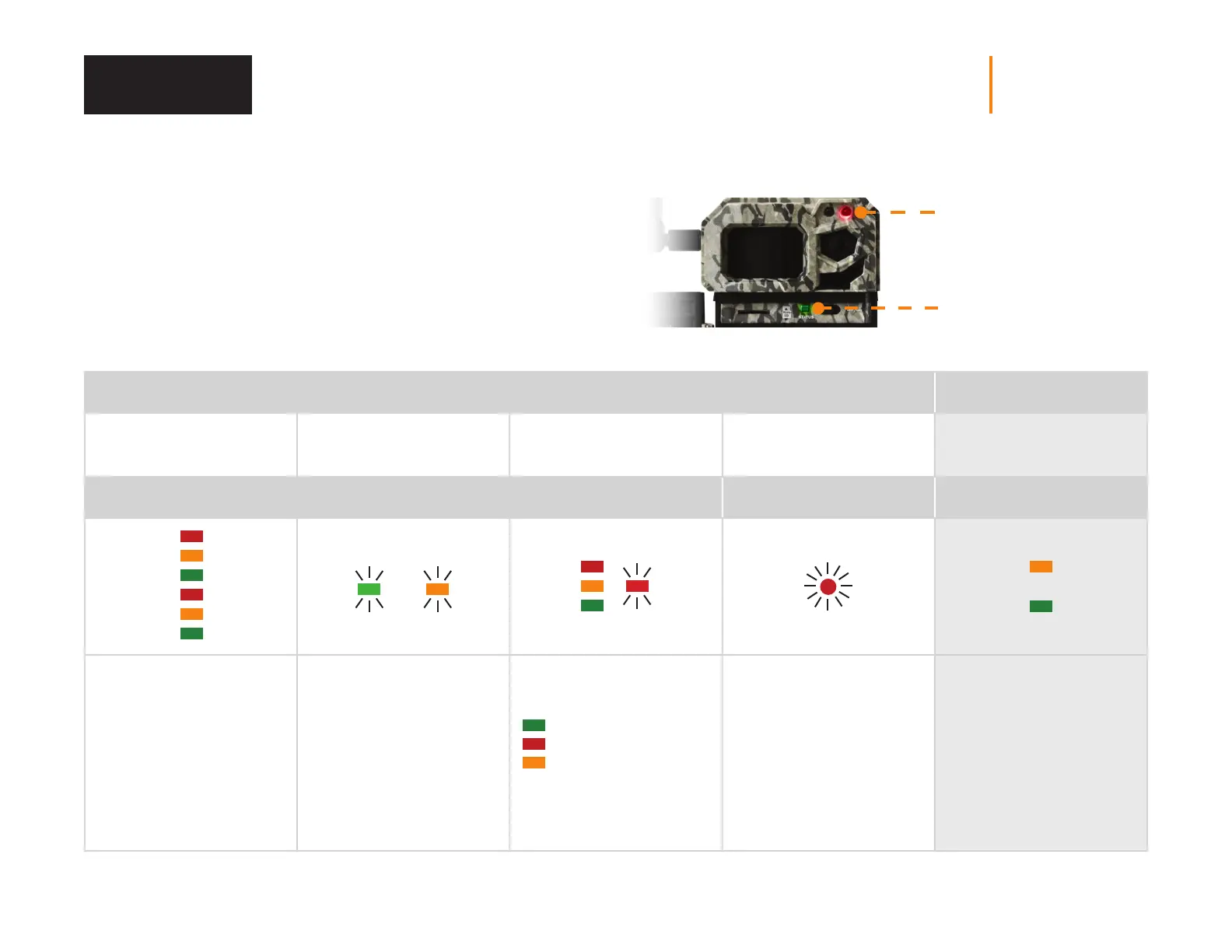
STATUS LIGHT AND DELAY LIGHT
Those two lights are another tool giving you clues on your camera status.
The following table shows you what these lights indicate when the camera
starts up and during normal operations. The fact that they are ashing or
xed, and their dierent colors are signicant.
STATUS light
Delay light
STEPS WHEN STARTING THE CAMERA CAMERA ON
1
2 seconds
2
≈ 30-60 seconds
3
15 seconds
4
15 seconds
5
STATUS LIGHT DELAY LIGHT STATUS LIGHT
2 possibilities:
or
4 possibilities:
or
Start-up cycle where the
3 colors of the status light
alternate rapidly.
Searching cellular signal
Flashing green light:
the battery charge is
sucient.
Flashing orange light:
the battery charge is low. It
can last a few minutes, until
a cellular signal is found.
Fixed light = found a
cellular signal.
Insucient signal
Acceptable signal
Optimal signal
Flashing red light:
cellular network issue.
The light ashes red
for 30 seconds:
indicates the delay to
move away without being
photographed.
Fixed green light:
a photo is being taken.
Fixed orange light:
a transfer is being made.
Verification















 To Next Page