Home
Spytec
GPS
GL-300
Page 8 (Using the Spy Tec GPS Interface)
Spytec GL-300 - Using the Spy Tec GPS Interface
28 pages
Manual
Save Page as PDF
To Next Page
To Next Page
To Previous Page
To Previous Page
Loading...
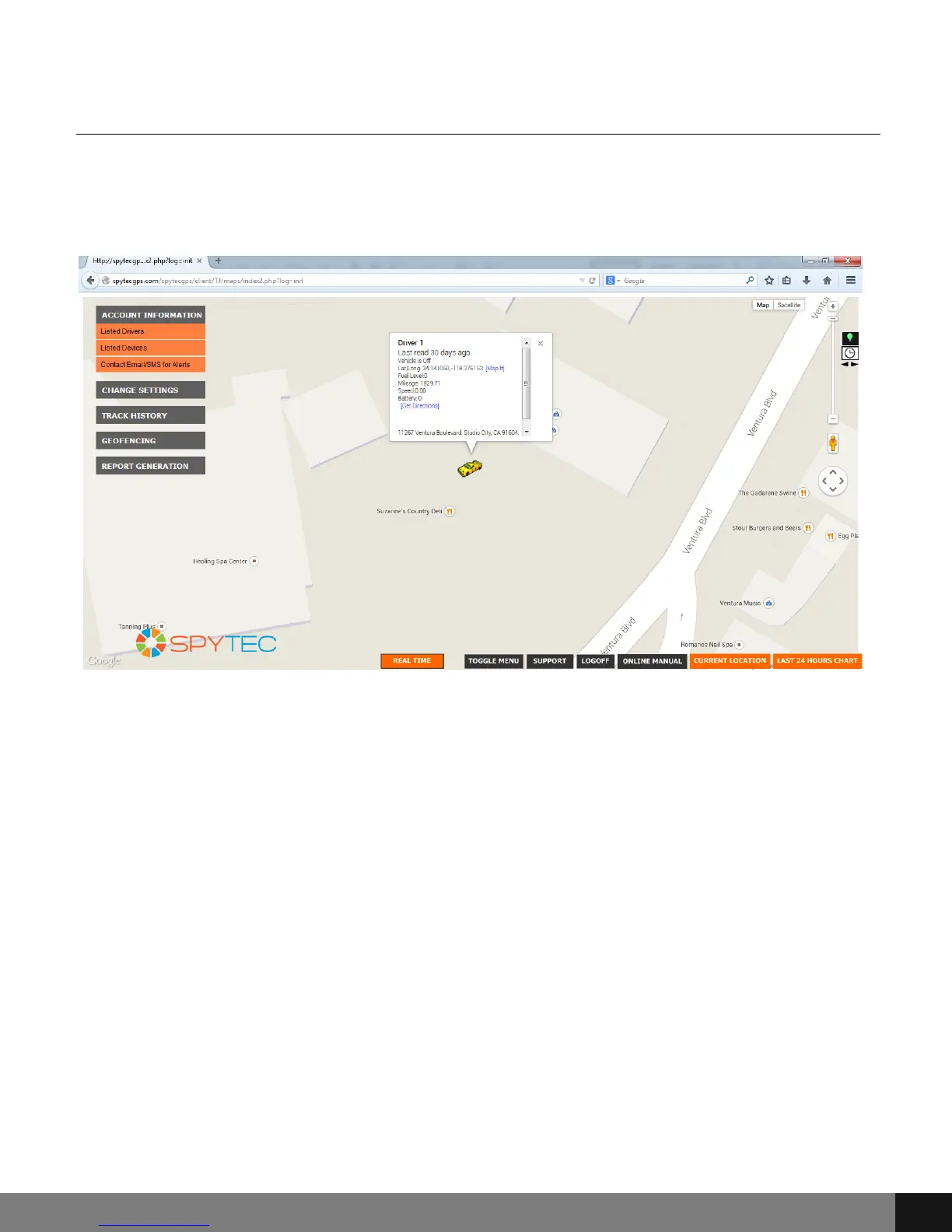
Using the Spy Tec GPS Interface
At the top left of the screen, there is a user menu with drop down buttons:
ACCOUNT INFORMATION, CHANGE SETTINGS, TRACK HISTORY, GEOFENCING
and REPORT GENERATION.
Spy Tec
www.spytecinc.com
Spy Tec
www.spytecinc.com
8
7
9
Table of Contents
Main Page
Table of Contents
2
Getting Started
3
Components
3
Features
3
Activating the Device
4
Charging the Device
5
Powering the Device
5
Placing the Device
5
Accessing the Spy Tec GPS Portal/Interface
6
Using the Spy Tec GPS Interface
8
Account Information
9
Set Home Address
10
Change Password
10
Change Driver Icon
10
Add New Driver/Vehicle
12
Remove Driver
12
Change Alert Settings
12
Add Email for Alerts
13
Add SMS for Alerts
13
Remove Email/Sms for Alerts
14
Change Time Zone
14
Track History
15
Geofencing
18
Create Geofencing Area
18
View/Delete Geofences
19
Report Generation
20
Travel Log Report
20
Mileage Report
22
Fuel Report
24
DTC Report
25
Bottom Buttons
26
Real Time
27
Precautions
28
Frequently Asked Questions (Faqs)
28
How Do I Unfreeze the Device
28
Why Is There Unexpected Interference
28
What Is the Battery Life
28
Other manuals for Spytec GL-300
Quick Start Guide
3 pages
Related product manuals
Spytec STI_GL300
6 pages
Wireless Charging Weatherproof
7 pages


 To Next Page