TRACK HISTORY
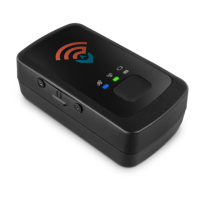
The TRACK HISTORY button allows you to View Track History by clicking the
View Track History link in a drop-down menu.
Clicking the View Track History option will open a pop up that asks for dates of
travel for which a detailed report will be generated according to Stops, Ignition
On/Off, Movements or All of these maneuvers. Begin by entering a Start and
End Date for the report.
Spy Tec www.spytecinc.comSpy Tec www.spytecinc.com 15


 To Next Page