16
5. Specific Operation Manual
5.7 Registration (Input ID)
1) In System Control Mode of [Fig 5.2], press ③ key and
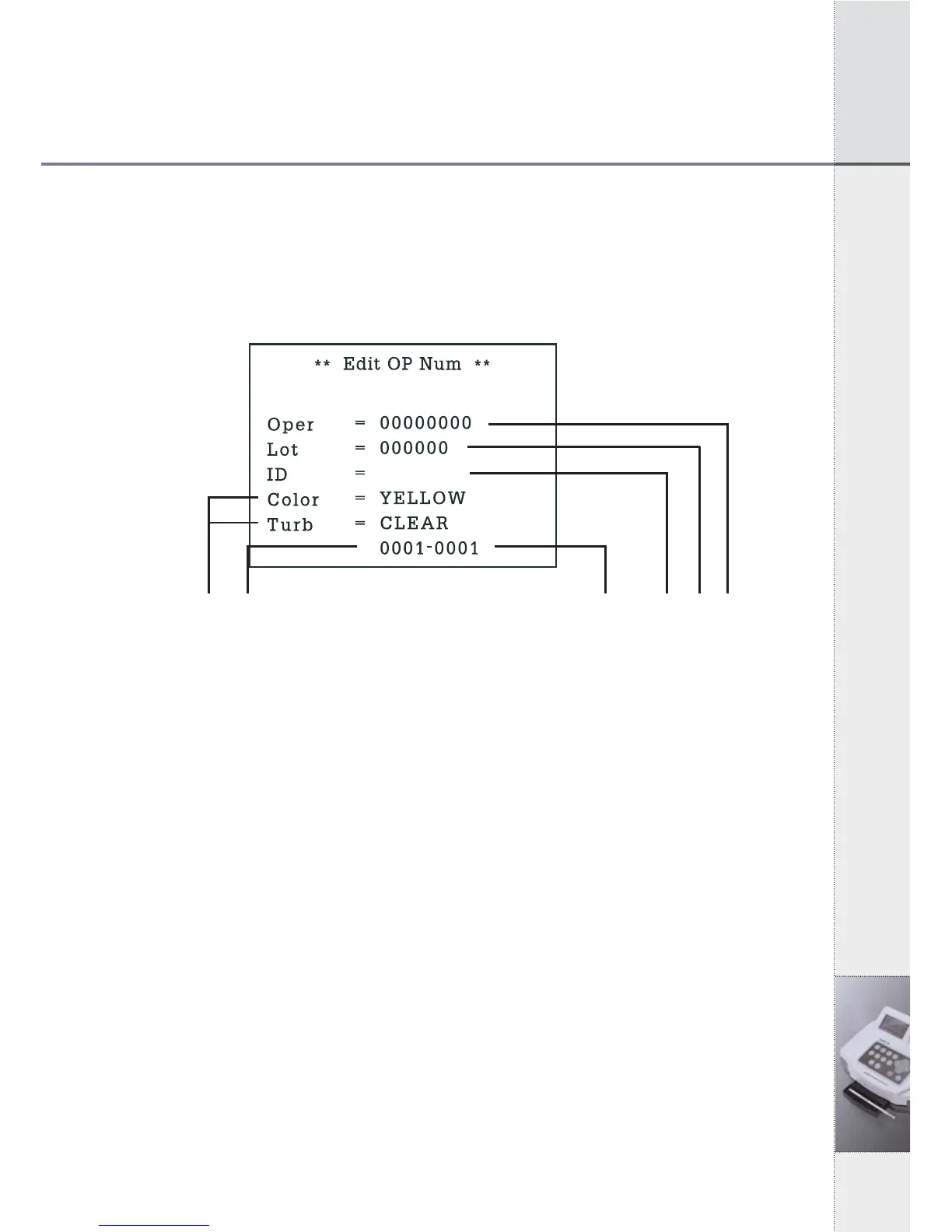
Registration Mode of [Fig 5.7] will be shown as below. You can
move to each item by using left/right (◀ / ▶) keys.
ⓕⓓ [Fig 5.7] Registration Mode ⓔⓒⓑⓐ
2) You can enter operator’s ID in part ⓐ and lot number of strip in
part ⓑ. If you don’s need any records about operator’s ID or lot
number of strip, you may skip and leave it as blank.
3) You can enter patient’s/sample’s ID in part ⓒ using numeric
keys or a barcode reader.
4) Press ENT key or up (▲) key to enter another patient’s/sample’s
ID.
5) If you want to change patient’s/sample’s ID, you can return to ID
mode using up/down (▲▼) keys and enter new patient’s
/sample’s ID, again.
6) Press ESC key to System Control Mode.
- Part ⓓ is a serial number of samples you are going to test. Part ⓔ
is number of data that will be stored in data base after
measurement.
- Part ⓕ is for entering the color and turbidity of urine. It has no
function in normal condition.
* Color changes in order of YELLOW, DK YELLOW, STRAW,
AMBER, RED, ORANGE, GREEN and OTHER, pressing
▶
▶
◀
◀
◀
◀
◀


 To Next Page