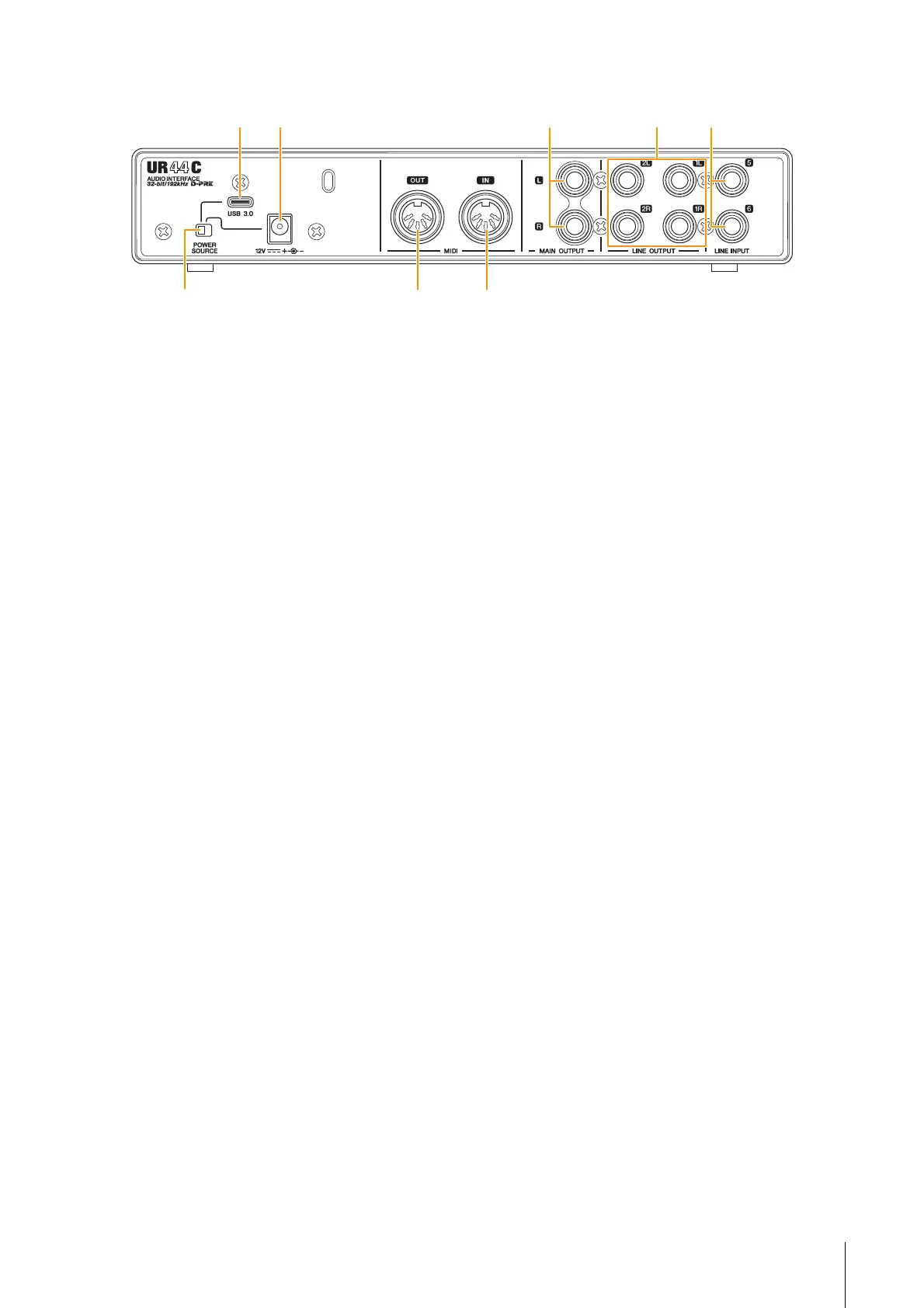
Panel Controls and Terminals
UR44C Operation Manual 5
Rear Panel
1 [POWER SOURCE] switch
For selecting the port for supplying power to the UR44C.
To supply bus power via the [USB 3.0] port, set this switch
to the [USB 3.0] side. To supply power via the [12V DC]
port, set this switch to the [12V DC] side. Even if you set
the power supply to [12V DC], the power to the UR44C
will not come on unless it is connected to a computer or
iOS devices by the [USB 3.0] port.
2 [USB 3.0] port
For connection to a computer or iOS device.
NOTICE
When connecting to a computer with a [USB 3.0] port,
observe the following to prevent the computer from freezing
or shutting down, as well as corruption or even loss of data.
• Before connecting/disconnecting the USB cable, be sure to
observe the following points.
- Quit all open software applications on the computer.
- Set all output level controls to the minimum.
• Wait at least six seconds between connecting/
disconnecting the USB cable.
NOTE
Apple accessories may be required when connecting the UR44C
with iOS devices. For details, refer to the UR44C Startup Guide.
3 DC IN [12V]
For connection to the AC power adaptor.
4 [MIDI OUT] jack
For connection to the MIDI IN jack of the MIDI device.
Transmits MIDI signals from the computer.
5 [MIDI IN] jack
For connection to the MIDI OUT jack of the MIDI device.
Receives and inputs MIDI signals to the computer.
NOTE
• Select [Steinberg UR44C-port1] for the MIDI port when using a
MIDI jack with an iOS app. Please note that [Steinberg UR44C-
port2] is not available.
• Do not activate dspMixFx when using a MIDI device. This may
interfere with stable data transmission/reception.
6 [MAIN OUTPUT L/R] jacks
For connection to monitor speakers. These jacks can be
connected to phone-type (balanced/unbalanced) plugs.
This outputs the MIX 1 signals. To adjust the output signal
level, use the [OUTPUT] knob on the front panel.
7 [LINE OUTPUT 1L/1R/2L/2R] jacks
For connection to external devices with line level signals.
These jacks can be connected to phone-type (balanced/
unbalanced) plugs. The [LINE OUTPUT1L/1R] jack
outputs the MIX 1 signal and the [LINE OUTPUT 2L/2R]
jack outputs the MIX 2 signal.
8 [LINE INPUT 5/6] jacks
For connection to digital instrument or a mixer. These
jacks can be connected to phone-type (balanced/
unbalanced) plugs. You can select the input signal level of
the [LINE INPUT 5/6] jacks between “+4 dBu” and
“-10 dBV.” Select “+4 dBu” when connecting a
professional audio device, and select “-10 dBV” when
connecting a consumer device. The default initial setting
is “-10 dBV.” To select the input signal level, use the
“Setup Window” (page 12) in the section “dspMixFx UR-
C” or the “Settings Window” (page 15) in the “Dedicated
Windows for Cubase Series.”
1
4 5



 To Next Page