Stellar® Heavy-Duty Crane Owner’s Manual
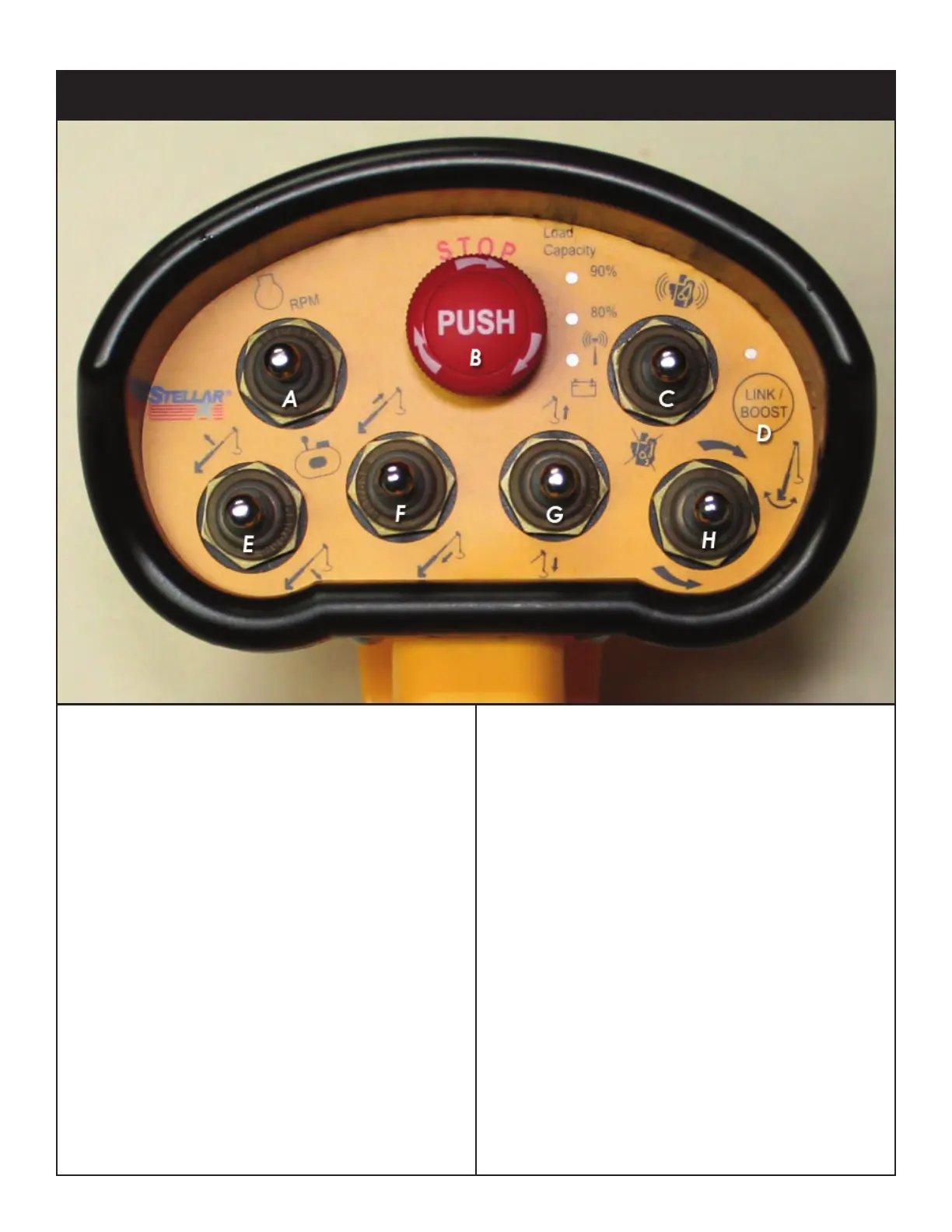
Radio Remote Control Functions
A. Optional Speed Control/Compressor
Start/Stop Toggle: Push up to start or stop
the optional speed control. Push down to
start or stop the compressor.
B. E-Stop Button: Push to immediately stop
all crane functionality. Note: The E-stop
button is not intended to be an on/off
switch. This is also the first item to check
if the crane is not responding to toggle
and trigger activation. Make sure the
red E-Stop button is in the up or
disengaged position.
C. Engine Start/Stop Toggle: Push to start or
stop the engine.
D. Link/Boost Button: Push and hold for 5
seconds to engage boost mode (See the
following page for details on ‘Boost
Mode’). If the remote loses connection
with the transmitter, use this button to
reconnect.
E. Boom Up/Down Toggle: Push up to raise
the boom. Push down to lower the
boom.
F. Extension In/Out Toggle: Push up to
extend the extension. Push down to
retract the extension.
G. Winch Up/Down Toggle: Push up to raise
the winch. Push down to lower the
winch.
H. Rotate Clockwise/Counterclockwise:
Push up to rotate the boom clockwise.
Push down to rotat the boom
counterclockwise.




 To Next Page