Stellar® Heavy-Duty Crane Owner’s Manual
:lennahC:epyT
Production-No.:
System-No.:
www.hetronic.com
1
2
3
4
5
1. Specific approvals, such
as BTZ, FCC, CE, etc.
2. Type of transmitter or receiver.
3. Frequency and RF unit.
4. Eleven-digit Production Number.
Unit Label Areas and Meanings
00000000000
00000000000
5. Eleven-digit System Number.
SYNCHRONIZING THE RECEIVER AND
TRANSMITTER ADDRESS AND CHANNELS
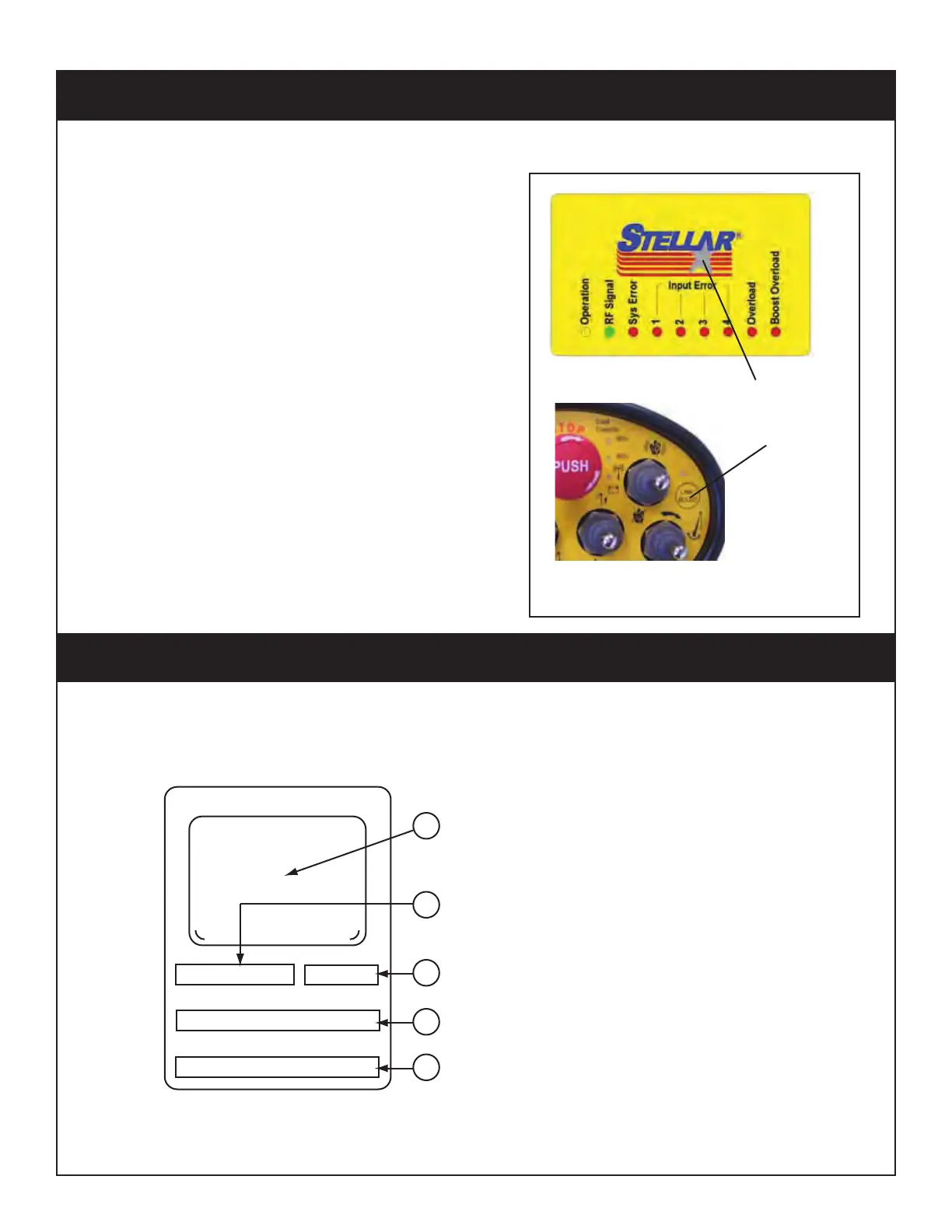
1. Press and hold the START switch on the
transmitter while pressing and holding the
Learning Function button on the receiver.
NOTE: The star in the Stellar logo is the Learning
Function button.
2. Release the Start switch and Learning
Function button as soon as the green RF
Signal LED is flashing on the receiver.
Your receiver and transmitter are synchronized
and ready to use.
Synchronizing RX and TX
Press and hold
simultaneously
TX
RX
Receiver/Transmitter Identification Tag
If the receiver and transmitter are not communicating, use the following procedure to re-
synchronize the unit:
Synchronizing the Receiver and Transmitter




 To Next Page