19
Starting Ramp/Soak
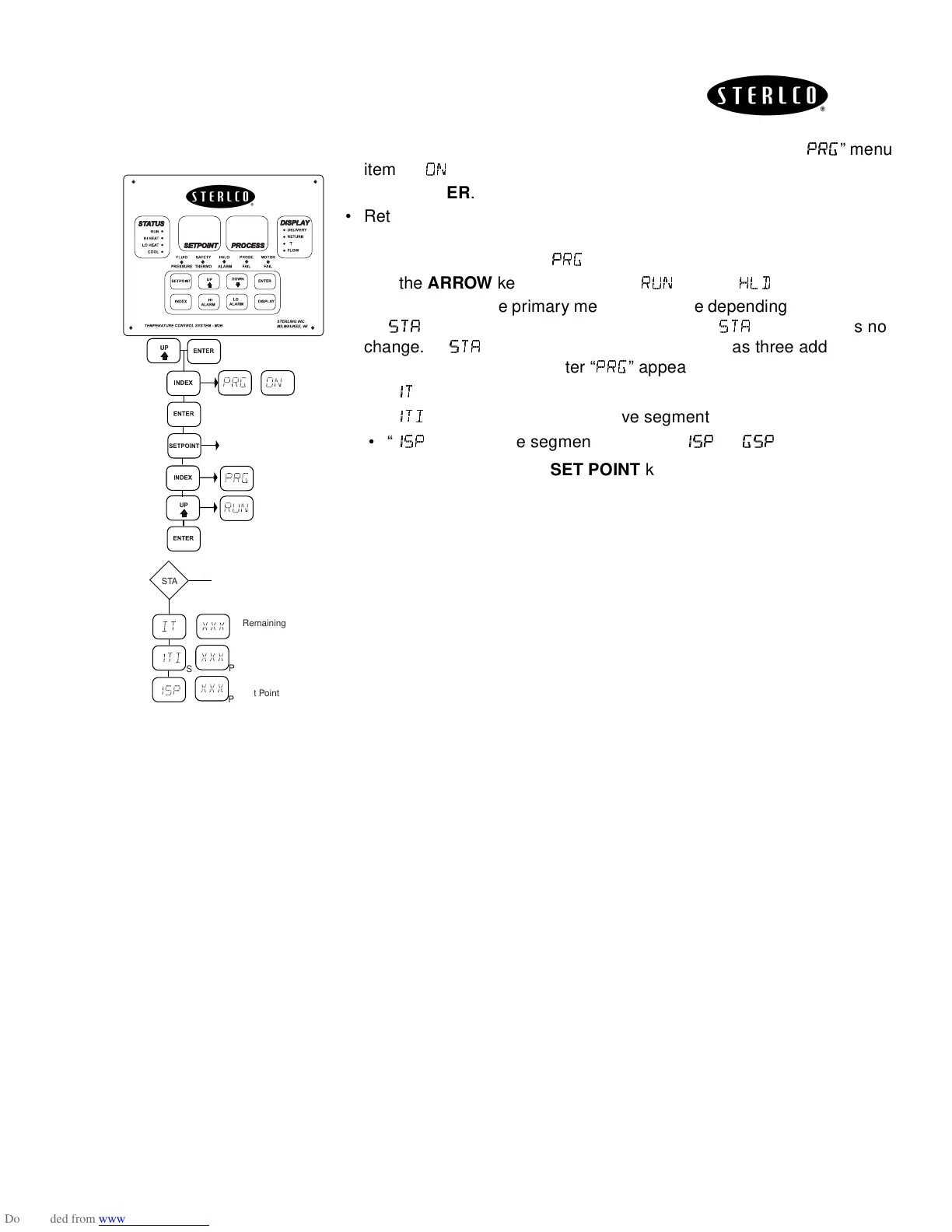
• To run the program, enter the secondary menu and set the “
” menu
item to “
”.
• Press
ENTER
.
• Return to normal display by pressing
SET POINT
key or waiting for the
display to time out.
• Press
INDEX
key once, “
'
''
'!
!!
!
” will appear.
• Use the
ARROW
keys to change to “
(
((
(
” (if it is “
”).
• Press
ENTER
. The primary menu will change depending on the setting
of “
” menu item in the secondary menu. If “
” is off, there is no
change. If “
” is set to on, the primary menu has three additional
information items added after “
'
''
'
!
!!
!
” appears:
•“
"
""
"
” displays remaining time in the current segment
•“
"#
"#"#
"#
” displays total time of active segment
•“
"
""
"
” displays the segment set point (“
"
""
"
”---”
!
!!
!
”).
To exit primary menu, press
SET POINT
key.
∆
S P
S
P
No Change
S
P
Return to Normal
OFF
ON
S
S
P
P
Remaining
Time
Total Time
of Segment
Segment
Set Point
STA


 To Next Page